











Types of Business Process Management: A Comprehensive Guide
Blog: CMW Lab Blog
A request can stall because nobody owns the decision, because reviewers have different document versions, or because two systems disagree about its status. Those problems call for different controls. Understanding the types of business process management helps you identify which control a process needs first.
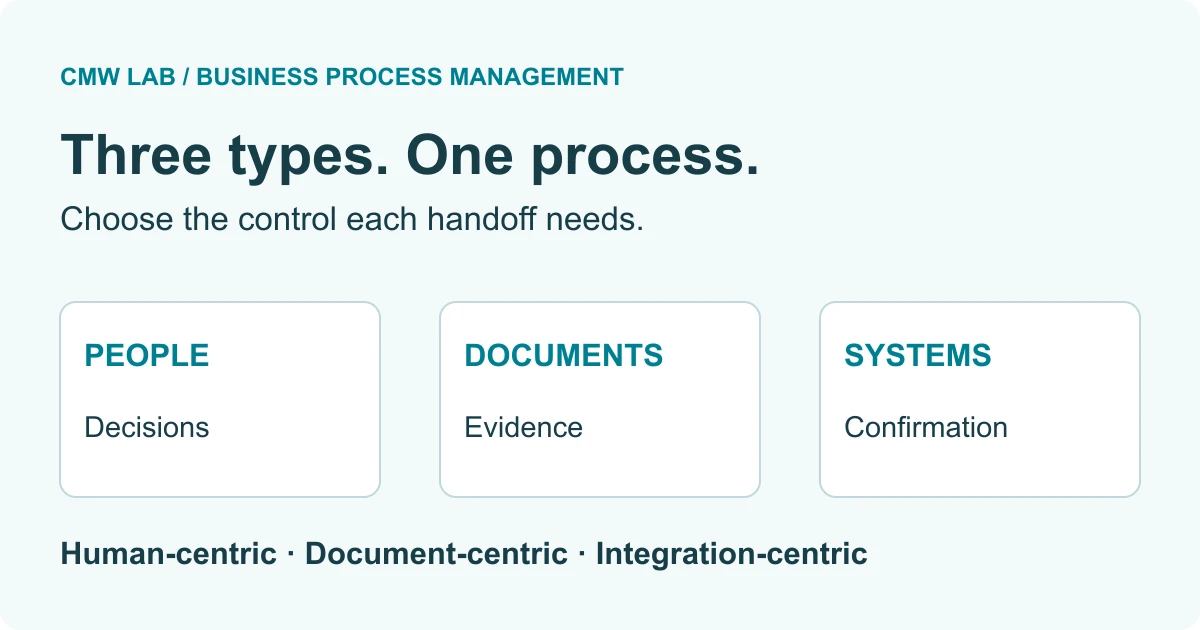
The three commonly described types of business process management are human-centric, document-centric, and integration-centric BPM. Human-centric BPM organizes work that depends on people’s judgment. Document-centric BPM controls the preparation, review, and movement of documents. Integration-centric BPM coordinates work between software systems. These approaches can coexist in one process: choose the emphasis according to the decisions, records, and system interactions needed to deliver its outcome.
By Pavel, CMW Lab blog author. Last reviewed: September 15, 2026.
Key takeaways
- Human-centric, document-centric, and integration-centric BPM describe different coordination needs within a process.
- Operational, supporting, and management processes classify the purpose of work; they answer a different question.
- A human decision can remain manual while assignment, reminders, evidence collection, and follow-up are automated.
- A completed approval and a successfully created record in another system are separate outcomes that need separate checks.
- Choose an approach using actual delays and failure points, then measure both completed work and overdue work still in progress.
The three types of business process management
Business process management (BPM) is the ongoing work of understanding, organizing, measuring, and improving how an organization delivers an outcome. Software can support that work, but a diagram or an automated task alone does not establish process ownership or a useful measure of success.
The human-centric, document-centric, and integration-centric classification appears in IBM’s overview of BPM. Use it as a practical way to examine coordination needs. It is not a rule that each business process must fit into exactly one category.
| Type | Primary coordination need | Controls to design | Evidence of completion |
|---|---|---|---|
| Human-centric | A person must assess context or make a decision. | Named owner, decision authority, necessary information, due date, delegation. | A recorded decision with its author, time, and rationale when required. |
| Document-centric | Participants must work from an identified, controlled document. | Version, review status, access, required evidence, handling of changes. | The approved version is identifiable and available to authorized users. |
| Integration-centric | Applications must exchange data or carry out coordinated actions. | Identifiers, validation, acknowledgments, duplicate prevention, recovery. | The required action is confirmed in the receiving system. |
Methodology: this is an editorial design checklist, not a vendor ranking or maturity score. Each row connects a coordination need to an observable result. Apply several rows when a process has several needs.
Human-centric BPM: organize decisions and accountability
Human-centric BPM puts people’s work and judgment at the center of process design. A manager deciding whether to approve an exception, a specialist investigating a service issue, or a team reviewing a proposed change needs more than a task notification.
Design the task so the person can act: show the request, relevant evidence, allowed decisions, and what happens next. Assign it to an accountable role, then define who takes over when the usual assignee is absent. A shared inbox may distribute work, but it still needs a rule for claiming tasks and handling items nobody claims.
Example: an equipment request outside the standard catalog goes to a manager who can approve it, reject it with a reason, or ask for more information. Routine routing and reminders can be automated while the exception decision remains with the manager. Clear rules may also allow standard requests to follow a simpler path.
Watch for: using escalation as automatic approval. An overdue task means the process needs attention; it does not prove the request is acceptable. Keep “reassigned,” “escalated,” and “approved” as distinct events. If work is exploratory and the next action depends on what an investigator discovers, allow controlled discretionary tasks instead of forcing every case through an identical sequence.
Document-centric BPM: control the record people act on
Document-centric BPM organizes work around documents and the information they contain. The central question is which version is being prepared, checked, approved, issued, or retained, and who is allowed to act on it.
Examples include a policy revision, a supplier agreement, or an engineering change package. The process needs to connect the document to its request, participants, review history, and current status. A folder containing several files with “final” in their names does not establish which one was approved.
Example: procurement and an operational owner review a supplier’s service proposal. When the supplier changes a material term, the process identifies the affected version and routes the changed proposal back to the reviewers who need to reconsider it. An earlier approval remains part of the history; it must not silently become approval of the new content.
Watch for: treating upload, approval, and signature as interchangeable. They are separate events. Specify which is required for the business outcome and how its evidence will be stored. Access, retention, and signature requirements depend on the document and the organization’s applicable policies; a document workflow by itself does not establish compliance.
Integration-centric BPM: coordinate system actions
Integration-centric BPM emphasizes work across applications. A process might receive an order, validate required data, create a record in an enterprise resource planning (ERP) system, and send the resulting identifier back to the initiating application.
An application programming interface (API) provides a way for applications to communicate. The process still needs to define the meaning of each exchange: which system owns a field, what constitutes success, and what happens when a response is delayed or missing.
Example: after a supplier request is approved, an integration creates a supplier record. The workflow closes that step when it has a confirmed supplier identifier, not merely when it has sent a message. A rejected record returns to a named owner with enough information to correct it.
Watch for: retrying a creation request after an ambiguous timeout. The receiving system may already have created the record. Use a stable request identifier and a documented way to check the outcome or make repeated requests safe. The exact mechanism depends on the receiving API. A manual recovery path is still necessary when the outcome cannot be established automatically.
BPM types are different from process categories and software categories
Operational, supporting, and management processes describe why work exists in the organization. Human-centric, document-centric, and integration-centric BPM describe what must be coordinated to perform that work. These are two different dimensions.
Order fulfillment can be an operational process with substantial system integration. An internal policy update can be a management process with document reviews and human decisions. The classification of a particular activity depends on its role in the organization.
For a broader process inventory, APQC’s Process Classification Framework (PCF) provides a hierarchy and common terminology for organizing processes. That is a different use from choosing the control needed at a particular handoff.
| Concept | Question it answers | How to use it here |
|---|---|---|
| BPM | How will we manage and improve the whole process? | Set ownership, outcomes, measures, and a review cycle. |
| BPM type | What coordination needs the most attention? | Design controls for people, documents, systems, or a combination. |
| Business process management software (BPMS) | Which software capabilities will support the process? | Evaluate the required modeling, execution, data, and monitoring capabilities. |
| Workflow software | How will tasks and information move through a defined flow? | Check actual capabilities; product labels alone do not establish the boundary with BPMS. |
For the software definition, see what BPMS means. Our guide to BPM software covers its broader components and evaluation questions. Low-code development, robotic process automation, and AI are implementation options; they do not replace the need to decide who owns an outcome.
How to choose the right BPM approach
Start with a failed or delayed handoff and identify the evidence that should have allowed work to proceed. The following diagnostic is an original framework for this guide. It is a set of design questions, not a scored assessment.
- Define the endpoint. Write what must be true when the process is complete. “Approved” may be too early if the requester needs an active record in another system.
- Find where work waits. Review actual requests, timestamps, returned documents, and error messages. Separate waiting for a decision from waiting for information or a technical response.
- Identify the controlling evidence. Does the next step need a person’s decision, an approved document version, or confirmation from another application?
- Choose controls for every critical handoff. A dominant type helps prioritize the work, but secondary controls remain necessary. A document approval process can still fail at its final integration.
- Test an exception. Try an unavailable reviewer, a revised attachment, and an uncertain system response. Name the person who can resolve each condition.
- Measure the result. Select a completion measure and a quality measure before changing the process. Keep unresolved work visible.
A team can begin with a simple process map and a consistent record of requests. Add automation where a repeatable rule or handoff justifies it. Buying a broad software suite before defining the endpoint makes it harder to distinguish a missing feature from an unresolved business decision.
Worked example: one supplier onboarding process, three BPM types
Illustrative process design: a company wants approved suppliers to become usable in its ERP system. This example describes a proposed operating model, not a CMW Lab customer implementation or a ready-made product configuration.
The process starts when a requester submits a supplier record and the required supporting documents. It ends when the ERP confirms creation of the approved supplier and the requester receives that identifier, or when an authorized owner rejects or cancels the request.
1. Establish one request and its documents
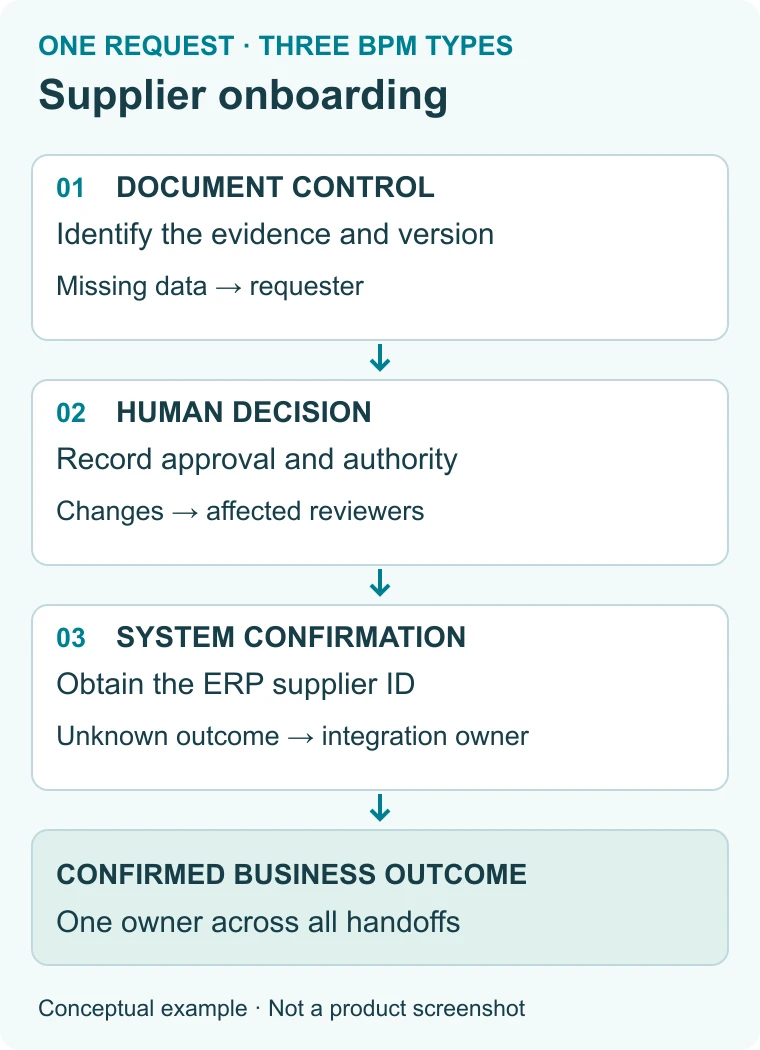
The requester supplies the business reason, supplier identity, required fields, and supporting documents. The process assigns a request identifier. The procurement coordinator checks completeness and identifies the document version being reviewed. Missing information goes back to the requester without creating a second request.
This is primarily document-centric work. The control is a traceable relationship between the request, its evidence, and the review status. File storage alone does not provide that relationship.
2. Record an accountable decision
The designated approver receives the checked information and records approval, rejection, or a request for changes. The authority rule determines the approver; absence triggers reassignment to an authorized substitute. If the underlying proposal changes, the coordinator identifies which approvals need to be repeated.
This is primarily human-centric work. The control is an attributable decision about the identified request and evidence. A reminder should help the owner act without changing the decision status.
3. Confirm the system outcome
After approval, the integration submits the necessary data to the ERP. The process stores the response and resulting supplier identifier. If validation fails, the integration owner receives an actionable error and routes any business-data correction to procurement.
If the response times out, the request enters an “outcome unknown” state. The integration owner checks whether the supplier already exists using the supported correlation or lookup mechanism. Only then does the process safely resume, retry, or require manual reconciliation. Approval alone does not close the request.
This is primarily integration-centric work. The control is confirmation that the receiving system achieved the intended result. The integration must also define how access is restricted and how unnecessary sensitive data is excluded from logs.
4. Keep one owner across all three
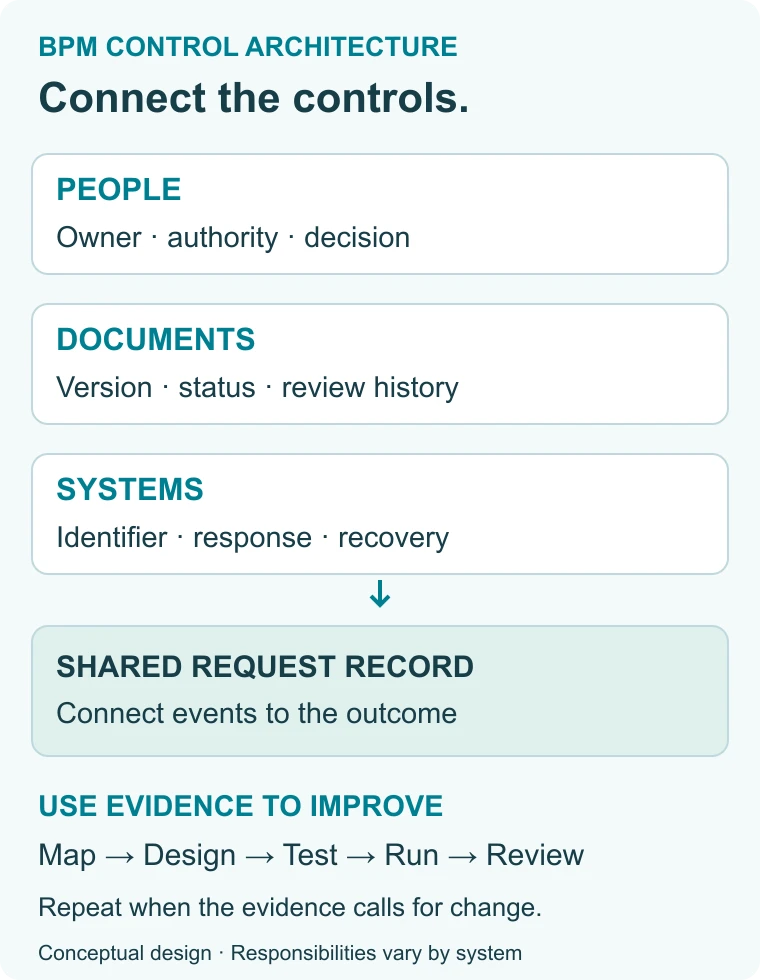
A process owner is accountable for the end-to-end outcome; the procurement coordinator, approver, and integration owner remain responsible for their steps. Shared request identifiers connect the evidence across those steps. Cancellation after the ERP record has been created needs a defined follow-up action in the ERP, because canceling a workflow does not automatically undo an external action.
The lesson is practical: a process can be human-centric at its decision point, document-centric in its evidence handling, and integration-centric at completion. Labeling the whole process with one type should never hide an uncontrolled handoff.
Measure outcomes without hiding unresolved work
Select metrics that expose the failure mode you are trying to fix. The definitions below are proposed measurement rules for the supplier example, not industry benchmarks. Record the cohort, time zone, working calendar, and treatment of canceled requests before comparing periods.
| Measure | Definition | What it reveals |
|---|---|---|
| End-to-end completion time | Confirmed business completion time minus initial submission time; report the median for completed requests. | How long the requester waited for a usable result. |
| Approval queue time | Decision time minus time the complete request became available to the approver. | Waiting around the human decision. This is not hands-on effort. |
| First-pass completion rate | Completed requests with no return for correction ÷ all completed requests in the defined cohort × 100. | Whether speed came with avoidable rework. |
| On-time completion rate | Requests completed by their due time ÷ all requests whose due time has passed in the cohort × 100. | Service performance, including overdue requests still open. |
| Unresolved integration outcomes | Count of requests awaiting confirmation or reconciliation at a stated observation time, with the age of each. | Whether systems are leaving business outcomes uncertain. |
Worked calculation: suppose 20 requests have reached their due times. Eighteen are complete: 17 finished on time and one finished late. Two remain open and overdue. The on-time completion rate is 17 ÷ 20 × 100 = 85%. Dividing by only the 18 completed requests would produce 94.4% and hide the two unresolved commitments.
Suppose 15 of those 18 completed requests needed no return for correction. First-pass completion is 15 ÷ 18 × 100 = 83.3%, rounded to one decimal place. Its denominator differs deliberately: it describes the completed subset. These are invented teaching numbers, not measured CMW Lab results or performance targets.
Compare like with like. If a new process starts its clock only after documents are complete while the old process started at initial submission, the apparent time improvement may come from excluding preparation work. Preserve both timestamps so you can report customer waiting and internal processing separately.
Implement the controls, then evaluate the software
Each BPM type needs a repeatable improvement cycle: understand the current process, design its controls, test them, run the process, and review observed results. Revisit the design when the evidence shows a bottleneck or a recurring exception.
Business Process Model and Notation (BPMN) 2.0.2, published by the Object Management Group, provides a common notation for process diagrams. Use a model to discuss responsibilities and alternate paths, and verify what the selected execution system supports. A drawing alone does not implement access rules, integrations, or reliable recovery.
For a software demonstration, bring one representative request and ask the team to show the following:
- Human work: assign, claim, reassign, return, and complete a task while preserving its history.
- Document work: identify the reviewed version and show what happens when it changes after approval.
- Integration work: show success, a rejected request, an ambiguous timeout, and recovery without an unintended duplicate.
- Governance: demonstrate who can change rules and how a changed process version affects work already in progress.
- Monitoring: find a delayed request, identify its current owner, and follow its events across the process.
Some controls may be configured in a BPMS; others may belong in a document repository, integration service, or system of record. Record which component is responsible. Low-code tools can simplify configuration, but permissions, exception handling, and deployment choices still require deliberate design.
For a more detailed selection exercise, the workflow automation checklist covers routing, rules, visibility, and implementation questions.
A CMW Lab customer example: replacing spreadsheet-based claims tracking
CMW Lab’s published customer case collection describes Anthem replacing cumbersome Excel files with CMW Tracker for healthcare claims management. The described change brought claims tracking, performance indicators, and document management into an automated workflow solution.
The reported outcome is qualitative: the case describes easier tracking of handling effectiveness and service quality. It does not provide a baseline-and-final cycle-time dataset, so this guide assigns no percentage improvement to the implementation.
Viewed through the framework above, the case illustrates the relationship between document handling and visibility into ongoing work. The public summary does not describe the integration architecture, so it cannot establish how external-system confirmation or recovery was implemented.
For a process spanning these coordination needs, CMW Lab’s current business process management software page describes CMW Platform capabilities for BPMN modeling, task routing, process monitoring, and integration through an open API and OData. Evaluate the controls your process needs against the specific configuration and connected systems.
Practical next step: take one delayed request, mark its decision, document, and system handoffs, and use the comparison table to identify the missing control. Then explore the platform with that request as your demonstration scenario.
Frequently asked questions
What are the three main types of BPM?
The three commonly described types are human-centric, document-centric, and integration-centric BPM. They emphasize people’s decisions, controlled documents, and interactions between applications, respectively. Use the categories to identify the controls a process needs. A single process can use all three, so choosing a dominant type does not eliminate the other requirements.
How are BPM types different from types of business processes?
BPM types describe coordination needs, while process categories describe the purpose of the work. Operational processes deliver the organization’s core outcomes; supporting processes enable that work; management processes direct and oversee it. Any of those categories can involve human decisions, document handling, and system integration. The two classifications should be used together rather than substituted for one another.
Can human-centric BPM include automation?
Yes. Human-centric BPM can automate assignment, reminders, information gathering, and routine routing while leaving a decision to a person. The design should identify which actions follow a reliable rule and which require judgment. It should also define delegation and escalation without treating silence, absence, or an expired deadline as approval.
Is document-centric BPM the same as document storage?
No. Document storage keeps files; document-centric BPM organizes the work performed on and around them. That includes responsibility for review, the version under consideration, approval status, and handling of subsequent changes. A repository can support the process, but the process must still define when a document is ready for its intended use and what evidence establishes that status.
Which BPM type is best for an organization?
The appropriate emphasis depends on the process and its failure points. Start with human-centric controls when decisions lack clear ownership, document-centric controls when versions and review status cause confusion, or integration-centric controls when applications leave actions unconfirmed. Apply additional controls wherever needed. There is no universal ranking that makes one type appropriate for every process.
How this guide was prepared: definitions were checked against the linked sources, and product statements were checked against CMW Lab’s public documentation. The diagnostic, tables, diagrams, supplier scenario, and calculation are editorial teaching assets. The customer example is attributed to its published source.
The post Types of Business Process Management: A Comprehensive Guide appeared first on CMW Lab Blog.