











Help Us Improve: Share Your Thoughts with Ease
Blog: ARIS BPM Community - Recent forum posts
In our previous post, we showed how ARIS Flows can automate the process of sharing models and personalize the emails sent to colleagues. Now, let’s add one more small but powerful enhancement: giving users the option to receive a copy of the email they send.
This feature improves transparency and helps users keep track of their own communications — all without any extra manual effort.
Extend the form: Add a “Send copy to me” option
Start by extending the existing form in your Share model flow.
- Open the form builder and add a Check box widget.
- Configure the checkbox as follows:
- Label: Send copy to me. Disable the label to keep the form clean
- Value: Send copy to me
- Technical name: e.g., SendCopyToMe

This checkbox appears when users trigger the flow and let them decide on the spot whether they want to receive a copy of the email. Once added, the checkbox value becomes part of the form output and can be used in the flow logic to control the next steps.
Send a copy to the initiator
To send a copy to the flow initiator, follow these steps:
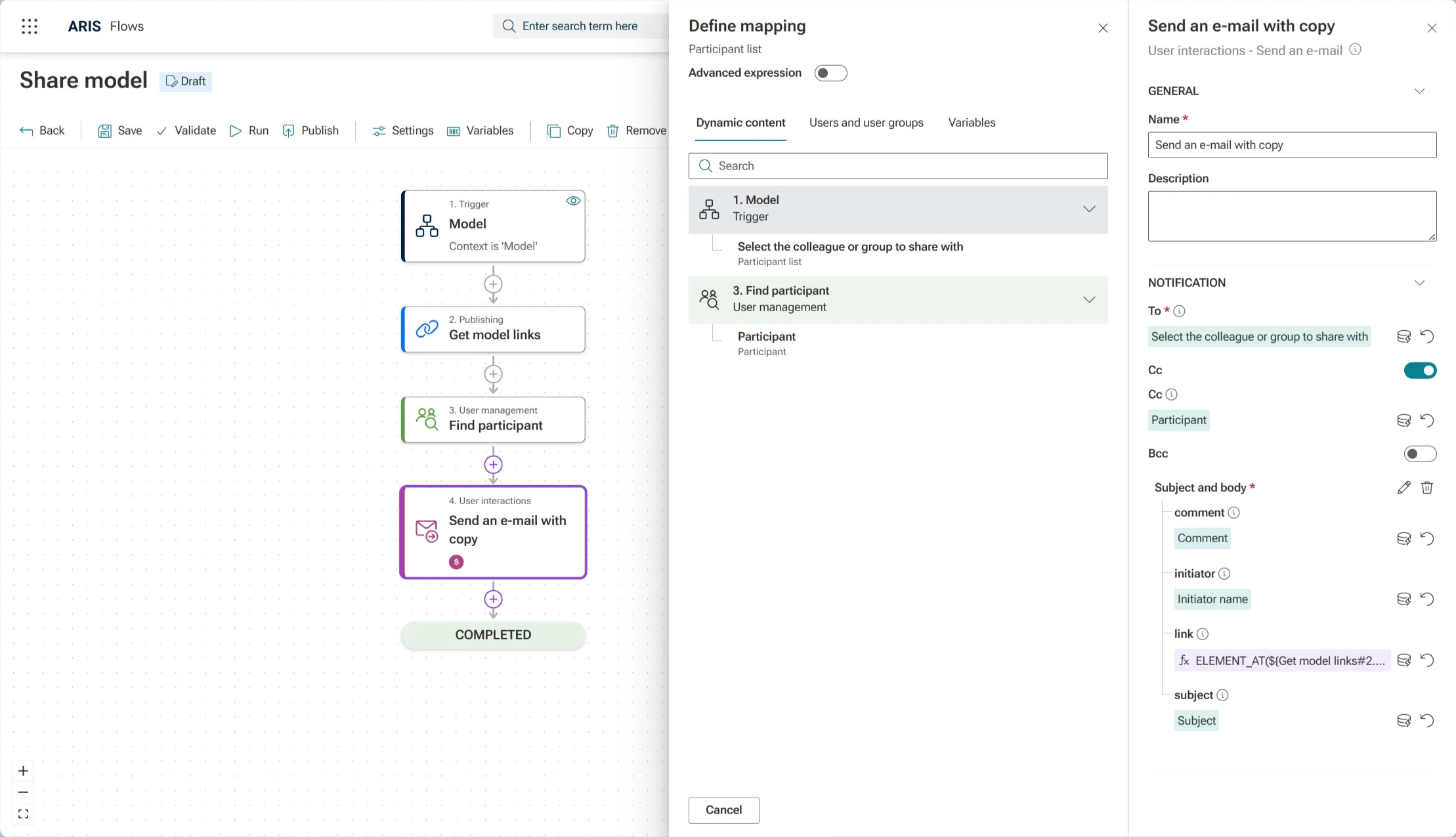
- Add the Find participant action to retrieve the user who triggered the flow. This step is needed to get the required data type for the Cc field.
- Map the initiator name to the Search term field.

- In the Send an Email action:
- Rename it to Send an email with copy.
Enable the Cc field and map the participant from the previous step.

Add Conditional Logic to decide whether to Send a Copy
Next, we need to let the flow decide if a copy should be sent:
- Add a Switch action before the Find participant action and define two cases:
- 🔹 Case 1: Send a mail notification with a copy
- 🔹 Case 2: Proceed without sending a copy
- The e-mail action is needed in both branches. To avoid configuring it twice from scratch, copy and paste the Send an email with copy action into the other branch and adjust the Cc mapping as needed (reset mapping field and disable cc).
- Specify the switch conditions:
- Case 1 (send copy): Open the mapping panel, enable Advanced Expression, select Send copy to me (TRUE/FALSE) from the trigger, and write ==true.
- Case 2 (no copy): Similarly, write ==false.
- Disable the Default case to ensure the flow only executes one of the defined branches.

With these steps, the Share model flow now allows users to:
- Decide whether they want a copy
- Automatically Cc themselves when desired
A simple addition, but it greatly increases control and traceability for all users.