











Fleet Management Software: Best Solutions for Fleet Managers
Blog: Blog | Process Street | Compliance Operations Platform
Fleet management software is a system for monitoring vehicles, drivers, maintenance, routes, fuel use, safety, and compliance from a shared operational view. It converts location and vehicle data into decisions that help fleet managers keep vehicles available, drivers supported, and work moving.
The best platform depends on what you operate and which problems you need to solve. A local service fleet may prioritize dispatch and maintenance, while a regulated carrier may need electronic logging, driver vehicle inspection reports, safety coaching, and a defensible record of corrective action. This guide explains the essential capabilities, selection criteria, and leading options.
- What fleet management covers
- How fleet management software works
- Benefits for fleet operations
- Key software features
- How to choose a platform
- Leading fleet management software
- How Process Street supports fleet operations
- Fleet management software FAQ
What is fleet management?
Fleet management is the coordinated work of acquiring, operating, maintaining, tracking, and eventually replacing commercial vehicles. It also includes the people and procedures required to use those assets safely and efficiently. The scope can cover passenger cars, delivery vans, service vehicles, heavy trucks, trailers, specialist equipment, and mixed fleets.
A fleet manager balances several goals at once. Vehicles need to be available without unnecessary maintenance cost. Drivers need workable routes and clear instructions without unsafe pressure. Customers expect reliable arrival times. Finance teams need accurate records for fuel, leasing, insurance, depreciation, and repairs. Safety and compliance teams need evidence that inspections, training, and corrective actions actually happened.
Good fleet management therefore connects asset data with operating discipline. Knowing that a vehicle has a fault code is useful. Knowing who must inspect it, when the vehicle should be removed from service, what evidence is required, and who approves its return to service is what turns data into control.
Fleet management may not be challenging when a company has only a few vehicles, but the manual labor quickly becomes difficult when it has hundreds or thousands of vehicles. Managing a fleet manually leaves a lot of room for potential issues. A manager might struggle to get in contact with drivers when necessary, lose track of inspection reports, or run into complications when filing an insurance claim after an accident. Using fleet management software alleviates these problems by keeping records, communication, and operating data in an accessible location.
The responsibilities of a fleet manager
- Vehicle availability: Keep enough safe, suitable vehicles ready for scheduled work.
- Maintenance: Coordinate preventive service, inspections, repairs, parts, warranties, and downtime.
- Dispatch and routing: Match vehicles and drivers to jobs while accounting for location, capacity, traffic, and service windows.
- Fuel and utilization: Measure fuel consumption, idling, mileage, and underused assets.
- Driver safety: Monitor risk indicators, investigate incidents, coach drivers, and document follow-up.
- Compliance: Maintain required records for hours of service, inspections, qualifications, defects, and regulated operations.
- Cost control: Understand total cost of ownership and make evidence-based repair, lease, and replacement decisions.
What is fleet management software?
Fleet management software brings vehicle, driver, route, maintenance, and safety information into one operational system. Most modern platforms combine a web application with data from GPS devices, vehicle gateways, mobile apps, fuel cards, cameras, diagnostic systems, or connected equipment. The platform then organizes that information into maps, alerts, reports, schedules, and tasks.
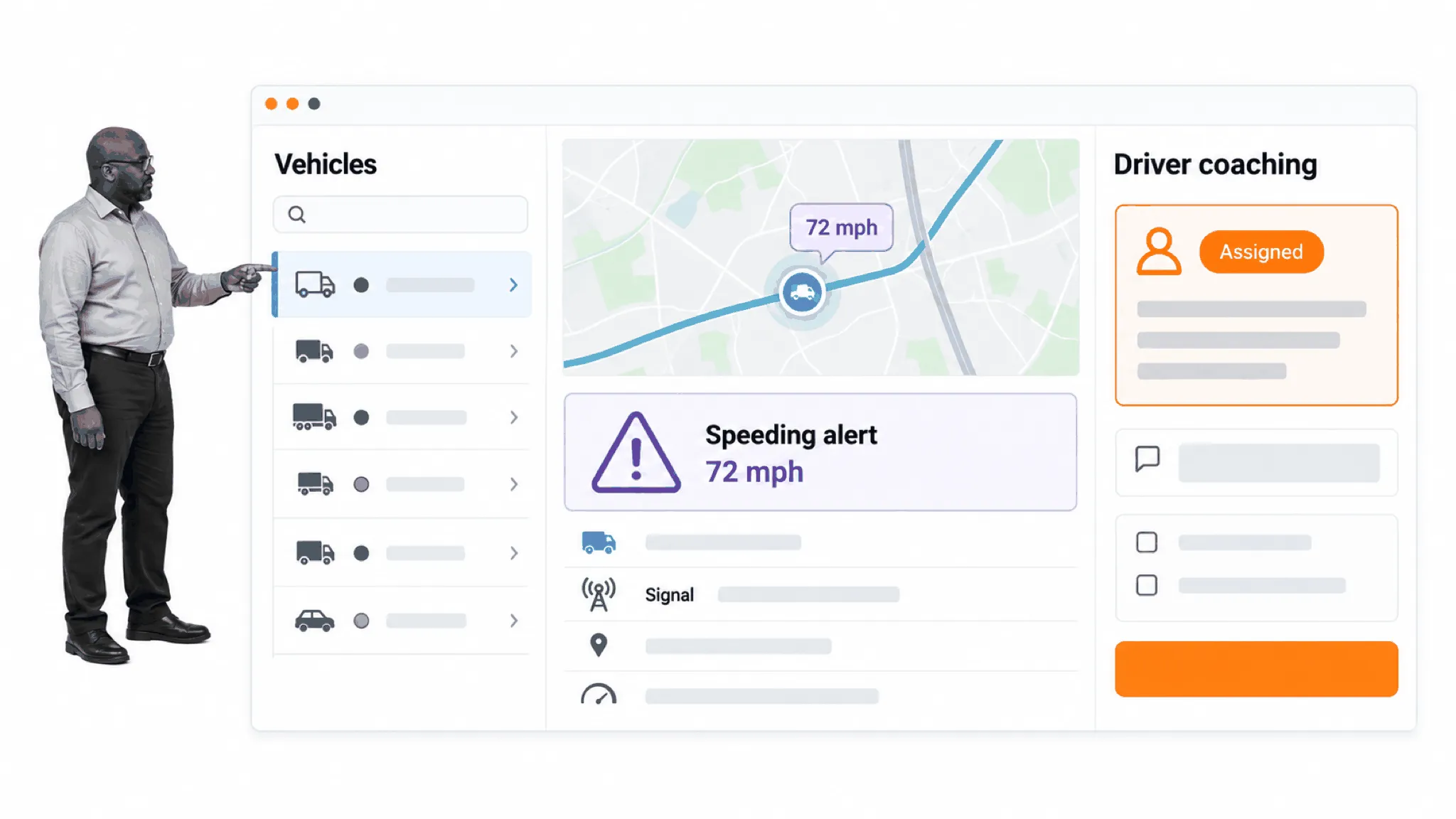
The important shift is from raw telemetry to managed exceptions. A location ping alone does not improve performance. Software creates value when it identifies an event, gives the manager enough context to judge it, and supports a timely response. That response might be rerouting a driver, opening a work order, investigating a harsh-braking event, or escalating an overdue inspection.
Fleet management software is also broader than a live map. A complete operating model connects real-time data with slower but equally important work such as preventive maintenance, document retention, training, approvals, and root-cause analysis. Some organizations use one suite for most capabilities. Others combine telematics, maintenance, routing, and controlled workflow tools through integrations.
Telematics, GPS, and fleet workflows
Telematics generally refers to data transmitted from a vehicle or device, such as position, speed, ignition state, engine information, odometer readings, and sensor events. GPS supplies location, but the broader telematics system collects and communicates the operating signals that power alerts and analysis.
A useful workflow starts with a defined threshold or event. The system detects the exception, assigns it to the correct owner, captures evidence, and records the result. This makes it possible to distinguish an alert that was acknowledged from a risk that was genuinely resolved.
Benefits of fleet management software
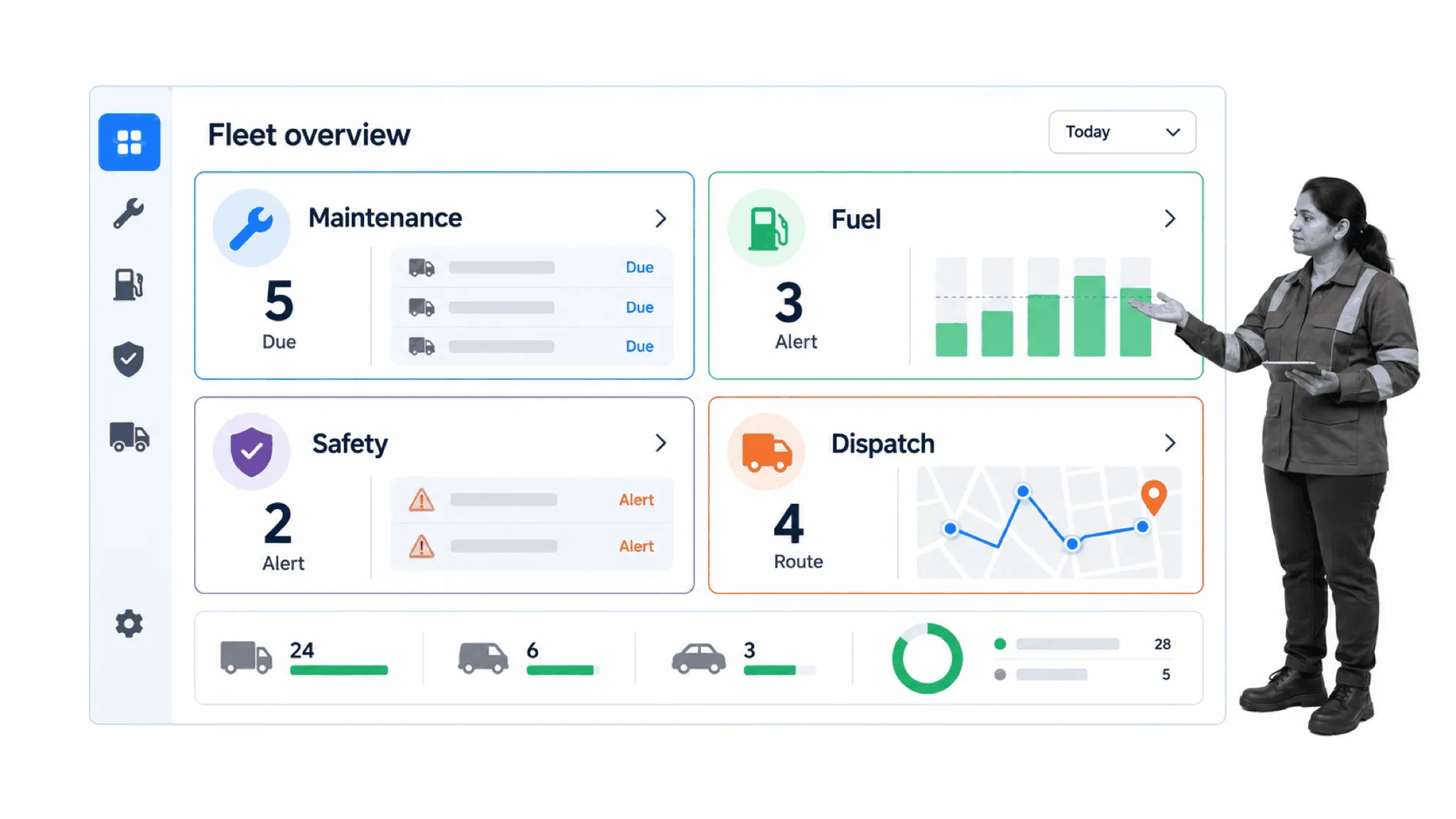
Better customer service
Accurate locations, arrival estimates, and route status help dispatchers give customers better answers. When a job changes, the team can identify the closest suitable vehicle and communicate the new plan. Historical route and service data can also expose recurring delays that need a process change rather than another apology.
Less manual coordination
Automated mileage capture, maintenance reminders, digital inspections, alerts, and scheduled reports reduce repetitive data entry. The goal is not automation for its own sake. It is to remove clerical work while preserving the human decisions that require context, judgment, or approval.
The recurring tasks are familiar to most fleet managers: collecting and organizing proof of deliveries, fuel receipts, and other forms; manually calling drivers for ETAs; locating specific vehicles or equipment; and putting together vehicle inspection reports. When those records are captured by the operating system, employees spend less time on tedious administration and have more opportunity to improve service, safety, and the wider operation.
Stronger profitability and asset use
A shared view of cost, mileage, downtime, fuel, and utilization makes it easier to identify inefficient routes, unnecessary idling, repeated repairs, and underused vehicles. Managers can compare the cost of keeping an asset with the cost of replacing it and can plan maintenance when disruption will be lowest.
Commercial vehicle operations carry high costs that need to be closely monitored or they can seriously affect profits. Fleet management software can lower company expenses through less fuel consumption, earlier detection of vehicle malfunction, fewer instances of vehicle mishandling, and stronger day-plan efficiency. The precise result depends on the fleet, but the underlying management question is consistent: can the same vehicles and employees complete more planned work without compromising safety or service?
Improved safety and risk control
Safety capabilities help teams identify speeding, harsh events, distraction indicators, hours-of-service risks, and recurring incident patterns. The response still matters more than the alert. Coaching, inspection, investigation, and corrective action should be assigned and documented so the organization can learn from the event.
Accidents are always a danger for companies that are vehicle-dependent. It is important to practice safety while on the road, and the financial repercussions of accidents can be damaging. Drivers and their behavior on the road also represent the company. If someone witnesses an employee driving dangerously in a vehicle with the company name on it, they may see the company in a negative light moving forward. Fleet safety is therefore about preventing accidents and injuries, protecting employees and the public, and addressing unsafe practices before an accident occurs.
The financial consequences of crashes make that discipline important. The Federal Motor Carrier Safety Administration’s current crash-cost methodology, expressed in 2022 dollars, estimates average costs of $46,765 for a large-truck non-injury crash, $383,168 for an injury crash, and $14,578,771 for a fatal crash. These are economic estimates rather than a prediction for any individual incident, but they show why prevention and evidence-backed response deserve operational attention. See the FMCSA crash cost methodology report.
Key fleet management software features
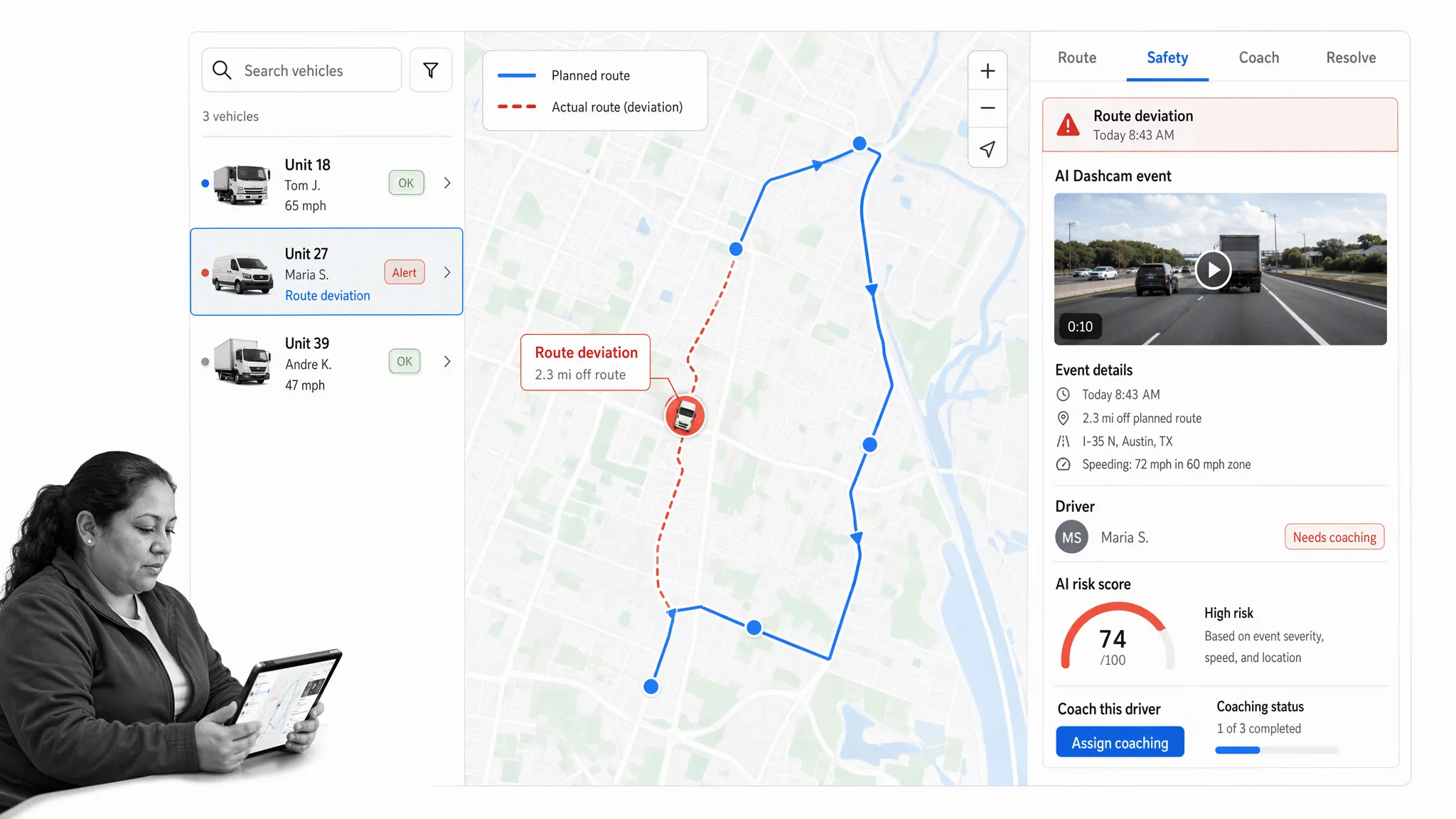
GPS tracking and route visibility
Location and route data show where vehicles are, where they have been, and whether planned work is on schedule. Look for useful history, geofences, arrival estimates, route playback, and privacy controls appropriate to your workforce and jurisdiction.
The main and most recognized feature of fleet management software is its GPS tracking capability. This allows management to view and track the location of vehicles and drivers in real time. Without software, companies often have to manually call drivers to receive estimated arrival times and then call customers to tell them how long they will be. Fleet management software can automate this communication and send ETA notifications with the help of the system’s GPS tracking feature.
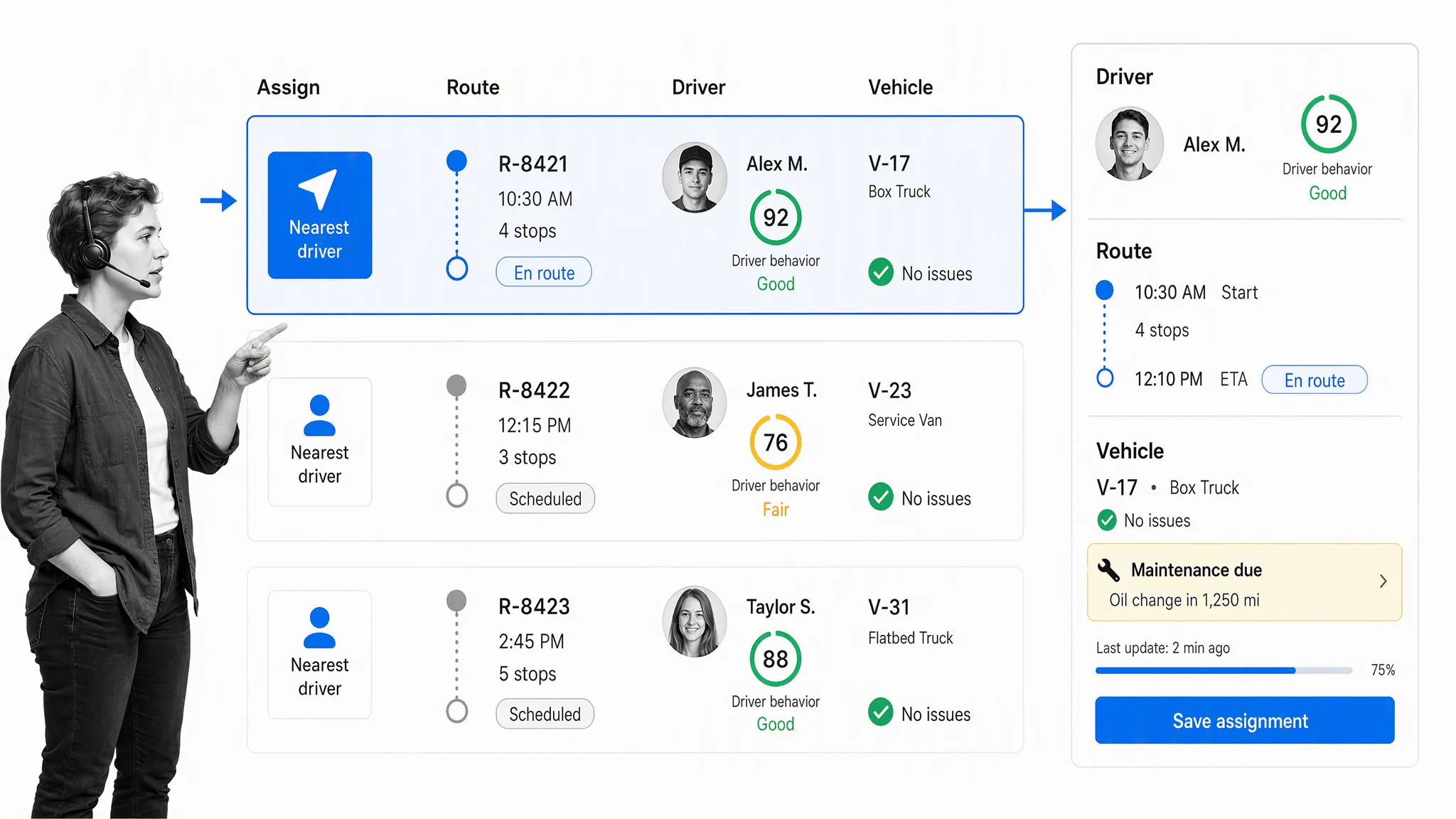
The same visibility helps when a customer needs a driver quickly. A dispatcher can find the driver nearest to the customer and assign the work, rather than contacting multiple drivers and trying to work out the best option with more room for potential error. Historical GPS tracking also records driver whereabouts. This gives managers the ability to see where vehicles were at a given moment, investigate possible misuse, and check vehicle history during a customer dispute about whether a driver was late.
Vehicle diagnostics and maintenance
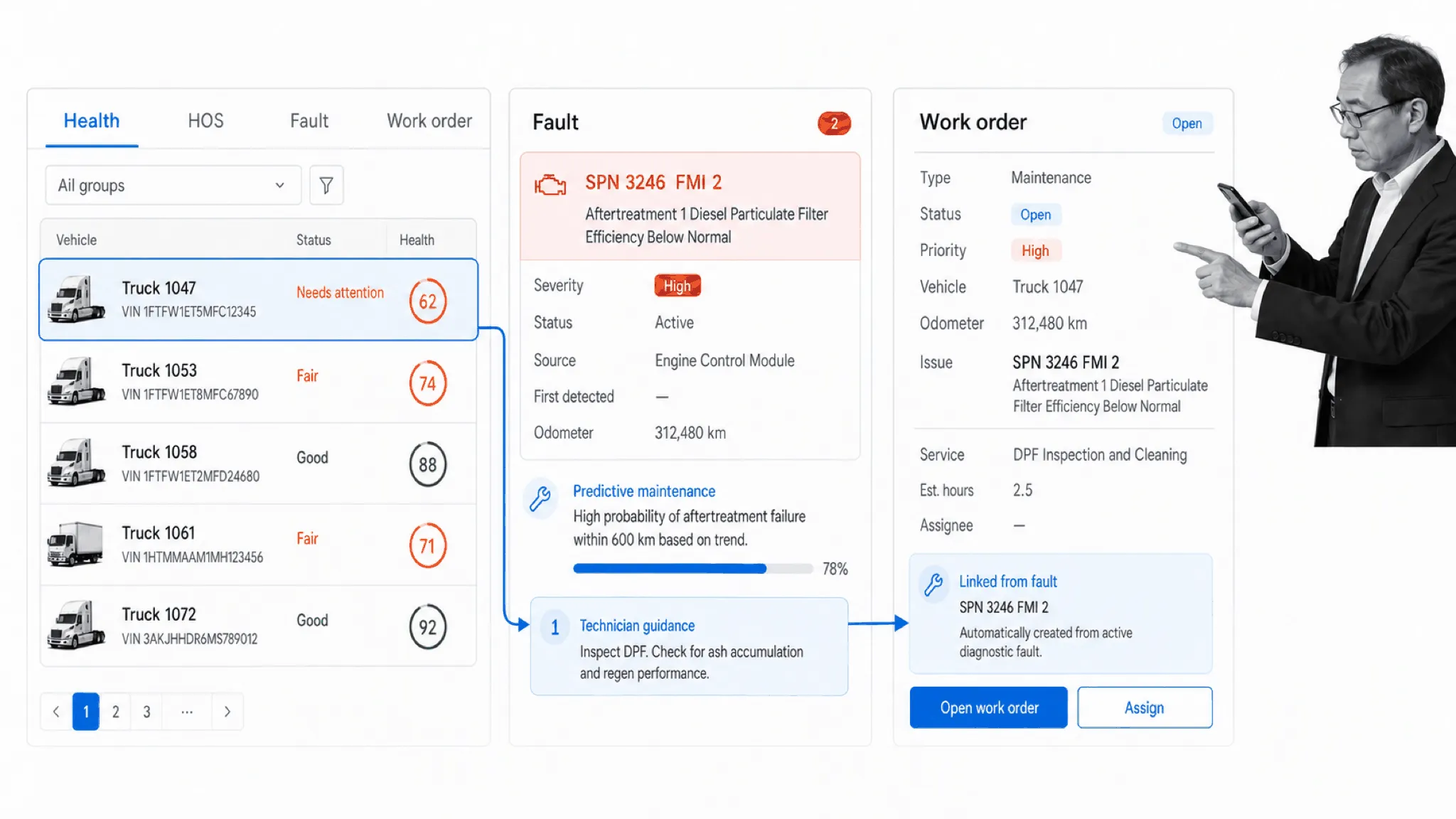
Diagnostics, odometer data, inspection results, service intervals, and repair history should lead to an actionable maintenance plan. Strong systems help managers prioritize faults, create work orders, schedule service, record parts and labor, and measure downtime. For a deeper comparison of tools built around that work, see our guide to maintenance management software.
When vehicles break down and have to undergo repairs, the disruption can be costly and can get in the way of company performance. That is why many fleet management systems offer a vehicle diagnostic feature that constantly monitors vehicles for potential issues. If the system finds something wrong, it can compile the relevant information into a report. The report can then be handed to a mechanic, helping the technician inspect the related issues together and reduce the chance of future complications.
Some systems can also alert drivers and management when they detect a critical issue with the vehicle. That can allow a driver to pull over safely and avoid further damage or accidents. The operating procedure should define which alerts require an immediate stop, who evaluates the problem, and what approval is required before the vehicle returns to service.
In addition, management can receive automated text and email notifications when vehicles arrive at or leave job sites, allowing for better supervision and overall employee performance. Speed, trip length, distance traveled, fuel levels, voltage, motion, and idle status can inform future operating decisions when they are reviewed in accordance with a clear policy.
Fuel, idling, and utilization
Fuel-card integration and engine data can reveal unusual purchases, excessive idle time, route inefficiency, and vehicles that are used too little or too heavily. The U.S. Department of Energy notes that a typical heavy-duty truck may consume about 0.8 gallon of fuel per hour while idling, although actual consumption varies by engine, load, and operating conditions. The DOE heavy-duty vehicle idling guide provides the underlying context.
Vehicles and fuel are often among a fleet’s most significant expenses. Fleet management software makes it easier to determine how fuel may be wasted and whether each vehicle is being utilized as much as it should be. Managers can identify drivers who are spending too much time idling, investigate the operating reason, and step in with a route, scheduling, maintenance, or coaching change.
Vehicle drive-time data can also show whether some assets are not getting much use. That makes it easier to consider reassigning or selling vehicles that consistently sit idle, while checking that the remaining fleet has enough capacity for seasonal demand, maintenance downtime, and unexpected work. Utilization should be evaluated alongside asset condition and service requirements, not as an isolated percentage.
Safety, cameras, and driver coaching
Safety modules may combine driving events, camera evidence, risk scoring, coaching, and incident review. Evaluate how an alert is validated, how privacy and access are handled, and whether the system records coaching and corrective actions instead of stopping at detection.
Many fleet management systems include safety features that keep a record of driver performance on the road and make it easier to determine whether any employees are driving dangerously. Some systems analyze hazardous driving behavior so management can review the event and address the issue. This is useful because dangerous driving can otherwise remain invisible until an accident takes place.
Even with careful drivers, accidents are always a possibility. Dashcam footage and route history can provide evidence for an internal investigation and an insurance claim. They can help establish what happened and may protect the company from liability when an accident was not its fault. The evidence should be retained under a defined policy, with access limited to authorized people.
Driver communication and dispatch
Mobile communication helps drivers receive assignments, directions, forms, and updates without fragmented calls and messages. Dispatchers need a clear view of driver availability, vehicle type, route, service constraints, and exceptions. The system should also support safe communication practices and avoid encouraging interaction while driving.
Communication between management and drivers can become disorganized and spread across various platforms. That makes it difficult to get hold of employees and to review communication history later. Fleet management software can tackle this issue by compiling company communications into a single, easily accessible location. Depending on the platform, management may be able to share company-wide announcements, send group messages to particular drivers, and confirm if and when drivers have read important messages.
Compliance records and integrations
Regulated fleets may need electronic logging device support, hours-of-service records, driver vehicle inspection reports, International Fuel Tax Agreement reporting, driver qualification records, and evidence retention. Confirm the exact regulations that apply to your operation. Integrations with payroll, enterprise resource planning, customer relationship management, maintenance, fuel, and workflow systems can prevent double entry and keep downstream work aligned.
Tips for choosing fleet management software
Start with operating outcomes, not a feature count. A long checklist can make every platform look similar while hiding the few capabilities that determine adoption and return on investment. Document the current process, the exceptions that cause the most cost or risk, and the decisions that better data should improve.
It can be daunting to decide which fleet management software is the best when there are so many options. Reviews are a useful discovery signal, but they should be treated as evidence to investigate rather than a final ranking. Make sure the provider offers support that matches your operating hours and escalation needs. Confirm that the software offers the variety of features your operation actually needs, rather than little more than basic GPS tracking. Dashcams, instant messaging, vehicle diagnostics, maintenance, and compliance functions can be valuable, but only when they fit the way your fleet works.
Integration is important because fleet software should be able to exchange information with other devices and technology for a streamlined experience. Contract terms matter too. Instead of assuming that any contract is a red flag, review the commitment period, renewal terms, device ownership, early-termination conditions, data portability, and service levels. The product should be strong enough to earn continued use through results and support, while giving the company a clear understanding of its obligations.
- Define the fleet and use case. Record vehicle classes, locations, ownership model, driver count, operating regions, connectivity constraints, and regulatory obligations.
- Prioritize three to five outcomes. Examples include reducing preventable collisions, increasing preventive-maintenance compliance, lowering idle time, improving arrival reliability, or replacing manual inspections.
- Map the full workflow. Test what happens after an alert, failed inspection, missed service, or route exception. Confirm ownership, evidence, approvals, and escalation.
- Validate the data and hardware. Check supported vehicles, installation requirements, device replacement, data frequency, camera options, mobile behavior, and offline operation.
- Review integrations and exports. Make sure critical information can move to and from the systems used by finance, payroll, maintenance, customer service, and compliance teams.
- Evaluate usability and support. Include dispatchers, drivers, technicians, safety leaders, and administrators in a realistic pilot. Ask how training, implementation, and ongoing support work.
- Model total cost. Include hardware, installation, connectivity, licenses, cameras, implementation, data retention, integrations, and internal administration. Compare cost with a measurable baseline.
Security and governance belong in the evaluation as well. Ask about encryption, access controls, single sign-on, audit logs, retention, data ownership, subcontractors, incident response, and the regions where data is stored. Define who can view precise locations or camera footage and why.
Best fleet management software
There is no universal winner. The following platforms are durable options for different fleet profiles. Product capabilities and packaging change, so confirm current requirements in a scoped demonstration and pilot before committing.
Samsara
Samsara combines telematics, video-based safety, equipment monitoring, driver workflows, and reporting in a broad connected-operations platform. It is a strong candidate for organizations that want vehicles, cameras, and operational data under one vendor. Evaluate hardware deployment, camera policy, integrations, and total subscription cost.
Geotab
Geotab is known for telematics, vehicle data, reporting, and an extensive marketplace. It suits fleets that want flexible data access and a broad partner ecosystem. Confirm which marketplace applications are required for your workflow and how data quality varies across vehicle types.
Verizon Connect
Verizon Connect offers GPS fleet tracking, video, field-service, and related capabilities. It can be a practical option for fleets that value a large provider and a combined view of vehicles and field activity. Test reporting, implementation support, contract terms, and the exact modules included.
Motive
Motive brings together fleet management, driver safety, compliance, spend, and equipment monitoring. It is especially relevant to trucking and other operations where ELD, safety, and driver workflows are central. Review regulatory fit, camera configuration, coaching workflow, and integration requirements.
Fleetio
Fleetio focuses on maintenance, inspections, fuel, parts, and asset records. It is a strong specialist choice when the maintenance operating system matters more than live telematics breadth. Check how it connects to your telematics provider, shops, fuel cards, and accounting workflow.
Momentum IoT
Momentum IoT provides GPS tracking and fleet telematics with an emphasis on straightforward deployment for vehicles and equipment. It may suit small and midsize field fleets that need visibility without a highly complex rollout. Validate the depth of maintenance, safety, compliance, and reporting features your operation requires.
How Process Street supports fleet operations
Process Street is a Compliance Operations Platform for the repeatable work that happens around fleet data. It is one product with Docs and Ops capability areas plus built-in AI. Docs helps teams maintain approved procedures and policies. Ops turns those procedures into assigned, trackable workflows with evidence, due dates, conditional logic, approvals, and activity history.
Process Street is not a replacement for GPS, telematics, ELD, routing, or maintenance systems. It complements them by controlling the human work those systems trigger. A diagnostic fault can start a repair workflow. A failed inspection can require evidence and approval before a vehicle returns to service. A safety event can launch investigation, coaching, corrective action, and closure.
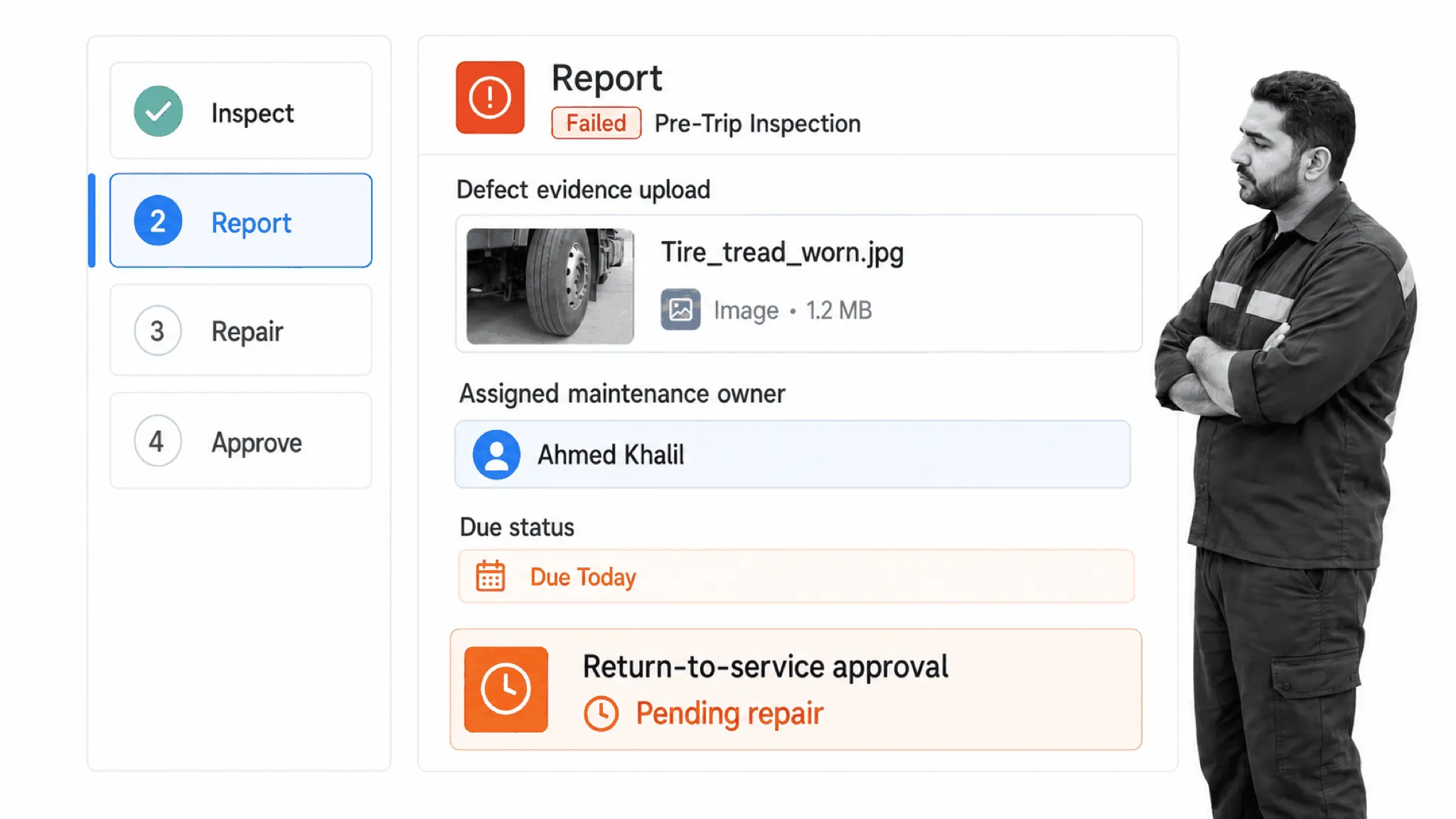
- Inspections: Standardize pre-trip, post-trip, and periodic inspections with required evidence and escalation for defects.
- Maintenance control: Coordinate repair requests, approvals, vendor work, verification, and return-to-service decisions.
- Incident response: Collect statements and evidence, assign corrective actions, and retain a complete response history.
- Driver onboarding: Track qualifications, training, acknowledgments, equipment issuance, and role-specific requirements.
- Compliance routines: Run recurring reviews, record exceptions, route approvals, and make overdue work visible.
- Policy management: Keep controlled procedures available in Docs and connect them to the operational work in Ops.
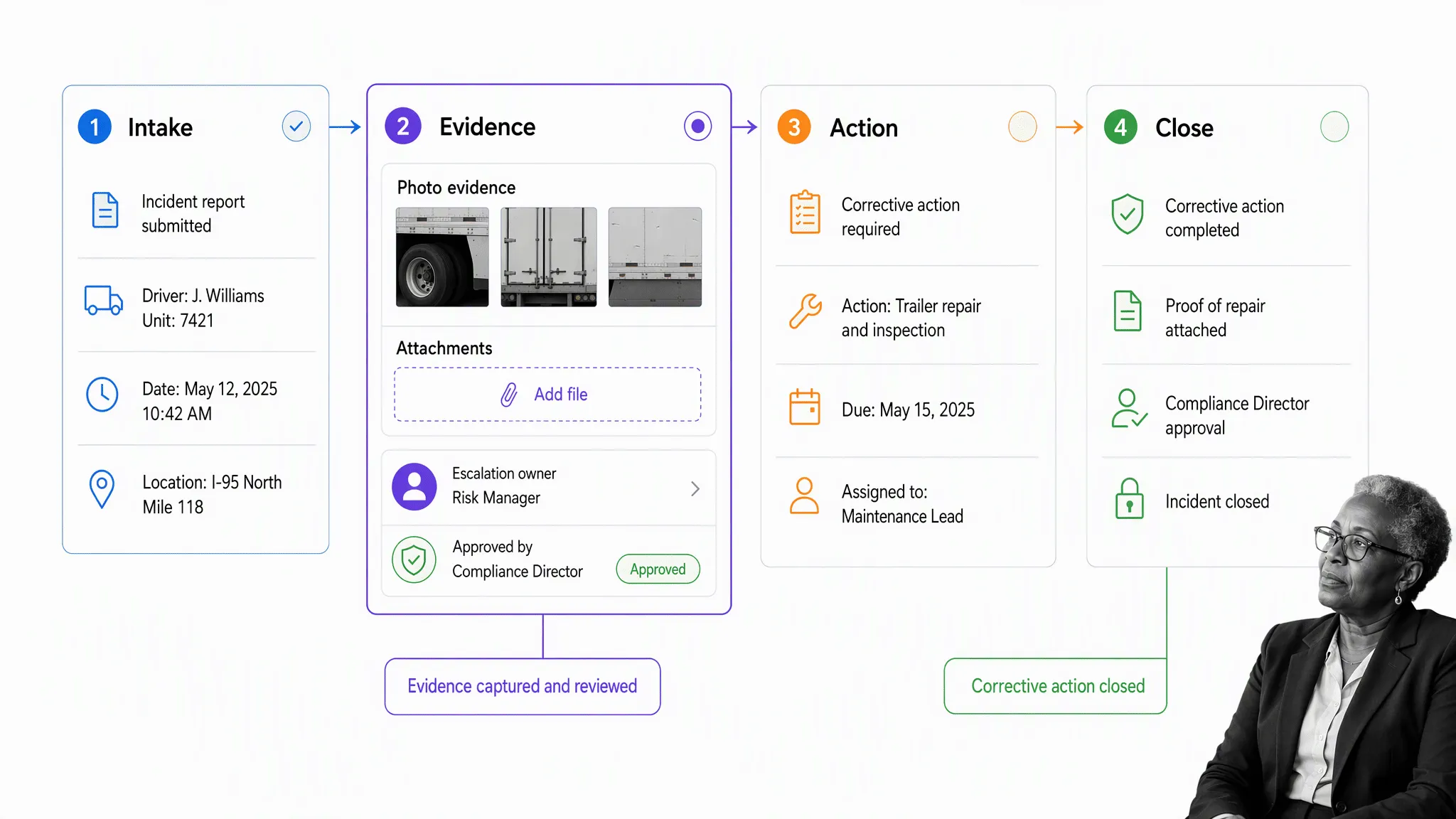
Built-in AI can support work inside these controlled processes, such as helping teams summarize evidence or draft structured content, while the organization retains defined owners, decision points, and approvals. That combination helps fleet teams move faster without losing the operational controls needed for safety and compliance.
Start with the fleet management templates, including a pre-trip inspection checklist. The embedded facility inspection workflow below is another example of turning a repeatable inspection into assigned, documented work.
Fleet management software FAQ
The post Fleet Management Software: Best Solutions for Fleet Managers first appeared on Process Street | Compliance Operations Platform.