











Enterprise Automation: How to Make 100 Employees Feel Like 1,000
Blog: Blog | Process Street | Compliance Operations Platform
Enterprise automation is the coordinated use of rules, workflows, integrations, user-interface automation, and governed AI to move work across an organization with less manual coordination. It does not remove people from the operating model. It gives them a reliable system for routine work while preserving human ownership of judgment, exceptions, and consequential decisions.
That is how 100 employees can feel like 1,000: not because automation creates a literal tenfold productivity guarantee, but because the same team can spend less time copying data, chasing status, routing requests, and repeating predictable steps. The useful question is not whether a task can be automated. It is which parts should be automated, which controls must remain visible, and where a person needs to decide.
Enterprise automation works best as an operating system for work rather than a collection of isolated shortcuts. A request enters through a known channel, the right process starts, data moves between systems, owners receive assignments, exceptions are routed, and evidence is retained. Each layer should make the next action clearer.
The principle from the original era of business process automation still holds: your employees should not be replaced by routine coordination. They should be able to perform more valuable work instead of getting bogged down in repetitive tasks. Interviewing candidates, helping customers, reviewing important documents, investigating risk, and deciding what to do next still depend on context and judgment.
For many leaders, enterprise automation is still a complex and scary topic. Some believe it takes too much work to set up automated systems, while others are worried that robots will take over jobs. That framing is too simplistic. Automation is designed around letting people perform their jobs better than before. It can augment their ability, hand off menial tasks accurately, and let a team focus on more important items. The newest generation of tools makes setup more accessible, but the organization still has to design the process, controls, and human responsibilities carefully.
What is enterprise automation?
Enterprise automation connects tasks, processes, systems, and controls so recurring work moves consistently across departments. It is broader than a single bot or integration. A mature program combines several automation patterns and applies each one where it fits.
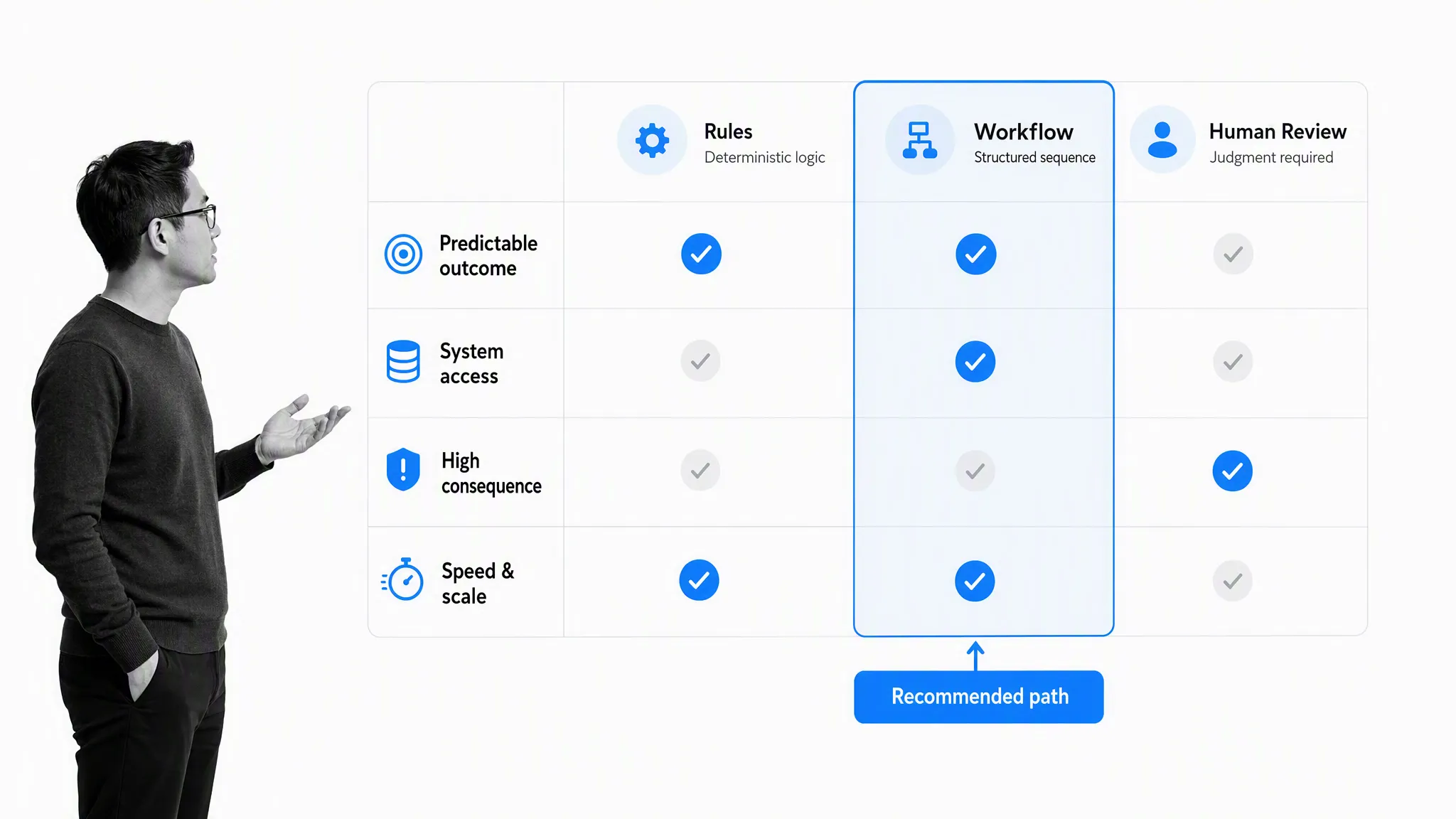
A predictable, low-consequence task may need a simple rule. A cross-functional process needs workflow orchestration. Data moving between systems needs integration controls. A legacy application may require UI automation. Work that involves ambiguity may benefit from AI assistance, but only inside defined permissions, validation, and review.
The dividing line is not “human or machine.” It is the point at which context, risk, or accountability requires a person. Good enterprise automation makes that boundary explicit instead of hiding it.
While there are different schools of automation, the main principle lies in identifying the tasks in your operations and processes which machines are better suited to than humans. After that, practices and software usage can be adjusted so those tasks are handled automatically. Automation does not just mean that simple tasks are completed quicker and more efficiently. It also frees up employees to focus on work that humans are better at and more engaged with, including interviewing, helping customers, reviewing important documents, and applying human intelligence or judgment.
Task and rules automation
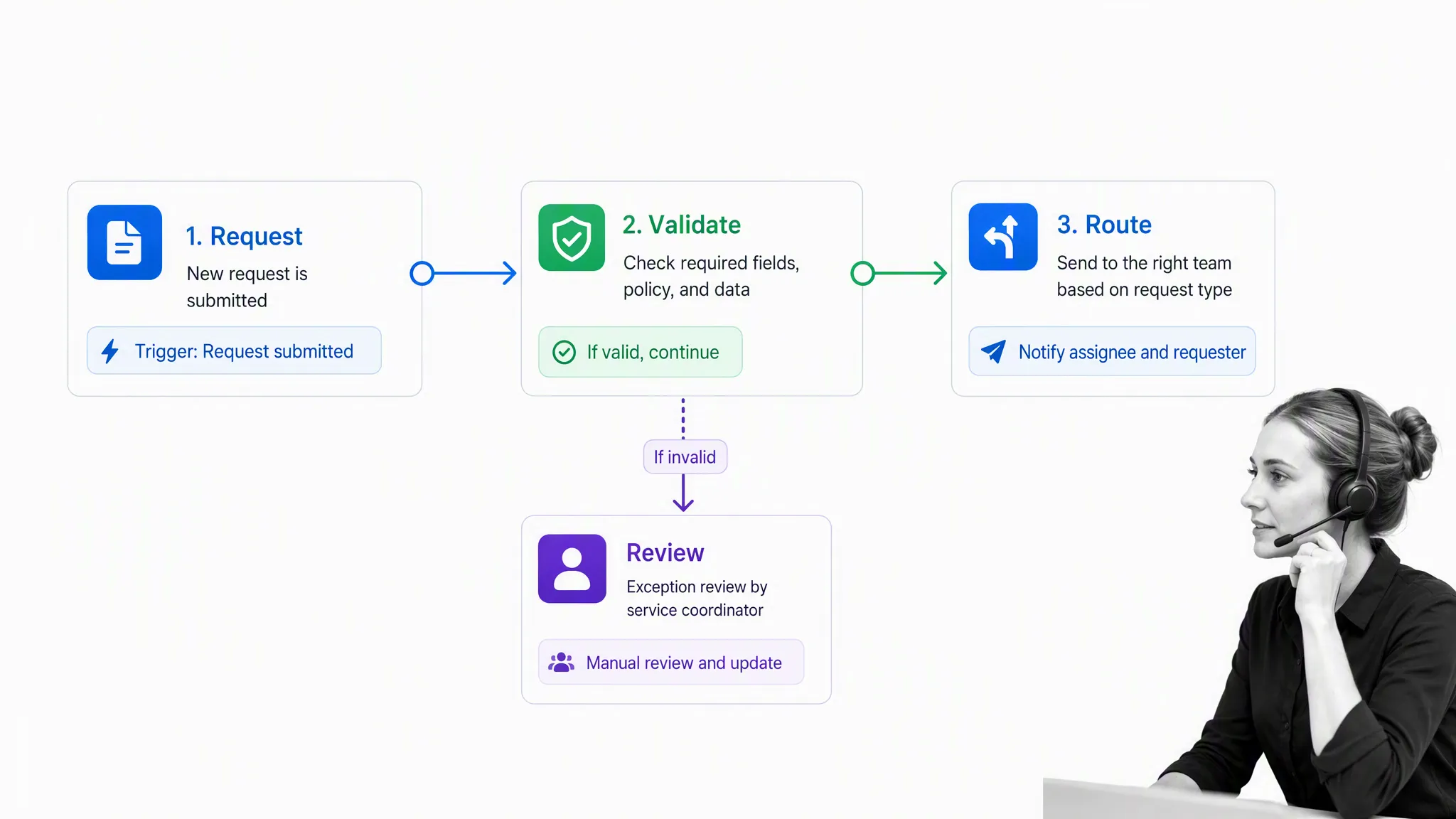
Task and rules automation handles predictable events: validate a form, calculate a field, send a reminder, route a request, create a record, or notify an owner. The trigger and conditions are known in advance, and the outcome is easy to verify.
This is the easiest place to begin because the work is already stable. A submitted request can be checked for required fields, sent to the correct team, and paused for human review when a condition is not met. The automation reduces waiting and context switching without pretending every case is identical.
Rules are useful only when they remain understandable. Name the owner, document the trigger and conditions, log the result, and create an exception route. A rule that nobody can explain becomes operational debt.
Basic automation also improves visibility. Instead of relying on an inbox or memory, a team can collect the relevant information in one place and show the current state to everyone who needs it. The value comes from the trigger, routing, and shared state, not from replacing one communication app with another.
Basic automation is centered around simple tasks, usability, and communication. At its most useful it provides a central location to view all of the relevant information. Transparent communication is vital for enterprises to avoid confusion and wasted time, but a central chat application by itself is not enterprise automation. The stronger pattern is a request, message, or form that triggers a defined action, creates shared visibility, and keeps the team up to date.
Workflow and process orchestration
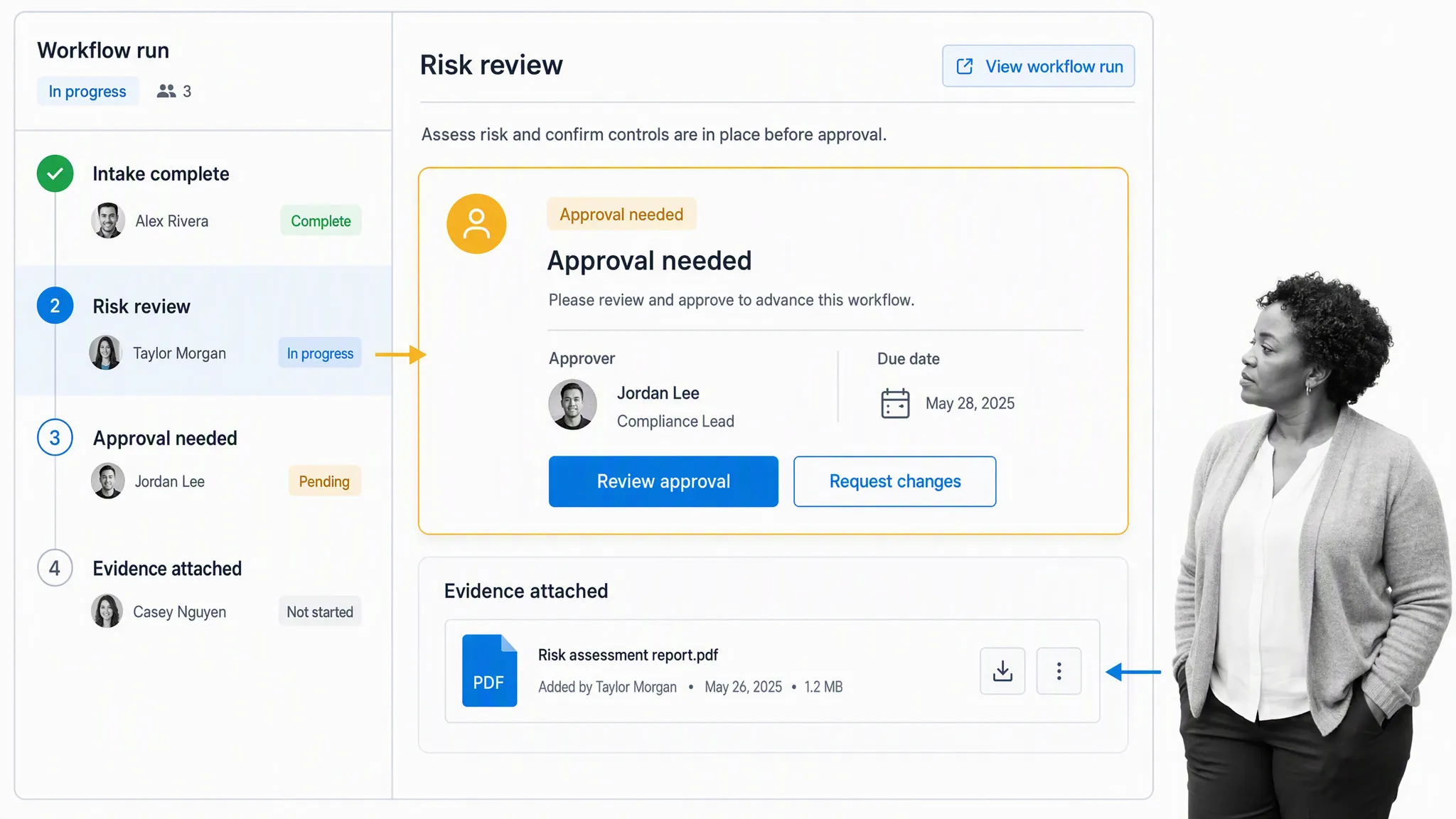
Workflow automation coordinates a complete process rather than one isolated task. It connects instructions, forms, assignments, approvals, due dates, evidence, and status so everyone knows what is happening and what comes next.
The first step is to map the end-to-end process. Document the owners, systems, decisions, exceptions, controls, and evidence, not just the happy path. Once the process is visible, recurring work such as employee onboarding, client onboarding, content approvals, document reviews, and compliance checks can move through a shared workflow.
A workflow also creates accountability without constant chasing. Managers can see whether work is blocked, reviewers can see the evidence behind an approval, and operators can follow the current instructions rather than a stale document.
Even an inexperienced employee can complete complex work more reliably when the instructions, form fields, decision points, and escalation path appear in context. That does not eliminate training or judgment. It reduces avoidable variation and gives the employee a clear place to ask for help when the case falls outside the documented path.
Process automation focuses on documenting and managing recurring duties so everyone knows what is going on and how to perform their tasks. A list of instructions for common duties lets employees perform their work faster and more accurately, while access to the same instructions helps even inexperienced employees complete complex tasks. The control comes from a current workflow, clear ownership, and visible evidence, not from a static document alone.
Integration automation
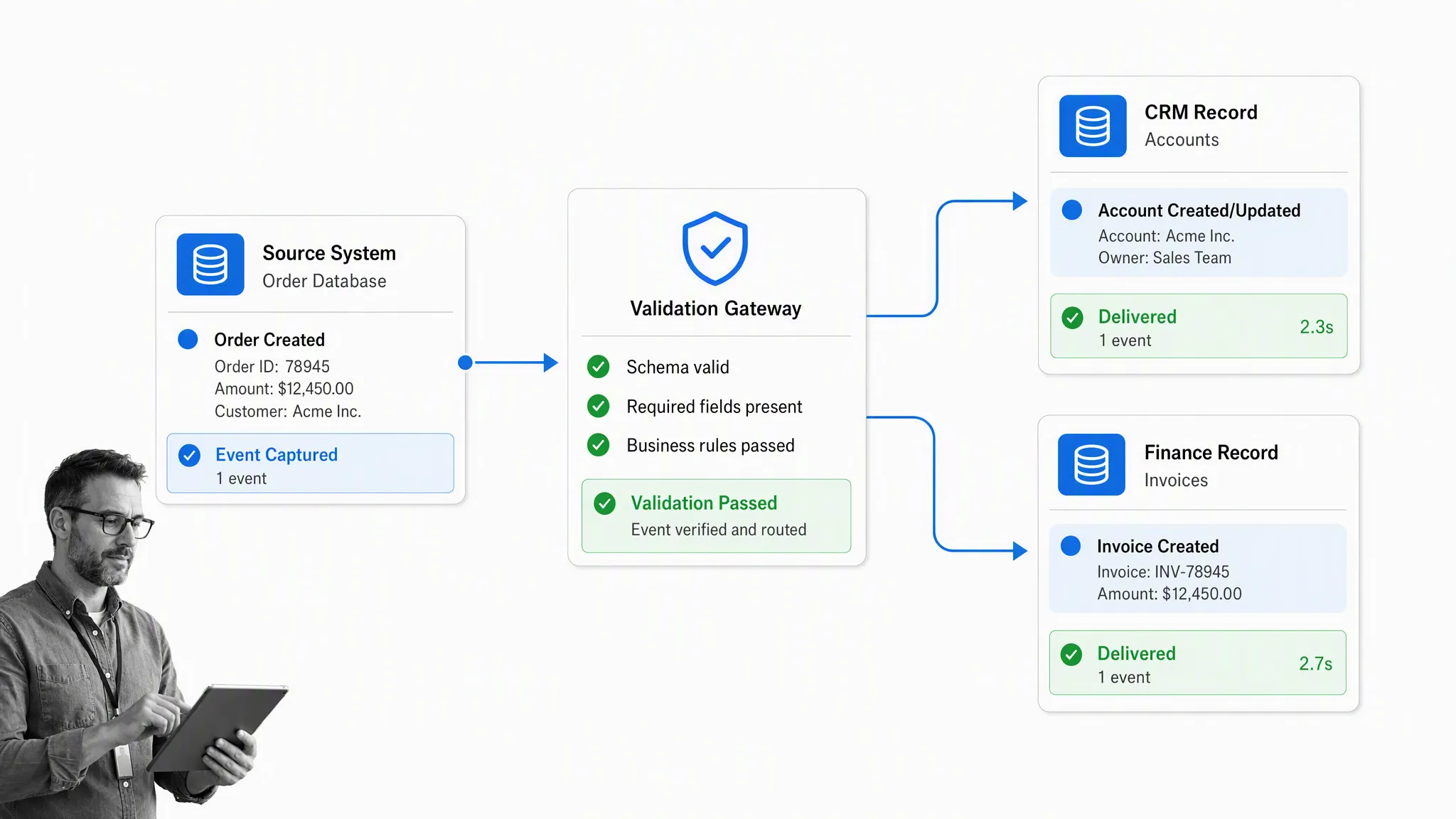
Integration automation lets systems exchange data and events through APIs, webhooks, native automations, or integration partners. Instead of copying customer, financial, or operational data by hand, a verified event can create or update the right record in another system.
A robust integration does more than move a field. It validates the payload, maps the data, checks delivery, records the result, and decides what happens when a system is unavailable. That makes the automation observable and recoverable.
Enterprise teams often combine workflow and integration automation. A new support conversation can start a workflow run, assign an owner, add the customer context, and return a verified status update to the support system. The workflow carries responsibility and controls; the integration carries data.
Integration automation works by letting your services talk to each other according to predetermined logic. As long as you can define rules for actions to be performed at specific times or when certain events occur, an integration can take a repetitive data-transfer task off your hands. It can automatically run a workflow, assign team members, populate documents and forms, arrange meetings, or synchronize approved data between a support platform and an operations system.
UI and agent-assisted automation
UI automation, often called robotic process automation, mimics defined actions in a software interface. It is most useful when a critical legacy application has no reliable API and cannot be replaced yet. Current tools range from desktop recorders to governed low-code platforms, so a team does not always need to outsource the work.
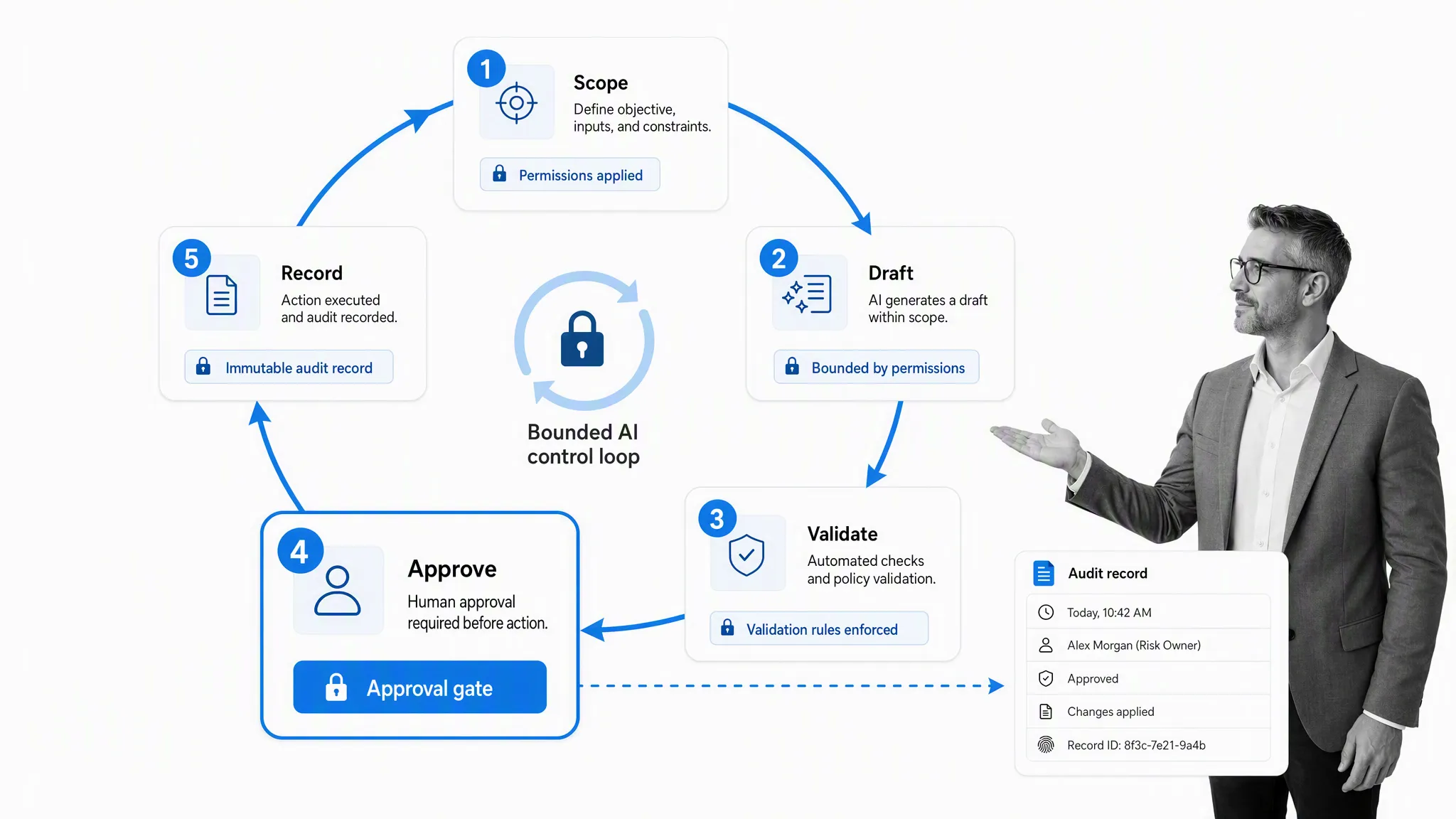
AI assistance extends automation to work that is less deterministic, such as summarizing approved evidence, extracting structured fields, drafting a response, or choosing among allowed routes. It should not receive unlimited authority. Define the scope, limit data and actions, validate the output, require approval based on consequence, and retain an audit record. The NIST AI Risk Management Framework is a useful reference for structuring this governance.
Use UI or agent-assisted automation when rules and integrations are not enough. Keep a named human owner for exceptions and consequential actions. The objective is bounded assistance, not invisible autonomy.
Why should you care about enterprise automation?
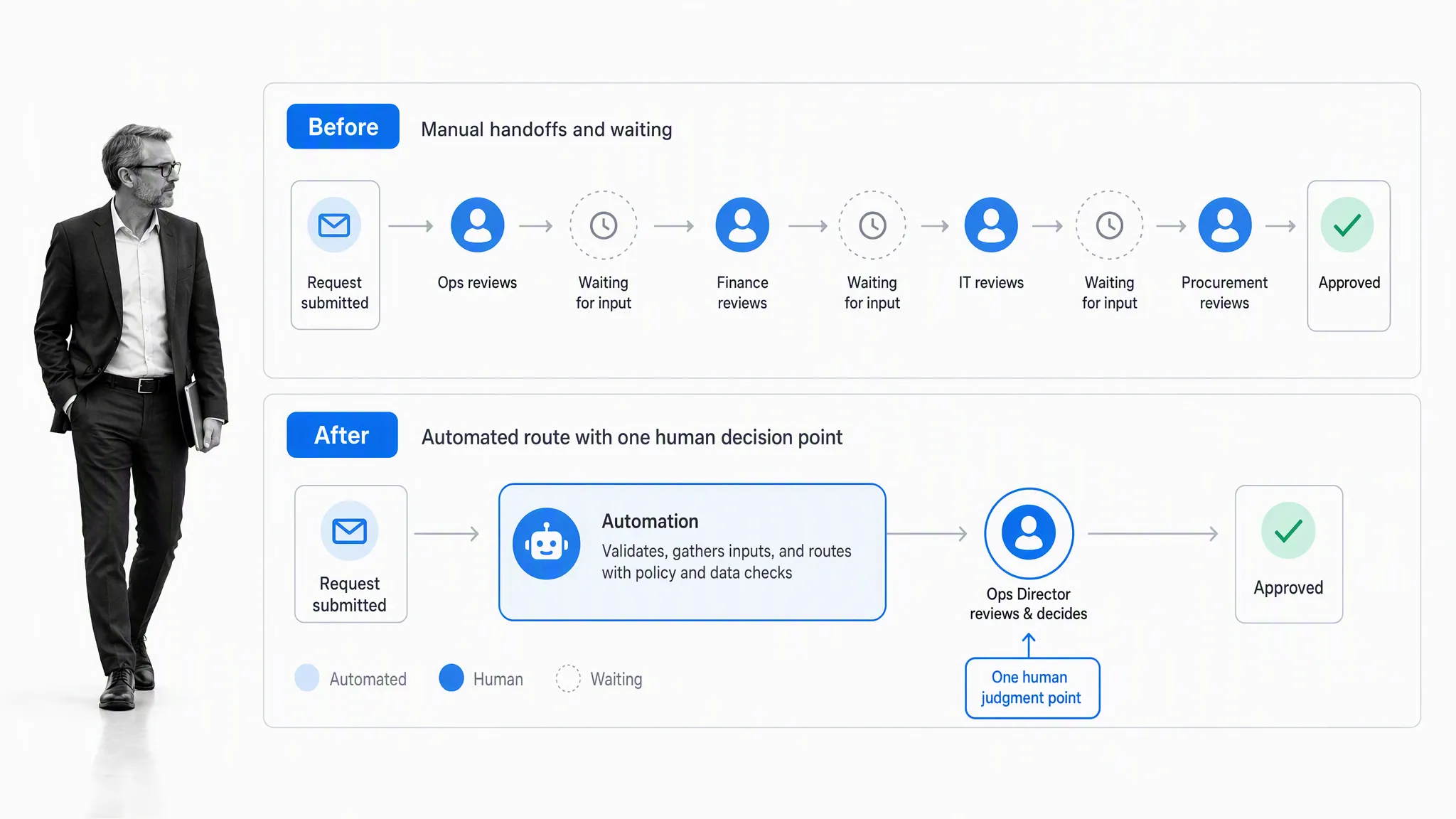
Enterprise automation increases capacity by removing repetitive coordination from the critical path. Work can start sooner, move with fewer handoffs, and arrive with the context needed for a decision. The benefit is not “zero human error.” It is more consistent execution with monitoring, validation, and exception handling.
- Faster throughput: events trigger the next step without waiting for someone to copy, forward, or re-enter information.
- Greater consistency: the current instructions and controls travel with the work.
- Clearer accountability: assignments, approvals, due dates, and evidence remain visible.
- Less rework: validation catches missing or inconsistent data before it travels downstream.
- Better onboarding: new employees can follow an established workflow while managers see readiness and blockers.
- More useful improvement data: bottlenecks and exceptions become observable instead of anecdotal.
- Safer scale: a growing team can expand volume without multiplying coordination at the same rate.
There are human benefits too. People spend less time switching between programs, searching for the latest instructions, and asking who owns the next step. They gain more time for customer conversations, investigation, design, review, and improvement.
Managers gain a more useful view as well. Rather than chasing updates across email and meetings, they can examine process state, overdue work, exception patterns, and evidence. The goal is not surveillance. It is to notice where a team needs support, where a handoff repeatedly stalls, or where the process itself should change.
The combination of reliable, transparent communication, fewer boring tasks, and more creative, engaging work can improve morale and motivation. Managing a team or heading a department becomes easier when communication, accountability, and processes are maintained to a high standard. Instead of chasing everyone up for their work, a manager can see who is on schedule, who might need help, and which part of the process requires a follow-up message. In other words, enterprise automation can create a more efficient, accurate, motivated, and manageable team that can scale as the enterprise grows.
Those who understand automation for what it is, a powerful tool that lets a team increase its value output, can focus on important items instead of menial tasks. Without clutter in the workflow and without constantly switching between programs to get the information they need, employees can maintain focus and spend their energy on higher-value activities. The benefit is not exponential output or a universal cost claim. It is a practical combination of efficiency and accuracy that can reduce operating expense, improve service, and give people more room for valuable work.
Problems in your processes also become easier to spot and fix when each step produces state and evidence. Work can be carried out in the same way every time while still allowing a human exception. Employee onboarding can go faster, communication can become more transparent, and accountability can increase because the owner and due date are explicit. These benefits are less quantifiable than a throughput metric, but they matter when an enterprise grows.
That is the practical meaning of helping 100 employees feel like 1,000. The organization creates leverage around the team it already has, while keeping responsibility visible.
Enterprise automation methods
Start with the business process, then choose the smallest reliable automation pattern that can improve it. A common sequence is to map and govern the process, automate stable tasks, connect systems, and use UI or AI assistance only where simpler methods are insufficient.
Map the work and set governance
Before automating, document how the process currently works. Identify the trigger, desired outcome, owners, systems, inputs, decisions, exceptions, controls, and evidence. A process map should reveal where work waits, where people re-enter data, and where a mistake would matter.
Do not automate a broken process just because its steps are easy to record. Remove redundant approvals, clarify ownership, and standardize the minimum information required. Then define how the process will be monitored and changed.
Interview the people who perform the work and observe the real sequence, including the workarounds. A process often looks simple in a policy document but behaves differently when information arrives late, a system is unavailable, or a customer needs an exception. Those details determine whether the automation will reduce friction or merely move it.
This is where a governed process automation solution earns its place: it connects the operating instructions with the work itself, rather than leaving a diagram separate from execution.
Extend systems with APIs and events
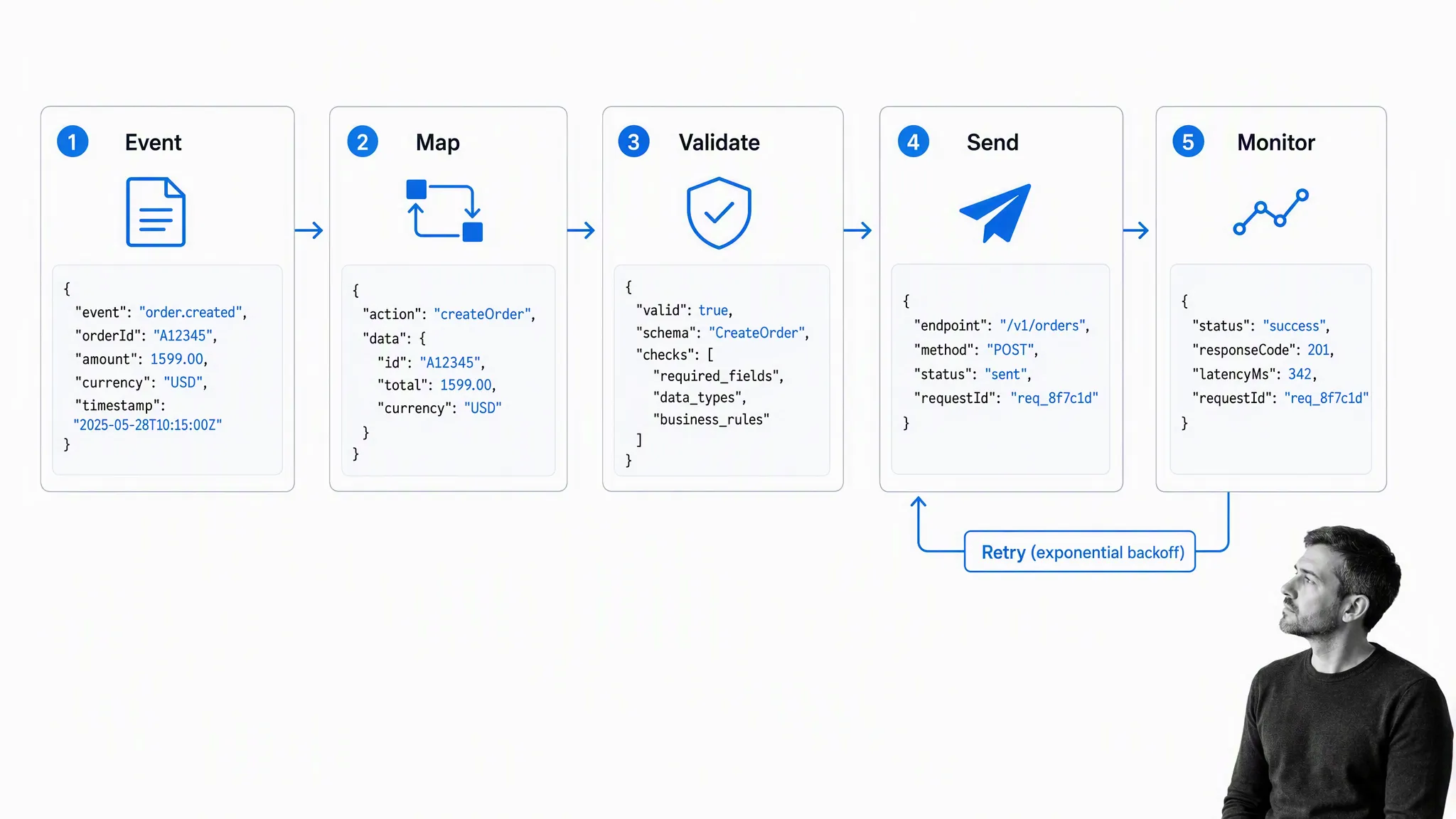
Custom integrations are appropriate when the process depends on specific systems or logic that off-the-shelf connectors cannot support. Development teams can use APIs and webhooks to map an event, validate the payload, send the request, monitor the response, and retry safely when a temporary failure occurs.
This approach deserves engineering discipline. Version the contract, protect credentials, test edge cases, apply idempotency where duplicate events could cause harm, and make failures visible to an operator. A custom integration that silently drops work is worse than a manual process everyone understands.
Custom development is not automatically the most powerful choice. It can require a substantial investment and ongoing maintenance. If a native automation or partner connector supports the event, fields, security, and error handling you need, it may deliver the same operating outcome with less complexity. Reserve custom code for the points where it creates a durable advantage or closes a genuine capability gap.
Extending IT services can involve dedicating development resources to creating integrations or using existing program APIs to let services interact with each other. While useful, this option takes a meaningful investment and is only worthwhile in specific circumstances. If the tasks have to be carried out using specific programs and methods, and the process is already documented and optimized, custom integrations can further boost performance. Otherwise, it is better to try easier avenues before committing to extending IT services.
Use native integrations first when they fit. Build custom connections when the process is valuable, stable, and genuinely requires them. The Process Street integrations layer can connect workflows with other systems through native automations, API access, webhooks, and integration partners.
Coordinate recurring work from one place
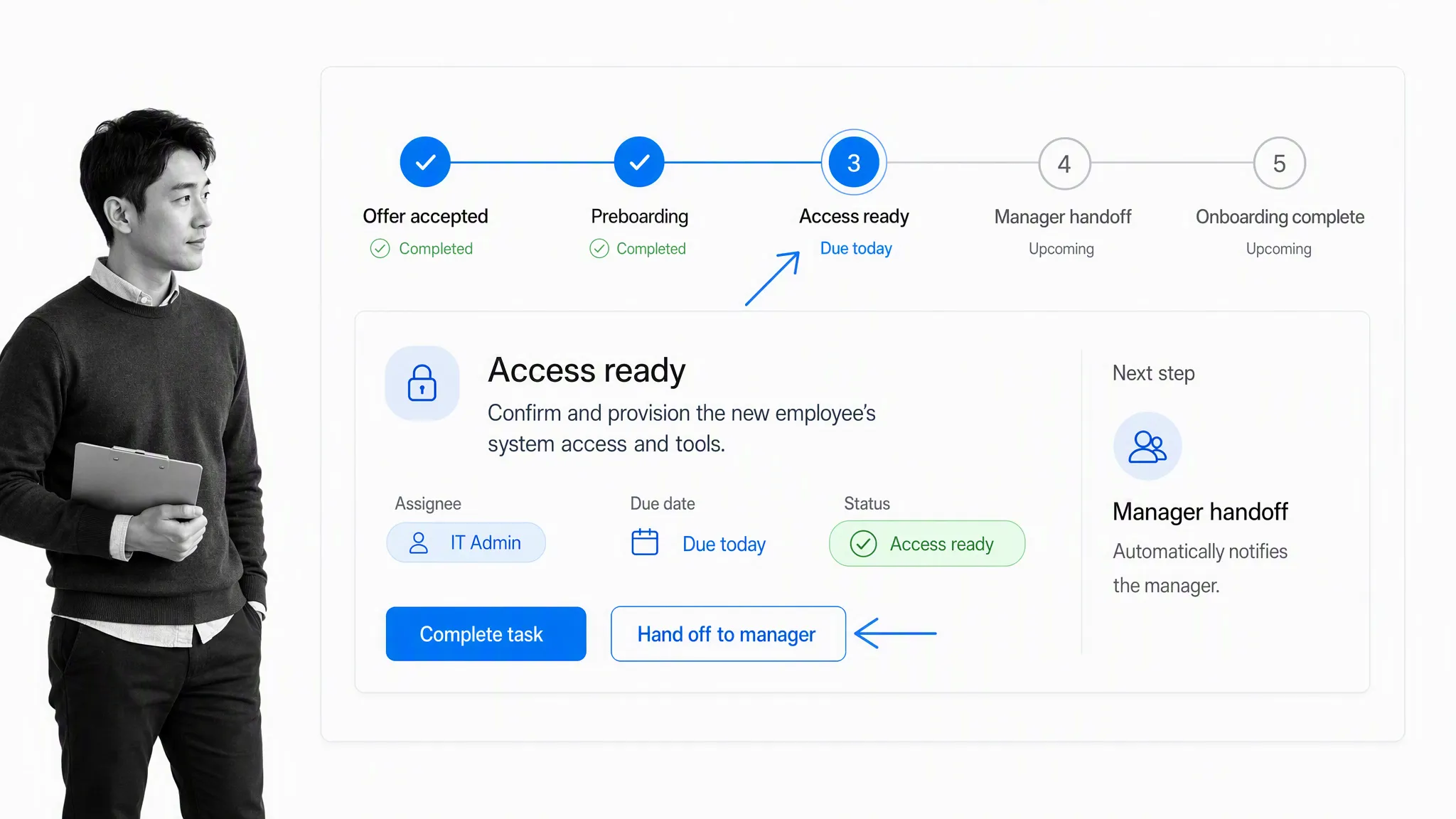
A workflow is the practical hub for cross-functional automation. Employee onboarding, for example, can coordinate offer acceptance, access provisioning, policy acknowledgement, manager preparation, role training, and the final handoff to independent work.
Each task can carry the instructions and evidence it needs. Conditional logic can reveal only relevant steps. Assignments and due dates can change with role or location. Approvals can pause the process when a control requires review. Reports can show which workflow runs are on schedule and which need attention.
The same pattern applies to client onboarding, content creation, procurement, incident response, financial approvals, and document workflows. The details change, but the operating need is consistent: one current process, clear owners, visible state, and evidence of completion.
Connect customer support and operations
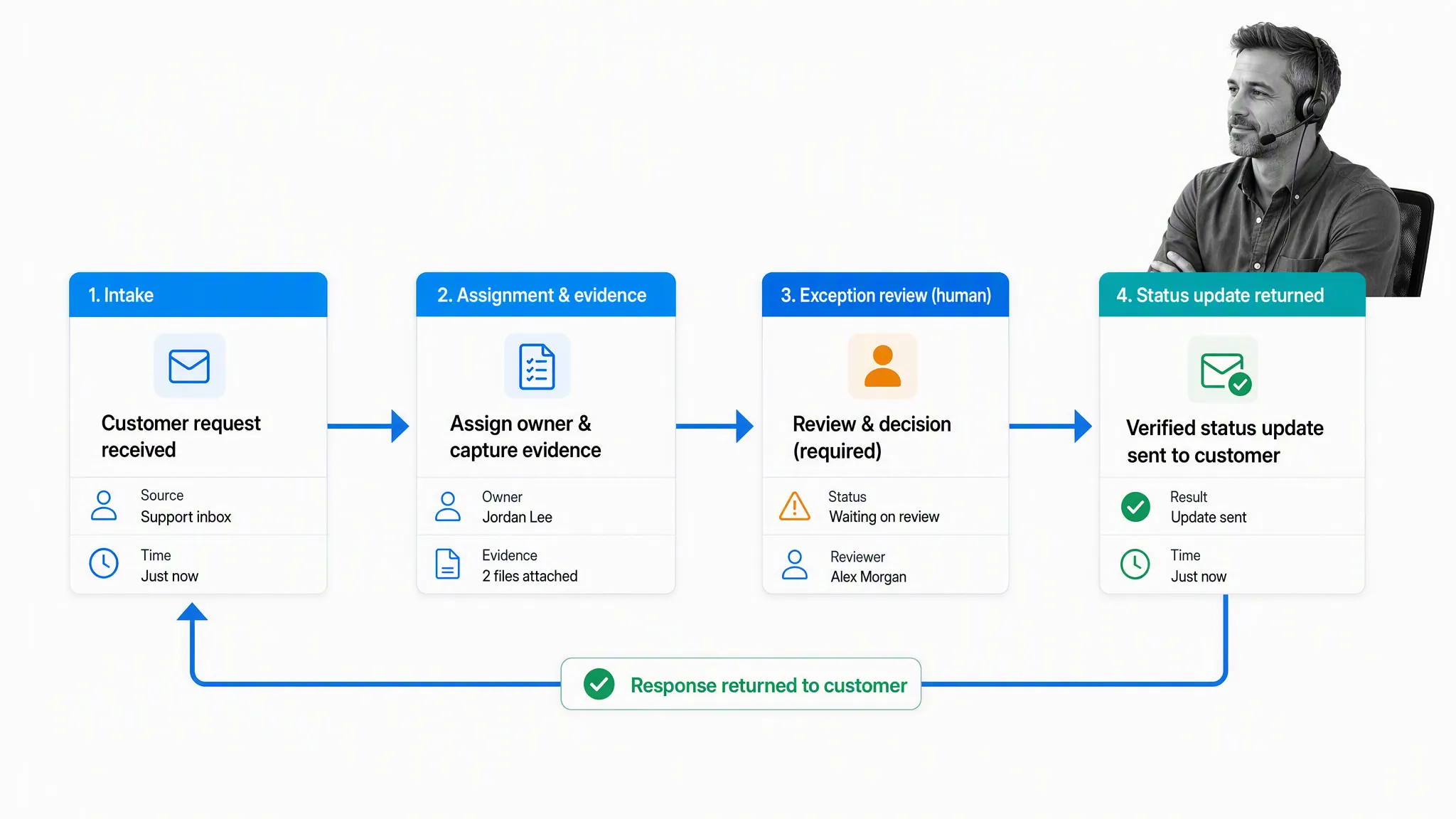
Customer support is a useful enterprise automation example because it crosses systems and still needs judgment. A new request can trigger intake, assignment, evidence collection, validation, and an exception review. The verified outcome can then return to the support system as a status update.
The support technician should not need to copy the same customer details into several places. At the same time, an automation should not send a consequential response just because a model produced plausible text. Bound the allowed action, retain the customer context, and require review when the issue falls outside a known route.
Use UI automation for legacy applications
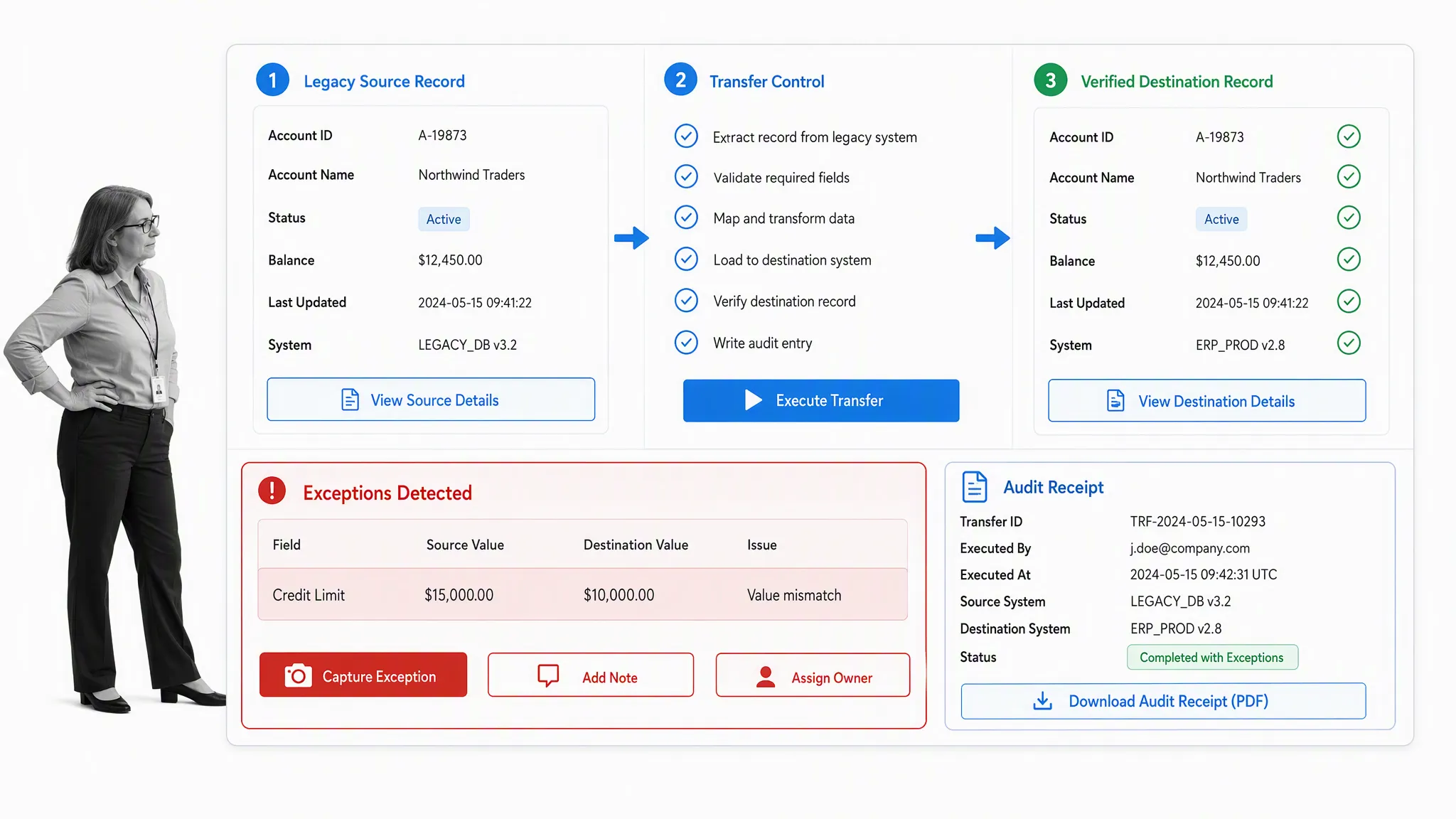
Some essential applications have no usable API. UI automation can bridge that gap by reading a source record, entering approved fields, validating the destination, and capturing evidence. This is a valid pattern when the legacy system cannot be replaced and the work is stable enough to automate.
Treat the interface as fragile. A changed button, field, or session state can break the automation. Add validation before and after the transfer, capture exceptions, monitor the run, and assign an owner. Use UI automation as a controlled adapter, not as a reason to ignore underlying system risk.
UI automation has largely the same effect as integration automation, except a digital worker mimics human actions in a software user interface. It is useful when integrating processes that involve legacy software without easily accessible or usable APIs. The automation can observe defined application states, press an approved button, copy data, and perform the same task in future. Unlike the earliest tools, current products can combine logic and AI assistance, but human review remains necessary when the case requires judgment or reasoning.
Begin with one controlled operation
Enterprise automation can feel overwhelming when every team has a backlog of ideas. Start with one stable, recurring, high-friction process. Choose work with a clear owner, measurable waiting or rework, and enough volume to justify improvement. Avoid the most consequential process until the team has established its controls and operating rhythm.
- Define the outcome: state what should improve and what must not change.
- Map the current work: include decisions, exceptions, systems, owners, and evidence.
- Select the automation pattern: prefer a rule or workflow before adding custom integration, UI automation, or AI.
- Design controls: set permissions, validation, approval thresholds, logging, and exception ownership.
- Test with real edge cases: confirm the happy path, failure path, retries, and manual fallback.
- Measure and improve: review throughput, waiting, rework, exceptions, and user experience.
Process Street is one Compliance Operations Platform with Docs and Ops capability areas plus built-in AI. Docs gives teams a governed place for operating procedures, policies, and process knowledge. Ops turns that knowledge into workflows with assignments, forms, approvals, due dates, integrations, and evidence. Built-in AI can assist inside those controls, while people retain ownership of exceptions and consequential decisions.
The result is a practical foundation for enterprise automation: processes people can understand, work the organization can coordinate, systems it can connect, and controls it can prove. Start with one process, make the handoffs visible, and expand only after the operating model works.
Enterprise automation FAQ
What is the difference between enterprise automation and business process automation?
Business process automation focuses on executing repeatable processes. Enterprise automation is broader: it coordinates task rules, workflows, integrations, UI automation, AI assistance, governance, and measurement across many departments and systems.
What should an enterprise automate first?
Start with a stable, recurring, high-friction process that has a clear owner and measurable waiting, rework, or data entry. Map exceptions and controls before automating the happy path.
Does enterprise automation replace employees?
Enterprise automation is most useful when it removes repetitive coordination and gives people more capacity for judgment, customer work, investigation, and improvement. Workforce impact depends on how the organization designs roles and accountability.
How should AI be governed in enterprise automation?
Limit AI to approved data and actions, validate outputs, require risk-based human review, retain an audit record, monitor exceptions, and provide a manual fallback. Consequential decisions need a named human owner.
The post Enterprise Automation: How to Make 100 Employees Feel Like 1,000 first appeared on Process Street | Compliance Operations Platform.