











BPMN Tutorial: Quick-Start Guide to Business Process Model and Notation
Blog: Blog | Process Street | Compliance Operations Platform
Business Process Model and Notation (BPMN) is like a flow chart on steroids. It is the standardized, globally recognized way to map how work actually moves through your business, and it is knowledge any team that wants reliable, repeatable process maps needs.
This BPMN tutorial quick-start guide gets you from a blank canvas to a process map anyone on your team can read. You will learn the core symbols, how pools and lanes organize who does what, and how gateways handle every decision and branch in a flow.
Mapping your processes with a standardized method like BPMN lets you:
- Get a clear picture of exactly how everything in your business works
- Save time by cutting steps that do not need to exist
- Reduce how often work gets forgotten, skipped, or done wrong
A flow chart is a fair comparison, but BPMN goes further: it can represent information moving between teams, data stored in the cloud, and departments working in parallel on the same process.
At its simplest, a process map drawn with BPMN looks like this:
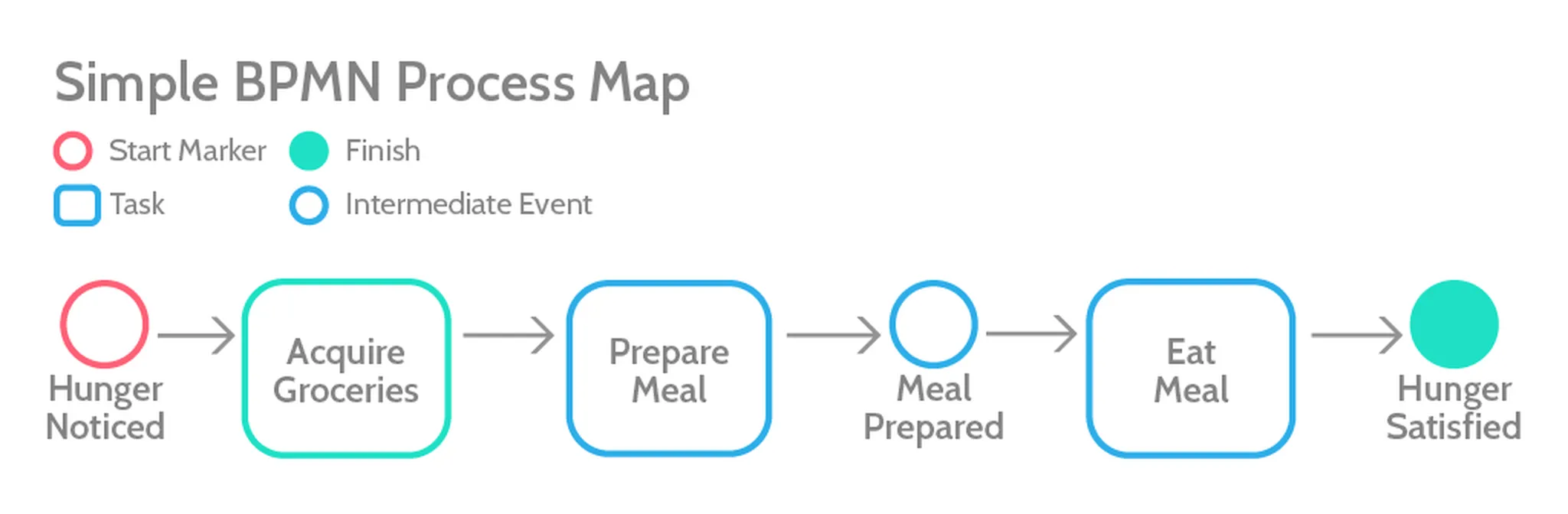
BPMN makes the flow easy to follow even before you know every symbol, because the method is intuitive by design. It has been developed as an open standard for two decades, and it is now widely accepted as the way to draw process maps. That is because:
- It is simple to understand at a glance
- It is precise, with a wide range of symbols to cover almost any case
- It models both human-centric and system-driven processes with equal accuracy
The core purpose of BPMN, as Trisotech puts it:
“It provides businesses, with the capability of understanding their internal business procedures in a graphical notation, and gives organizations the ability to communicate these procedures, in a standard manner.”
Who this BPMN guide is for
If you want to map your processes but are not sure how to turn rough notes and sketches into diagrams anyone can use, start here. This guide covers the core concepts and points you to deeper documentation when you need it. For most use cases a startup or small team faces, it works as a standalone reference.
The history of BPMN
Business Process Model and Notation was first developed under another name in 2000 by the Business Process Management Initiative, a non-profit founded by BPM leaders from companies like Ernst & Young and Versata.
The goal was to standardize how processes are represented visually, and that work has been carried on by the Object Management Group (OMG), a technology standards consortium that also stewards specifications like UML.
BPMN has since been ratified as an international standard (ISO/IEC 19510), and the current release is BPMN 2.0. It defines the symbols and diagram types used to represent the way modern organizations actually get work done.
Learning BPMN
Learning BPMN is a bit like learning a programming language. You can read overviews and watch tutorials, but the fastest way to get fluent is to understand the basics and then start mapping your own processes while referring to the documentation whenever you are unsure how to represent something.
Modern diagramming tools now include AI assistance that can turn a plain-language description of a process into a first-draft BPMN diagram, which makes that hands-on practice faster than it used to be.
Understanding lanes and pools
The canvas for a BPMN map is built from pools and lanes.
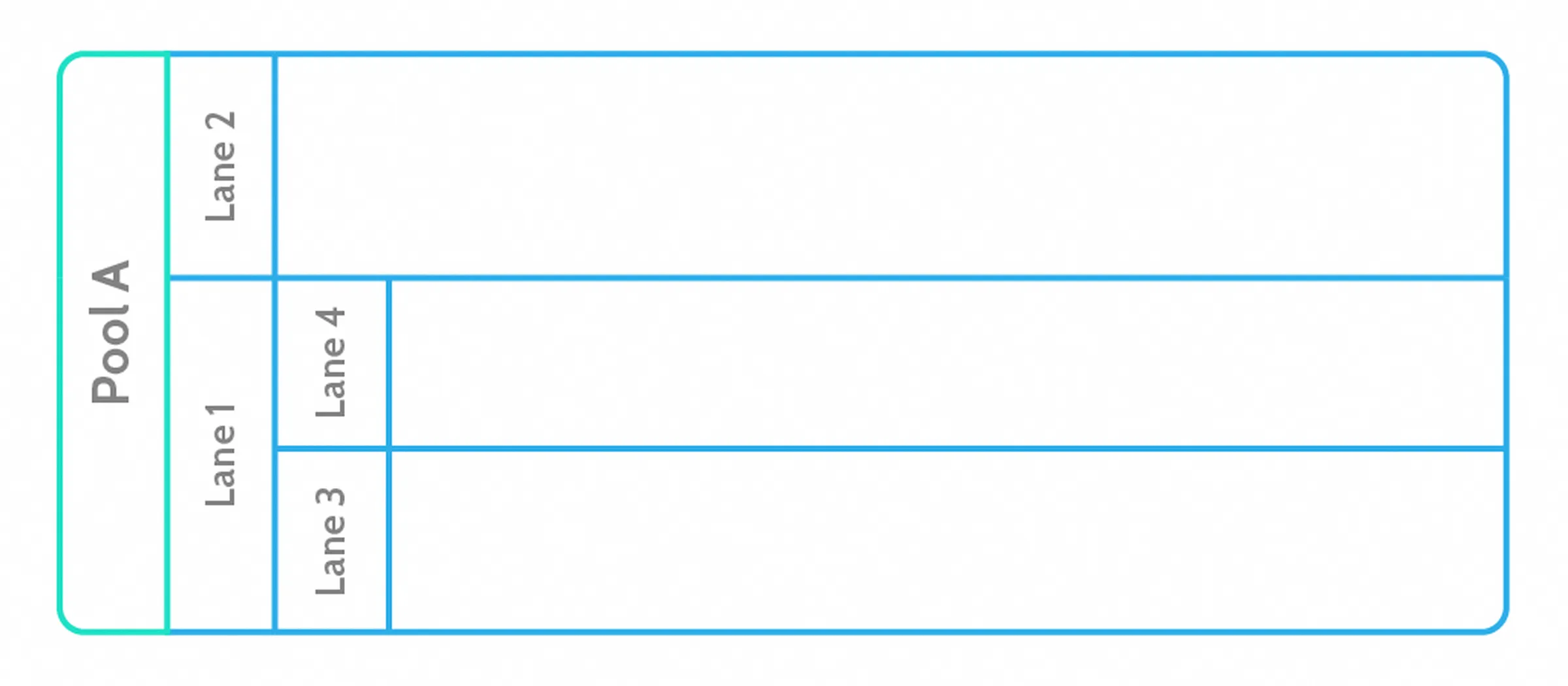
Pools represent separate organizations or entirely separate processes. Lanes represent the teams or individuals inside one organization.
Pools
Pools are the largest unit on a map. They contain the lanes, events, and tasks, and they represent who is doing the work. If you mapped a customer support process, you would have one pool for your company and one for the customer. Work that flows between pools signifies something like sending the customer a message.
How you use pools and lanes is partly a matter of taste, but a few rules hold:
- Each pool contains a maximum of one process
- Pools represent participants: companies, customers, or departments
Lanes
Often a process needs two or more departments to interact. A simple order fulfillment process might look like this:
- Customer places an order over the phone with a credit card
- Order clerk charges the card
- Clerk records the SKU and customer details
- Clerk emails the SKU and details to the warehouse
- The item is packaged and labeled
- Shipping mails it to the customer
Or, in BPMN:
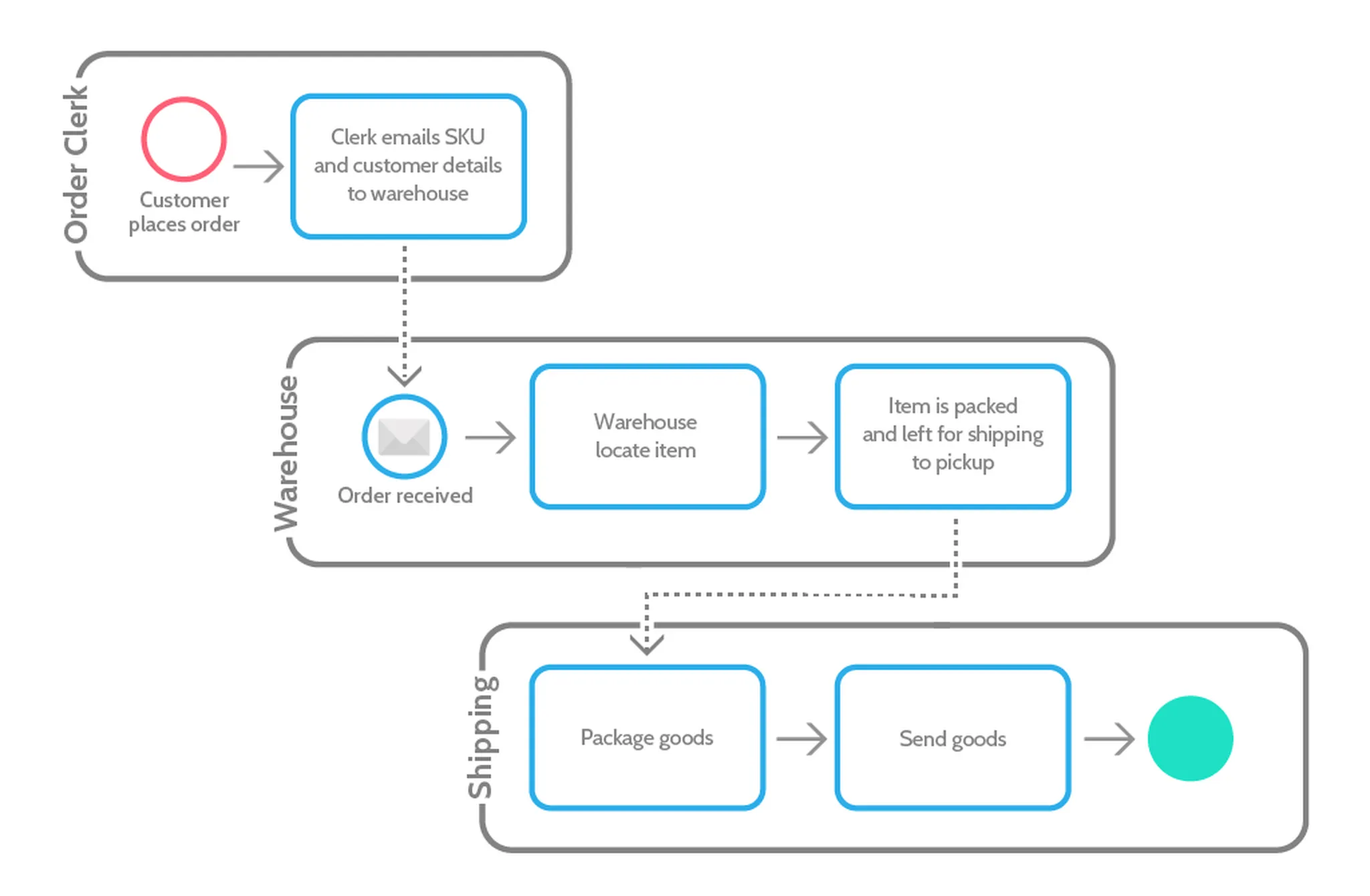
The main canvas, or pool, is divided into rows, or lanes. Each lane represents one participant in the process and shows both the tasks they own and how they hand off to each other.
Lanes do not always map to departments or people. According to Camunda’s reference, a lane can be:
- A position in the primary organization, for example an accounting clerk
- A role in a secondary organization, for example a data protection officer
- A general role, for example the customer
- A department, for example sales
- An IT system, for example a CRM
- A split between manual and automated steps
You will also notice new shapes in the example above. The message shape signifies information passed between two activities, and the shaded circle marks the end of the process.
A quick note on terminology: people often say “swimlane,” but BPMN 2.0 defines only pools and lanes. Sequence flow can cross lanes inside a pool, while only message flow can cross between pools.
Understanding basic notation
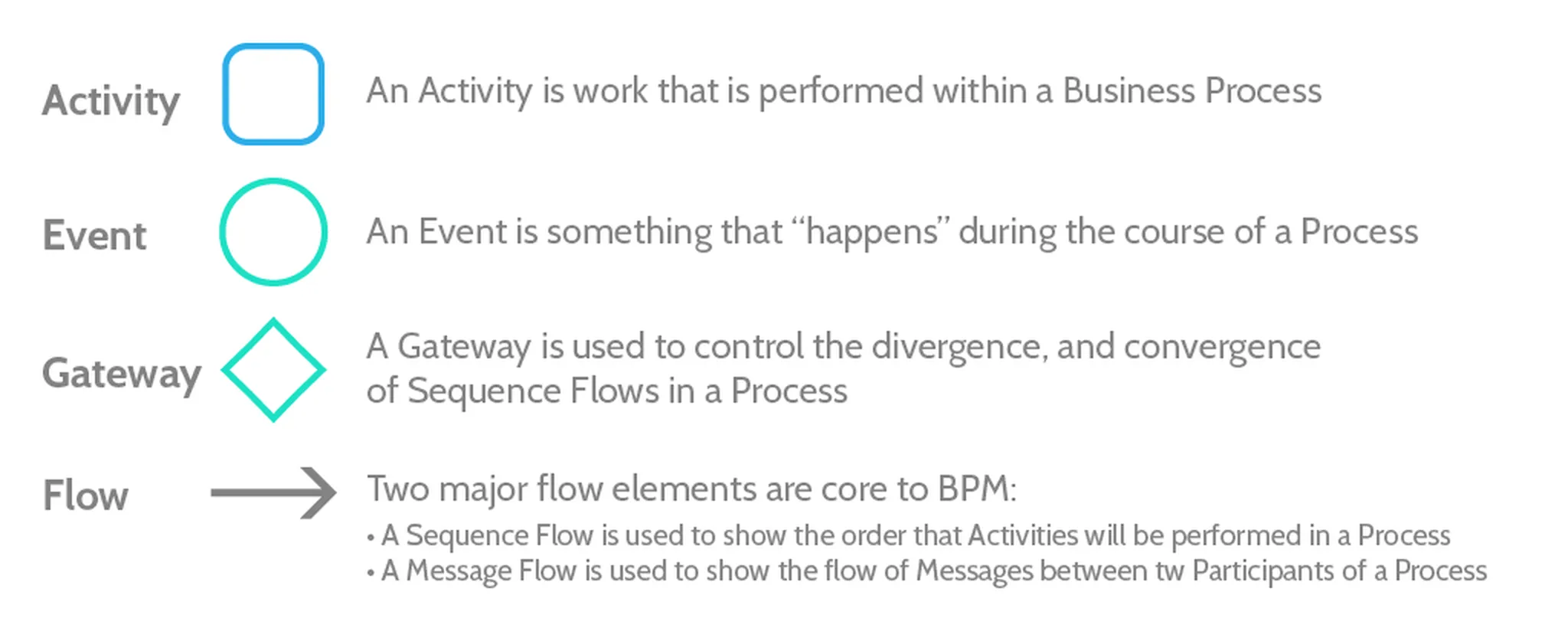
BPMN’s basic shapes look similar to a flow diagram, but they can represent business-specific actions like messaging another department or escalating an issue, not just logical steps.
Activities represent tasks
Activities are straightforward: a rectangle with rounded corners. They represent work to be done, like a checkbox on a checklist or an item on your to-do list.
Connecting objects show how work and information flow
Because BPMN is about the flow of activities, it uses three kinds of connecting objects to show how activities relate to each other:

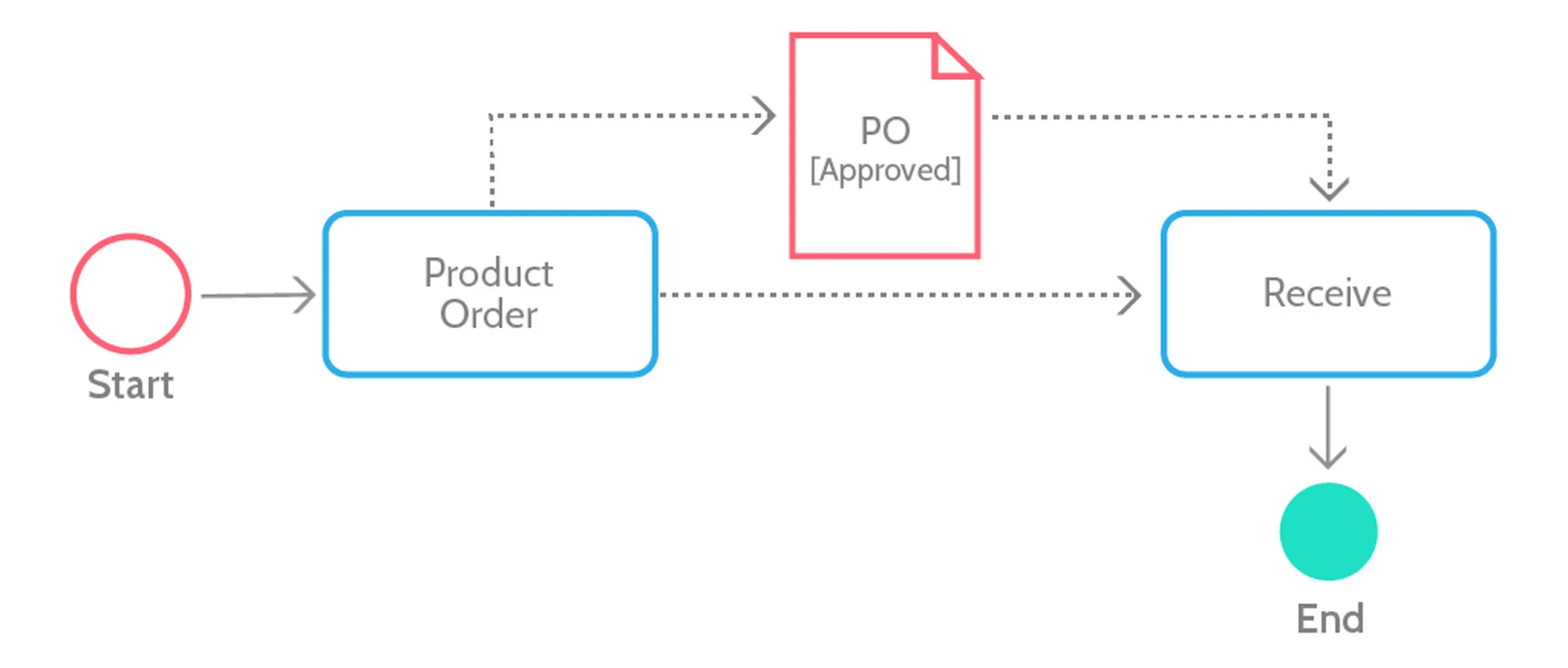
Sequence flow is the basic line that connects the elements of your map. It shows the order of work and is required to connect activities. Without a sequence flow, your map is invalid.
Message flow is used when different departments or organizations send information to each other. It represents a request or the sharing of information rather than a direct action, and it is the only kind of flow that can cross between pools.
Association ties documents, databases, and other artifacts to activities. If you had an activity to sign off on a purchase order, you would use a document symbol and an association line to connect the two.
Gateways deal with logic and decisions

Like diamonds in a regular flow chart, gateways represent a split or a convergence in the process.
For example, when you choose what to eat, the process splits depending on the meal you pick, but it converges again at the point where the meal is eaten, because whichever meal you choose, it eventually gets eaten.
Event gateways
Not every gateway is a choice you make. Sometimes the process continues based on getting more data, waiting for a specific time, or meeting another condition. That is an event-based gateway, and it branches based on whichever event happens next.
For example, if a delivery is more than a week late, you might reach a point where you decide whether to keep waiting or call the shipping company. You would place an event-based gateway there, branching into “wait longer” or “call.” Like this:
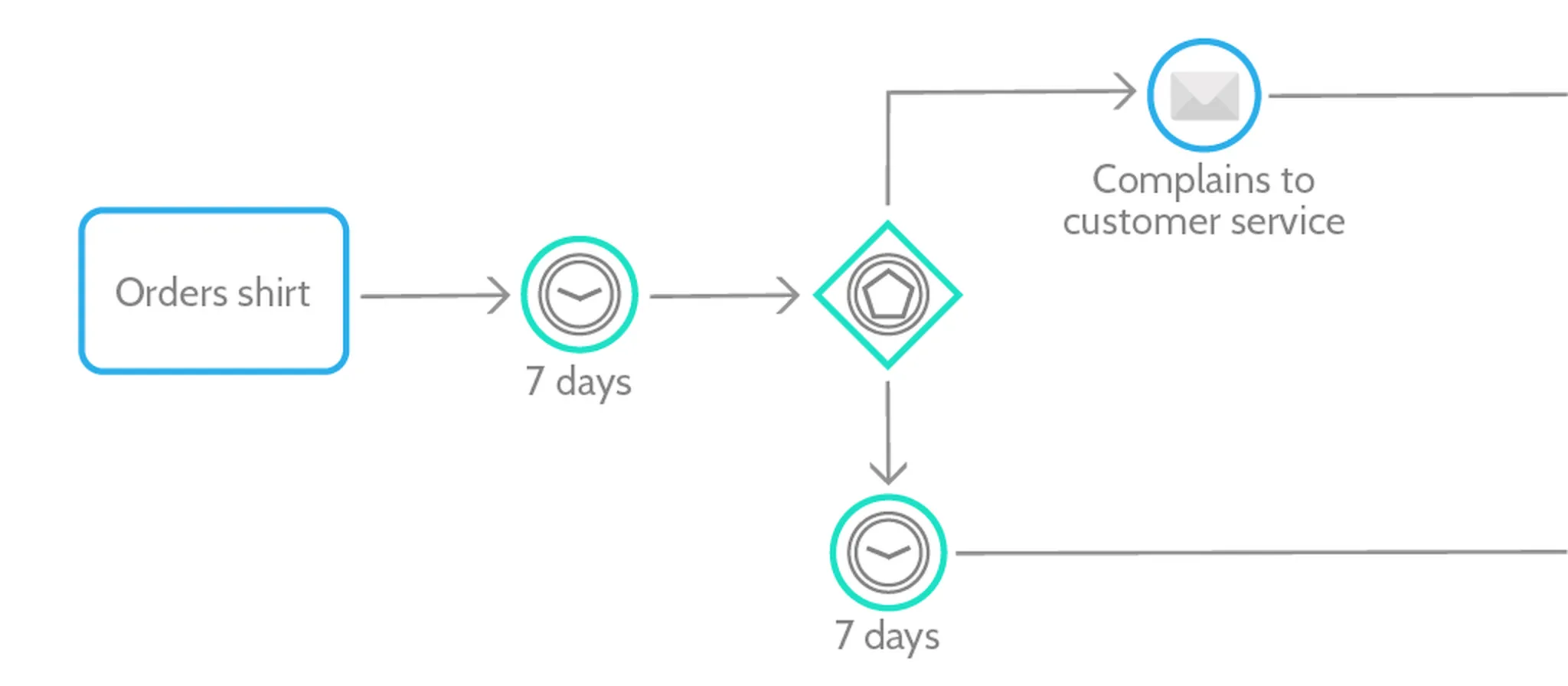
In the diagram above, note the time and message shapes, both simple concepts:
- Time can be days, hours, and minutes, or specific dates, years, and quarters.
- Messages are any information directed to a specific recipient, whether an individual, department, or organization. It can be data, files, emails, phone calls, or letters.
Parallel gateways
If one task does not depend on another, there is no reason not to run them at the same time once the process begins. To show that on a BPMN map, use a parallel gateway.
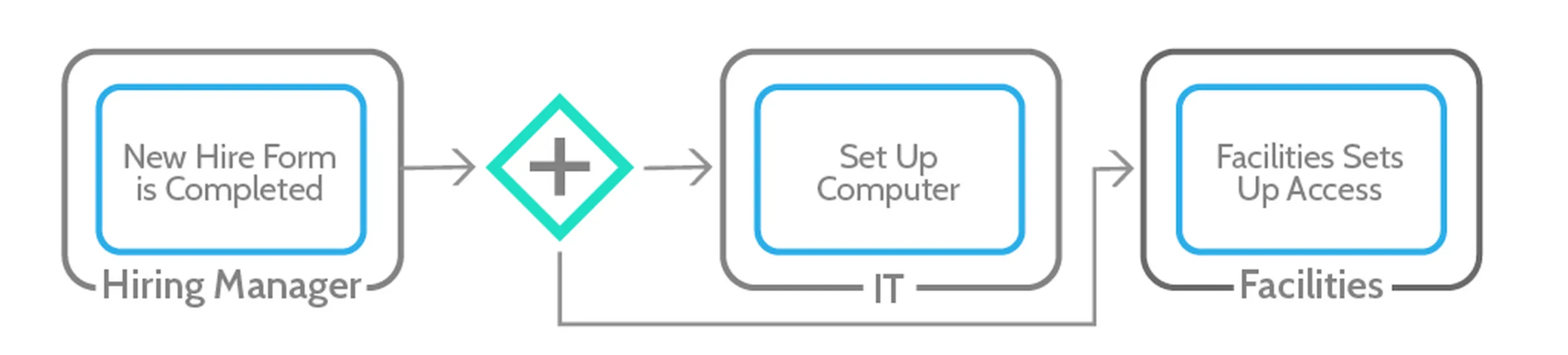
That simply means both of the following tasks can now start: the process breaks into two parallel branches.
Exclusive gateways
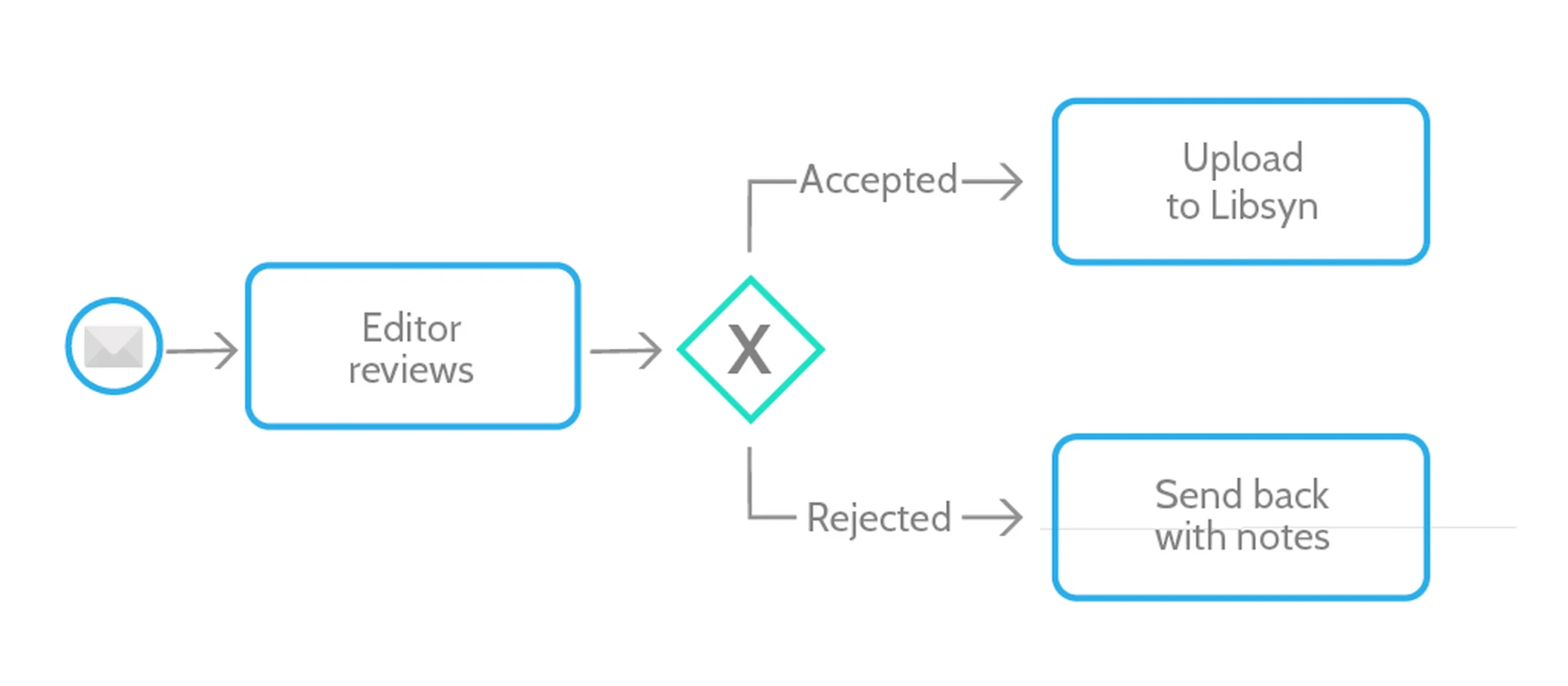
Sometimes a process can go only one of two, or more, ways. For example, a podcast recording is either accepted and moves on to editing, or rejected and sent back to the editor for another pass.
That is when you use an exclusive gateway, because there is no third option. It looks like this:
Inclusive gateways
An inclusive gateway breaks the process into multiple branches, each with a condition that decides whether the flow continues down it.
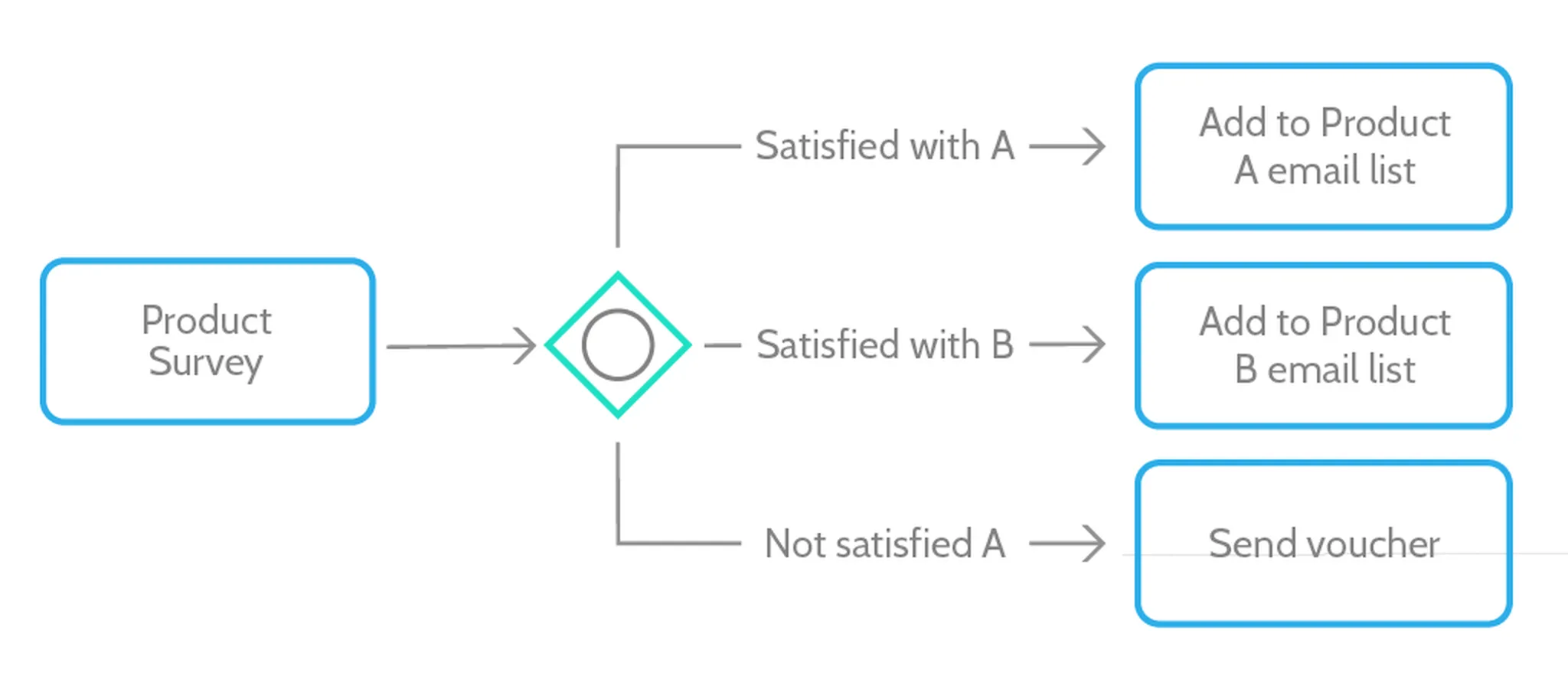
Lucidchart explains an inclusive gateway with a process that forks based on a customer’s response to a survey:
“One process is triggered if the consumer is satisfied with product A. Another flow is triggered when the consumer indicates that they are satisfied with product B. A third process is triggered if they aren’t satisfied with A. There will be a minimal flow of one and a max of two.”
Inclusive gateways allow more than one outcome to be selected at once. The customer could be both “not satisfied with A” and “satisfied with B,” and in that case they would be sent the voucher and added to the B list.
An example of BPMN concepts in action
Here is an example of a process map using the basic shapes:
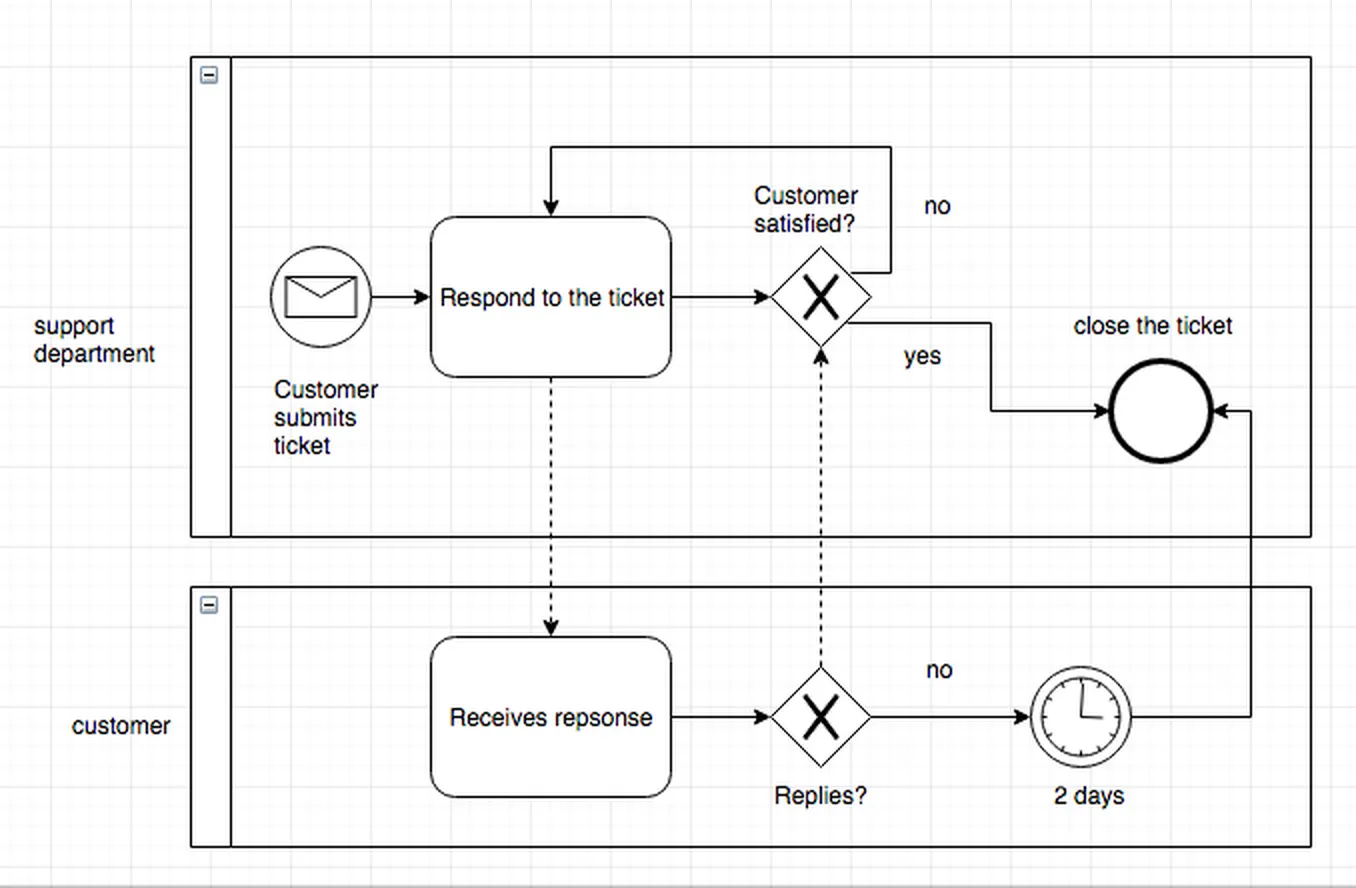
Above, we have two pools with one lane each. The process starts with the customer, who sends a ticket to your support team. Support responds, then waits two days. If the customer has not replied, the ticket is closed. If the customer is satisfied, the ticket is closed. Otherwise, the exchange continues until one of those conditions is met.
It is a deliberate oversimplification, but it is a good way to see the basic concepts working together.
Diagram tools that support BPMN
Drawing something this structured by hand is a waste of time, so take your pick from the BPMN tools available. Most now include AI-assisted diagramming that can generate a first draft from a written description of your process.
Draw.io
Draw.io, also known as diagrams.net, is free and open source, with no sign-up required. It supports the full BPMN symbol set and integrates with tools like Confluence, Notion, and VS Code. For a no-cost starting point, it is hard to beat.
Microsoft Visio
Visio is Microsoft’s long-running diagramming tool, now delivered through Microsoft 365 and the browser. It is familiar, well documented, and includes Copilot-assisted diagramming, though it is one of the pricier options and leans best into the Microsoft ecosystem.
Lucidchart
Lucidchart is a browser-based, collaborative diagramming tool with real-time editing, comments, and AI-generated diagrams. That makes building a BPMN map a team activity, which helps keep the process accurate with less room for error. Its BPMN symbol reference is a useful companion while you learn.
SmartDraw
SmartDraw is built for power users but stays approachable for beginners. It groups BPMN symbols so they are easy to find and can auto-arrange connected flows for you, which speeds up larger maps.
Implementing BPMN as your first step
Where you start depends on your starting point:
- If you already have process maps, you can standardize them with BPMN.
- If you have never mapped a process, use this checklist to create one, and this checklist to optimize it.
Run this checklist for every process you map:
Beyond that, use a BPMN-compatible tool like the ones above and refer back to the documentation when you need a second opinion on a symbol.
Turn your BPMN map into a running workflow
A BPMN diagram describes how work should happen, but a diagram on its own does not do the work. The gateways you just learned, the conditional branches, the parallel paths, and the handoffs between lanes are exactly the logic a workflow engine can execute for you.
That is the gap a business process management platform closes. Process Street is a Compliance Operations Platform that turns a static map into an executable, AI-assisted workflow: it documents each procedure, runs it as a live checklist that assigns tasks and enforces the conditional paths your gateways describe, and uses built-in AI to flag missed steps and keep the process improving as you run it. The map becomes the system that actually operates.
To put these techniques into practice you will need more than a diagram. Process maps are great for seeing a flow, but they are not something your team follows step by step. The resources below cover the software for the job you are dealing with:
- Workflow software
- Business process management software
- Onboarding software
- Standard operating procedure software
Start with the concepts in this guide, map one real process end to end, and then make it run.
The post BPMN Tutorial: Quick-Start Guide to Business Process Model and Notation first appeared on Process Street | Compliance Operations Platform.