











BPMN Elements: Elucidating Business Process Modeling Notation
Blog: CMW Lab Blog
A process diagram can look tidy and still describe the wrong behavior. A line crossing a pool boundary, an unnecessary parallel join, or a timer with the wrong interrupting behavior can change who waits, what continues, and when work ends. Learning BPMN means understanding those consequences as well as recognizing the symbols.
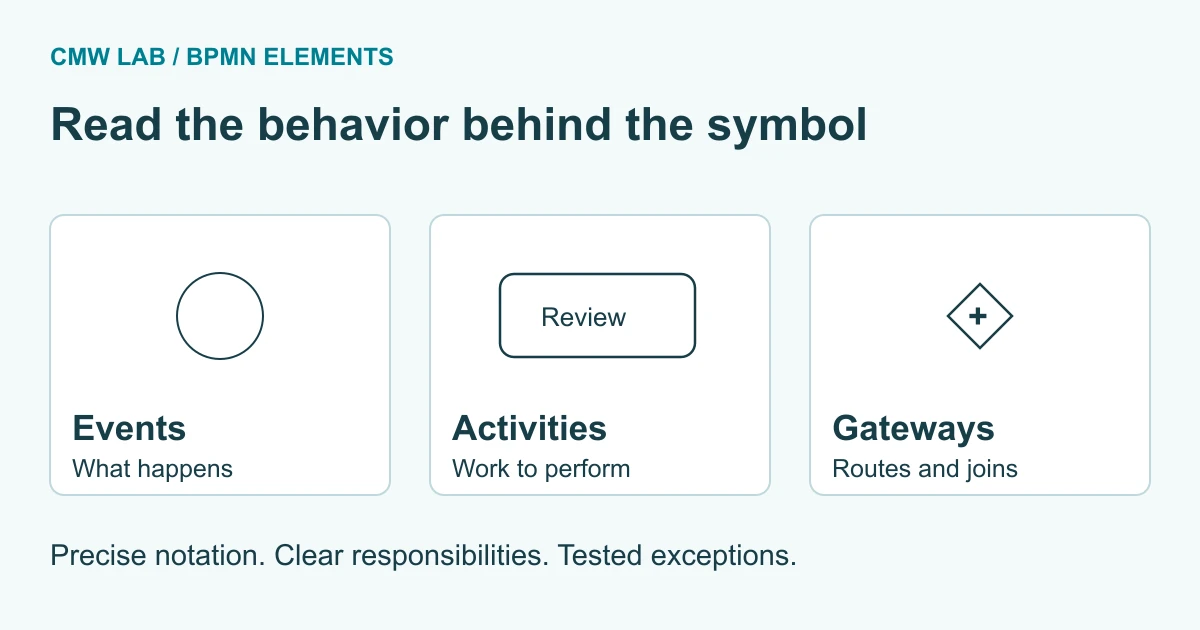
Business Process Model and Notation (BPMN) is a standard visual language for describing business processes and their interactions. Events show what happens, activities show work, and gateways control branching and synchronization. Pools, lanes, flows, and data elements add responsibility and context. BPMN supports both communication and executable process modeling, but a diagram becomes runnable only when its behavior and implementation details are supported and configured in an execution environment.
By Pavel, CMW Lab blog author. Last reviewed: September 17, 2026.
Key takeaways
- BPMN means Business Process Model and Notation; it is a notation standard, not a complete management method or software product.
- Use sequence flows within a process and message flows between separate participants.
- An exclusive gateway chooses a route; a parallel gateway creates or synchronizes concurrent paths.
- A boundary timer can interrupt an activity or start additional work while that activity continues.
- Validate both the diagram and the implemented behavior, including rejection, timeout, and recovery paths.
What BPMN is and when to use it
Use BPMN when people need a shared, precise description of a process: its trigger, work, decisions, participants, and possible outcomes. It is particularly useful when a process crosses teams, waits for events, or needs exception handling. The same notation can support business discussions and technical design, provided the model is detailed enough for its intended purpose.
The Object Management Group (OMG) maintains BPMN. Its current formal specification page lists BPMN 2.0.2. This guide uses that specification as the notation baseline. Product announcements about AI modeling or orchestration do not, by themselves, introduce a new version of the standard.
A simple flowchart may be enough to explain a short sequence. BPMN earns its additional detail when readers must distinguish a choice from parallel work, a task from an event, or an internal handoff from communication with another participant. Define the process boundary before drawing; our process mapping guide provides a practical starting point.
Process, collaboration, and choreography views
A process view describes the work inside a participant. A collaboration view adds interactions among participants, usually through pools and message flows. A choreography focuses on the exchanges themselves rather than each participant’s internal sequence. Start with the view that answers the reader’s question; showing every perspective together usually makes a diagram harder to follow.
BPMN element families and symbol reference
The five basic categories in BPMN 2.0.2 are flow objects, data, connecting objects, swimlanes, and artifacts. Older introductory summaries often present four families and place data under artifacts. For a BPMN 2.0 reference, keep data distinct. Flow objects comprise events, activities, and gateways; swimlanes comprise pools and lanes.
The matrix below is an original practical reference to selected, commonly used elements, not an exhaustive catalog. Visual descriptions help readers recognize the shapes; the last column identifies a behavior to check. The normative baseline is section 7.3 and the relevant element clauses of the OMG specification.
| Element | Recognizable shape | Meaning | Check before using it |
|---|---|---|---|
| Start event | Circle with a thin border | Starts a flow in its scope | What triggers this instance? |
| Intermediate event | Circle with a double border | Catches or throws an event during the process | Is the process waiting, or sending something? |
| End event | Circle with a thick border | Ends the arriving flow, with behavior determined by its type | Should other active paths continue? |
| Task | Rounded rectangle; optional task-type marker | A unit of work at this modeling level | Who or what performs it? |
| Collapsed subprocess | Rounded rectangle with a small boxed plus marker | Contains hidden internal flow | Where is the detail maintained? |
| Call activity | Rounded rectangle with a thick border | Invokes a reusable callable element | Which definition and input/output contract apply? |
| Exclusive gateway | Diamond, optionally with an X | Selects one outgoing route at a split | Are conditions clear and a fallback deliberate? |
| Parallel gateway | Diamond with a plus | Starts concurrent paths or synchronizes incoming flows | Can every required incoming path arrive? |
| Inclusive gateway | Diamond with a circle | Selects one or more qualifying routes | Which routes are activated for each input case? |
| Event-based gateway | Diamond with a double circle and pentagon for the common exclusive pattern | Routes according to an event that occurs | Which messages or timers are being awaited? |
| Sequence flow | Solid line with a filled arrowhead | Orders flow nodes within a process | Does it stay inside the same pool and scope? |
| Message flow | Dashed line, open circle at its source, open arrowhead at its target | Shows communication between participants | Are the endpoints in different pools? |
| Data object / data store | Document shape / cylinder | Shows information used or produced / persistent data | What data is required, and where does it persist? |
| Pool / lane | Participant container / subdivision | Shows participant boundaries / organization of work | Is this a separate participant or a role within one? |
| Group / text annotation | Dashed grouping outline / open-sided text bracket | Adds context without directing execution | Have important rules been implemented elsewhere? |
Events: start, intermediate, and end
An event represents something that happens, not work someone performs. A task named “Review request” belongs in a rounded rectangle. A message arriving or a deadline being reached belongs in an event, with the appropriate trigger and position.
A message start event can represent a process beginning when a message arrives. A timer start event can represent a scheduled start. An intermediate catching message event waits for a message during an existing process; an intermediate throwing message event sends one. An unfilled envelope identifies a catching message event, while a filled envelope identifies a throwing one.
A timer in normal flow means the process waits at that point. A timer attached to an activity boundary has different behavior, explained below. A drawing of a clock alone does not tell you whether a task remains active, whether a reminder repeats, or which calendar defines the deadline.
A none end event ends the flow reaching it; it does not automatically cancel other active paths. A terminate end event, recognizable by its filled circular marker, terminates the remaining activity in its scope. Use it only when that broader effect is intended. This distinction matters when reviews or integrations run concurrently.
Tasks, subprocesses, and call activities
A task is atomic at the level being modeled. It can still involve many human actions, but those actions are not expanded in this diagram. Name it with a verb and an object, such as “Review request,” rather than an outcome such as “Approved.”
- User task: human work managed with software support, such as approving a request in an application.
- Manual task: work performed without the process engine managing its execution, such as a physical inspection recorded outside the workflow.
- Service task: work provided through a service or automated application capability.
- Script task: work carried out by a script in the execution environment.
An embedded subprocess contains internal flow belonging to its parent process. It may be expanded or collapsed; the small boxed plus indicates hidden detail. A thick border identifies a call activity, which can invoke a reusable process or global task. A double border is used for a transaction subprocess, not as a generic sign for “more detail.”
Choose a subprocess because the scope has a useful meaning: perhaps “Complete supplier checks” has its own internal sequence and error handling. Choose a call activity when the callable definition is intentionally reused. Before reuse, agree on inputs, outputs, version behavior, and failure handling. Reusing the shape without agreeing on those details does not create a reliable shared process.
Gateways: choosing, running in parallel, and waiting
A gateway controls divergence or convergence of sequence flow. It does not perform the decision work itself. A user task may collect an approval decision; the following exclusive gateway uses that recorded result to select a path.
Exclusive, parallel, and inclusive gateways
Use an exclusive gateway when exactly one route should be selected at the split. Define conditions precisely and make the default route intentional. “Approved” and “not approved” are clearer when the underlying field has defined values and missing data is handled before evaluation.
Use a parallel gateway when every outgoing path should start. At a converging parallel gateway, execution waits for the required incoming flows. Do not connect mutually exclusive alternatives to a parallel join that waits for both: one alternative cannot supply the arrival that never started.
An inclusive gateway can select more than one outgoing route according to conditions. Its synchronization behavior is more complex than counting drawn branches. Test each combination of activated paths, especially when loops or nested choices are involved.
Event-based gateway or data-based decision?
Use an event-based gateway when the next route depends on what happens, such as receiving a supplier response or reaching a timeout. In the common exclusive event-based pattern, the first event to occur determines the route. Use an exclusive data-based gateway when the facts are already available and conditions select the route.
The following selection tree is an editorial aid, not a BPMN diagram. Follow the first question that matches the behavior you need, then check the detailed element rules.
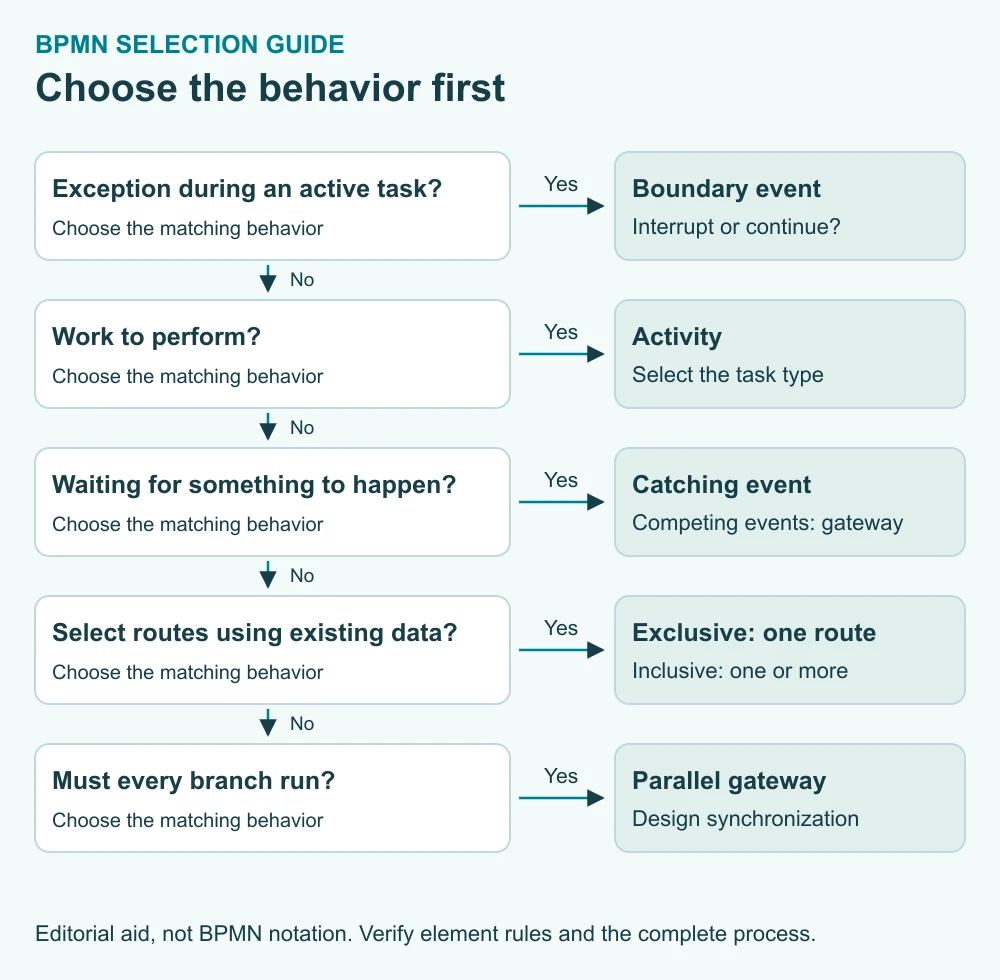
- Is this an exception while an activity is active? Consider a boundary event and decide explicitly whether it interrupts that activity.
- Is work being performed? Use an activity and identify the performer or implementation.
- Is the process waiting for something to happen? Use a catching event; use an event-based gateway when competing events determine the route.
- Are existing data selecting the route? Use an exclusive gateway for one route or an inclusive gateway for one or more.
- Must all branches run? Use a parallel split, then design any required synchronization.
Pools, lanes, messages, and sequence flows
A pool represents a participant. A lane partitions work within a process, often by role or department. An external supplier can be a separate pool, while a requester and procurement reviewer can be lanes inside the purchasing organization. A participant whose internal work is out of scope can be shown as a collapsed pool.
Sequence flows may cross lane boundaries within the same process. They must not cross pool boundaries. Message flows connect separate participants, not two tasks inside the same pool. Use an association for explanatory context and a data association for data movement; neither substitutes for the control flow that determines when work happens.
A lane label communicates organization, but it does not necessarily configure runtime permissions or task assignment. Likewise, a data object marked “Purchase request” identifies information without defining its fields, validation, access rights, or storage. Document and implement those details separately.
Boundary events, timers, and exceptions
A boundary event is attached to an activity and responds to a relevant occurrence while that activity is active. A solid event boundary denotes interrupting behavior; a dashed boundary denotes non-interrupting behavior where that event type permits it.
For an approval task, an interrupting boundary timer can cancel the current task and route work to an escalation owner. A non-interrupting timer can start a reminder path while the approval remains active. A boundary error event is interrupting; it is not a general-purpose marker for every technical failure.
Specify what “late” means: elapsed hours, business hours, a date, or a recurring schedule. Specify what happens to late responses after escalation. If an integration times out, decide whether to retry, investigate, or recover through another path. A label saying “Handle error” is incomplete without an owner and a defined recovery outcome.
Worked example: approval with an interrupting deadline
Illustrative model: a complete purchase request has already entered the process. The approver has 48 elapsed hours to review it. These are example assumptions, not a recommended policy or a measured customer result. A missing request field is handled before this model begins.
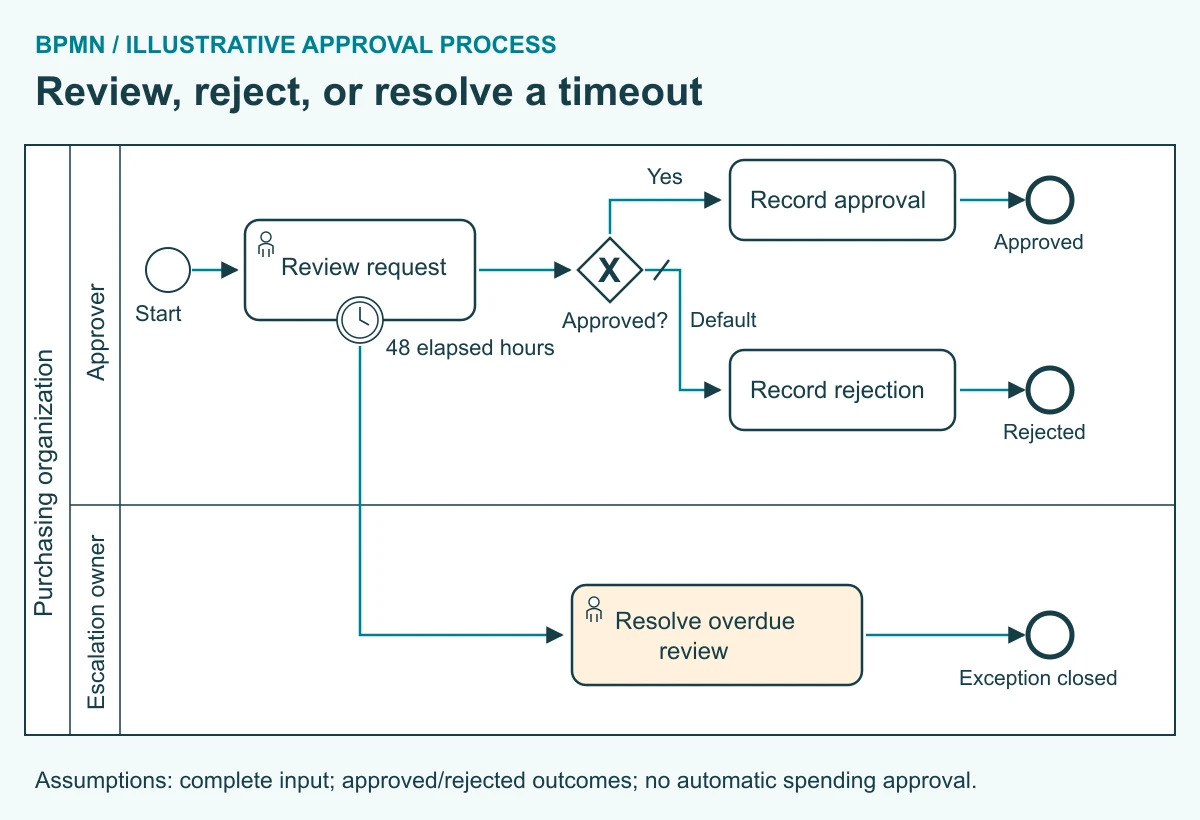
The approver completes “Review request.” An exclusive gateway then routes an approved request to “Record approval”; its default route leads to “Record rejection.” The form is assumed to allow only approved or rejected outcomes. A missing or unexpected result must be rejected by validation before the task completes.
If the timer fires first, it interrupts “Review request” and activates “Resolve overdue review” in the escalation-owner lane. That task closes the exception in this limited example; it does not silently approve the purchase. Normal completion and the timer path are alternatives, so no parallel join is required.
Compare this with a reminder-only requirement. Changing the boundary timer to non-interrupting would let the original review continue while a reminder path runs. That is a different process. Do not reuse the same implementation merely because the diagrams differ by a dashed border.
| Problematic model | Why it fails | Valid or clearer alternative |
|---|---|---|
| Sequence flow crosses from buyer pool to supplier pool | Violates the participant boundary | Use a message flow for the communication and local sequence flows inside each process |
| Message flow connects two lanes in one pool | Lanes are not separate participants | Use sequence flow for an internal handoff |
| Exclusive alternatives feed a parallel join that requires both | The unselected branch never arrives | Use an exclusive merge when the alternatives simply reconverge |
| Reminder requirement uses an interrupting timer | The task is canceled rather than left available | Use a permitted non-interrupting timer pattern and handle reminder completion |
| Ordinary completion uses a terminate end event without considering concurrent work | Other active work in scope can be terminated | Use a none end event if only the arriving flow should end |
The first two rows concern notation validity. The remaining rows concern mismatches between modeled behavior and the stated requirement; they are not blanket bans on those elements. This distinction keeps review focused on what the process must actually do.
From a BPMN diagram to an executable process
A diagram does not supply a working form, integration, authorization model, or operational log by itself. Execution requires supported elements, configured conditions, data mappings, task assignments, and implementation behavior. A successful import demonstrates that a tool accepted the file; it does not prove that every route works as intended.
Teams often distinguish descriptive, analytical, and executable levels of detail. Treat these as useful modeling purposes, not mandatory lifecycle stages through which every diagram must pass. A high-level communication model may be complete for its purpose without being ready to run.
For the approval example, test approval, rejection, timeout, an attempted response after timeout, an unavailable escalation assignee, and an invalid decision value. Confirm which task remains active, which result is recorded, and whether the process can finish. If completion and the timer occur almost together, verify the engine’s handling rather than guessing which action wins.
Keep decision rules maintainable as the process evolves. A frequently changing approval threshold may belong in a separately managed decision, while the workflow coordinates the resulting tasks. Our rules engine and workflow engine comparison explains that boundary.
BPMN modeling checklist
Use this checklist after a walkthrough with the people who perform the work. It combines notation checks with implementation questions; passing it is not a formal certification of BPMN conformance.
- Scope: one named process, a clear trigger, and explicit outcomes.
- Meaning: events describe occurrences, tasks describe work, and gateways describe routing or synchronization.
- Boundaries: sequence flows stay inside their process; message flows connect separate participants.
- Branches: conditions, defaults, merges, and joins match the possible paths.
- Exceptions: each timeout or failure has an owner, a recovery action, and a defined end or return path.
- Data: required inputs, permitted values, outputs, and access rules are specified.
- Execution: task assignment, integrations, supported constructs, and version behavior are verified in the target environment.
- Evidence: test cases, observed outcomes, and unresolved issues are recorded with the model version.
Measure the process, not the number of symbols
For the example, define review cycle time as completion time minus task-creation time for completed reviews. Track timeout rate = reviews interrupted by the deadline / reviews that ended by completion or timeout × 100, using a consistent reporting cohort. Report still-open reviews separately rather than treating them as successful.
Rework rate, waiting time, and exception-resolution time may reveal operational problems. A count of gateways or a shorter diagram does not demonstrate business improvement. Compare equivalent populations and record what changed in the process before attributing an improvement to automation.
Reading a public CMW Lab process diagram
The public CMW Lab invoice-processing diagram provides a useful exercise in reading markers. On its non-prepaid route, a parallel fork creates invoice-processing and paperwork-related paths, followed by a parallel join. The plus markers inside activity boxes indicate collapsed subprocess detail; the separate plus markers inside diamonds identify parallel gateways.
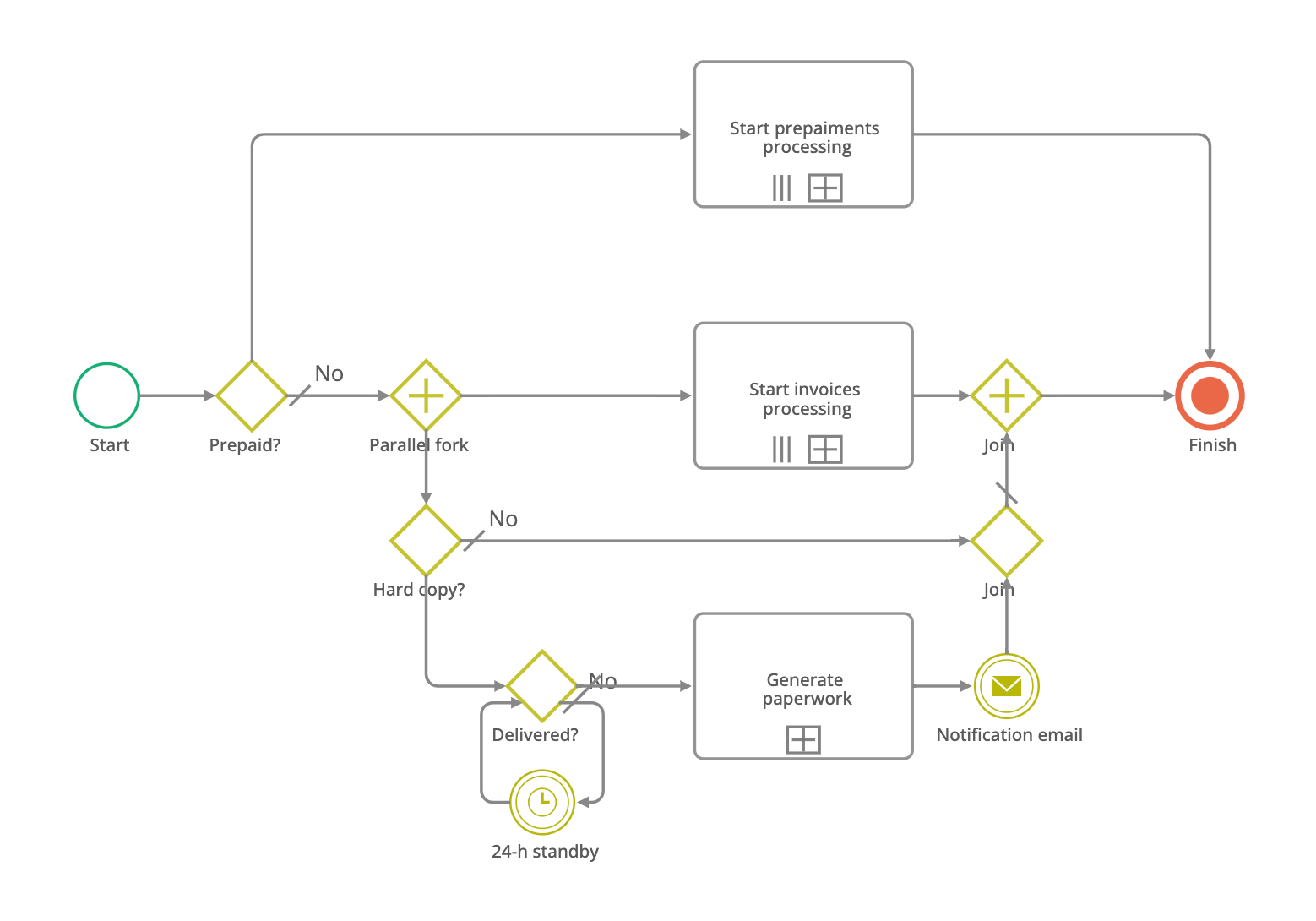
Its “24-h standby” timer appears in normal sequence flow around a delivery check. It therefore illustrates a wait before another check, not a boundary deadline attached to a review task. Those are different placements with different meanings. The image also uses a terminate marker at “Finish,” so a model review should check whether terminating all remaining work in that scope is intended.
This is a reading of a published first-party diagram, not a claim about customer performance or a validation of the complete deployed process. The image does not establish task permissions, retry limits, or measured service levels. Those implementation questions still need answers.
For a practical evaluation, bring one process, its exception cases, and the expected test outcomes to a discussion of CMW Lab’s BPMN modeling capabilities. Ask to see how the model, task assignments, data, and execution history connect. The process-diagram documentation in the Russian-language knowledge base provides the product-specific starting point for editing and publication.
How this guide was built: notation was checked against OMG BPMN 2.0.2, with a public CMW Lab diagram used for first-party analysis. The matrix, selection guide, approval example, and checklist are original explanatory material. No expert quotation or customer performance result is implied.
Frequently asked questions
What does BPMN stand for?
BPMN stands for Business Process Model and Notation. It is an OMG standard for describing business processes and interactions with defined graphical elements and semantics. It helps readers distinguish work, events, decisions, participants, and information. BPMN itself is neither a process-management methodology nor a complete software application.
How does BPMN work in practice?
A team defines a process boundary, models the work and possible outcomes, then validates the diagram against real scenarios. If the model will run in software, the team configures data, assignments, conditions, and integrations in the target environment. Testing must cover exceptions and recovery as well as the normal completion path.
How is BPMN different from a flowchart?
BPMN gives its elements more specific process semantics than an informal flowchart. For example, it distinguishes parallel work from an exclusive choice and a participant message from an internal sequence flow. A simple flowchart remains useful for a straightforward explanation; BPMN helps when those behavioral distinctions must be explicit and consistent.
Which KPIs should you use with BPMN?
Measure the modeled process rather than the notation. Useful measures can include cycle time, waiting time, rework rate, deadline misses, and exception-resolution time. Define the start and end timestamps, denominator, reporting cohort, and treatment of open cases. A lower symbol count does not establish that a process performs better.
What are common BPMN modeling mistakes?
Common mistakes include crossing pool boundaries with sequence flows, using message flows between lanes, confusing exclusive and parallel joins, and choosing the wrong interrupting behavior for a timer. Another is assuming a valid-looking diagram is executable without configuration. Review the intended behavior and test each important path in the implementation.
The post BPMN Elements: Elucidating Business Process Modeling Notation appeared first on CMW Lab Blog.