











Automate Your Exception Reports: It’s Easy, Here’s How
Blog: Blog | Process Street | Compliance Operations Platform

Part of the reality of managing operations at any scale is understanding that sometimes things go wrong. A step gets skipped, a number lands outside the expected range, a handoff stalls. An exception report is how you catch that moment, record exactly what happened, and act on it before a small deviation turns into a real problem. It is the first step in a critical culture where people can identify when and why a process has had a problem, so you can track problems, investigate them, and improve processes to stop those problems occurring.
The hard part is making that first step happen each and every time, with the right amount of detail, and in a way that is quick and painless to take. Done well, this is the art of an exception report: it illuminates your problems and becomes a crucial linchpin in a broader effort to improve processes and, in turn, outcomes. This Process Street guide shows you how to make that capture automatic.
Here is what we will cover:
- What an exception report is
- The business case for exception reports
- Recording exceptions in Process Street
- How to automate exception report generation
- Exception report FAQs
What is an exception report?
An exception report is a document you produce when something has gone wrong in a business process. If the outcome of a process, or a step within a process, is different to what was expected or planned for, this instance is described as an exception. The document records the nature of this instance.
The purpose of an exception report is to highlight problems when they occur, allowing management to tackle those problems quickly. This is the operating principle behind management by exception: you do not review everything, you review the deviations that actually need attention.
In high-volume processes, exception reports may be produced at a large scale. Management are then able to aggregate these reports to understand the severity and frequency of different problems, allowing them to be prioritized for the most efficient improvements.
A normal exception report might be a short document which identifies:
- what was meant to happen
- what actually happened
- at what stage in the process this occurred
- any extenuating circumstances
- the impact of the problem
- any possible reasoning for why the problem occurred
The business case for exception reports
There are two fundamental reasons why you should be using exception reports in your business:
- to understand why something went wrong
- to enable process improvement
These both seem on the surface like very similar concepts, and they are. As much as they are dependent, they are still distinct. The primary purpose of an exception report is to understand why deviation occurred. This could be a small deviation or a complete process breakdown.
If there is a complete breakdown of the process, then you will almost certainly be aware that it happened. But if there is only a small deviation, there is a chance that this deviation will have fallen through the cracks. Small problems in processes get papered over all the time, and each one you miss is a signal you never get to act on.
Exception reports create a culture of spotlighting problems
Utilizing exception reports well can create a culture where people admit to mistakes. This can result in an environment where process users are more self-critical and take greater personal responsibility for the performance of a process.
Admitting to a little mistake can feel like a big deal. But it feels like less of a big deal if that small mistake is seen as part of a grander process. Highlighting the mistake is no longer revealing your own weaknesses, rather it is a positive thing. It is providing useful data to achieve a better process.
Turning failure from being a negative to a potential positive is part of how you create a company culture which strives for success, rather than one that hides its limitations. Without doing this, you are liable to slip into a cycle of normalization of deviance, where skipped steps quietly become the new normal.
The goal is to have staff want to spotlight problems when they occur and to provide all the necessary details of what the problem was. Only then can you have enough accurate data to improve the processes in the best ways possible.
Every exception is a chance to improve
When something goes wrong, you have an opportunity to change the surrounding structures to stop that same problem from happening again.
You could use various process improvement techniques, from a full DMAIC investigation to Toyota Production System concepts like muda. Or you could use the data to build a new process from scratch with DFSS. All the data you gather from your exception reports helps inform what changes you will make to a given process to make sure it runs properly each time.
As you improve your processes, you can also improve your exception reporting methods. You can begin to create increasingly accurate standards for what counts as variation. For many of us, a step either works as intended or it does not. But for others, there might be a set of varying or fluctuating figures where you have to assess what degree of fluctuation is deviant and what is not. If you are in a sales management role and you have an unusually small number of closed deals come through one month, but the beginning of the pipeline is fine, then you have to decide whether that variation counts as an exception.
These are the kinds of judgments you gradually build into a mature process management practice after you engineer and re-engineer your processes. It is how retail organizations, for example, use exception-based reporting at scale to identify fraud and loss: the routine transactions pass silently, and only the anomalies get surfaced for a human to review.
Recording exceptions in Process Street
Process Street is a Compliance Operations Platform, and recording exceptions is built into how work runs on it. There are a number of ways you can use Process Street to manage your exception reports.
Process Street works by building a workflow which acts as your process model. This workflow can be built and edited without needing to code or do anything too complicated. For detailed processes which have multiple potential paths, you can use conditional logic to show or hide steps based on earlier answers, so the process adapts as it runs.
Using the process involves running the workflow as a workflow run. The operator simply works through the steps and completes each task as they go. Each step is designed to refer to a specific task the operator needs to undertake, so all the steps in the process are itemized and it is easier to break down where or when an exception has occurred.
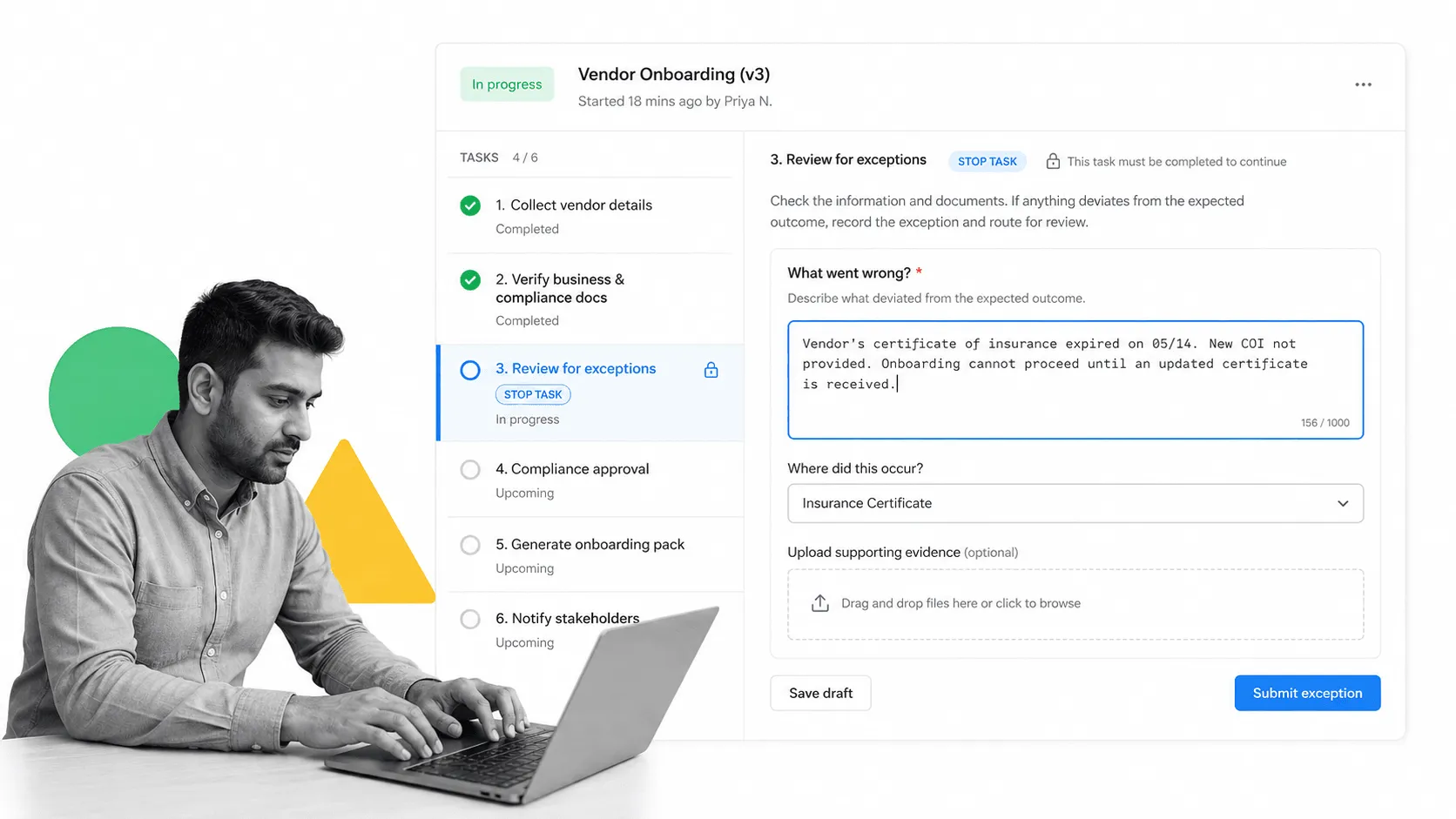
Within each task you can also include various form fields to record information. This could be about the result of a task, how a task was completed, or, crucially, whether something went wrong and how it went wrong. As the operator undertakes a task they record these details and move on.
To make sure the detail is actually captured, you can use the stop tasks feature to force an operator to complete a form field in order to continue with the rest of the run. This improves process adherence and makes sure the operator provides the necessary detail.
All of the information about a process is stored and reportable, including who ran the workflow, what steps were completed, and what information was entered into form fields during the run. That gives you the longitudinal data to help you identify process problems and their frequency.
How to automate exception report generation
As we have demonstrated, Process Street can allow you to record exceptions in real time, as they occur. However, you might still want to generate a traditional exception report as a document to be sent to the key stakeholders for the process. What we want to do is take the information recorded within a workflow run and turn it into a document, make that step an optional part of the process, and automate the document generation so the improvement makes the process easier than it was before, rather than harder. Which is always an important consideration if you want to keep process adherence high.
Take an order processing workflow as an example. This is designed for a firm processing a large sale, a delivery of timber or other goods, for example. These purchases are semi-frequent and valuable, so if something goes wrong in the process then a lot of money could be lost. Management want to receive a report whenever this process fails, as it is a process which definitely should not.
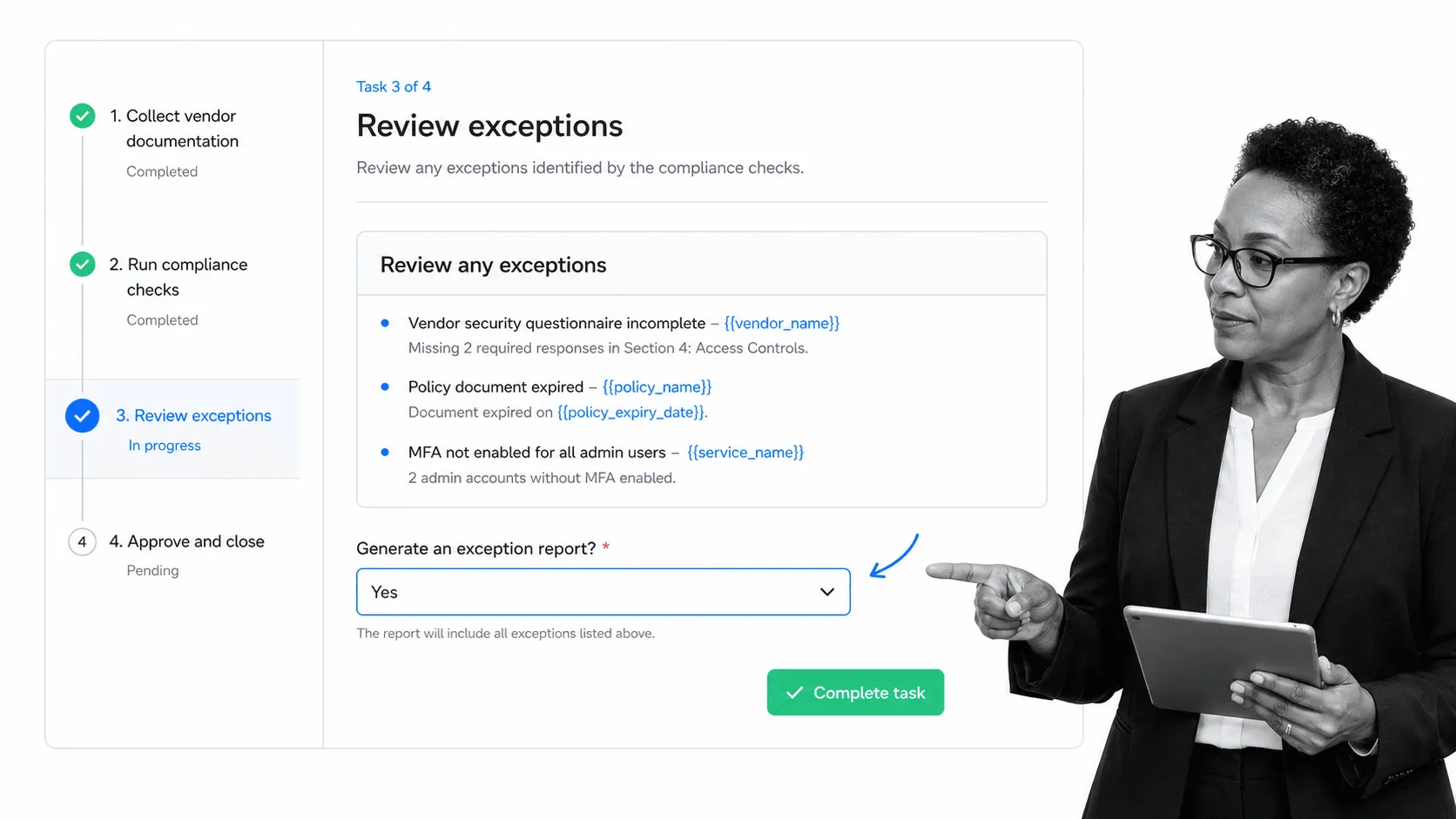
Throughout the workflow there are form fields to record when something went wrong, or if the process did not function as intended. The operator fills these in when necessary as they work through the run. At the end of the workflow, a review task uses variables to pull in the content of every form field related to exceptions and problems, so the operator can review the whole picture in one task. A dropdown field on that task records whether the process worked smoothly or whether an exception report is needed, based upon the information in the collated summary.
If the operator selects that the process did not run as intended, conditional logic generates an extra task to create the exception report. This is where the platform does the work for you, rather than pushing the data out to a separate document generator.
Process Street has direct, universal integrations to 5,000+ systems. Need a new one? An AI agent builds it on the fly. That agentic integration framework, combined with built-in AI, means the collated exception data can be turned into a finished, formatted report and automatically sent to the relevant stakeholders, with no copy-pasting between tools. Teams already standardized on Zapier, Tray, or Power Automate can route the same data through those platforms as well.
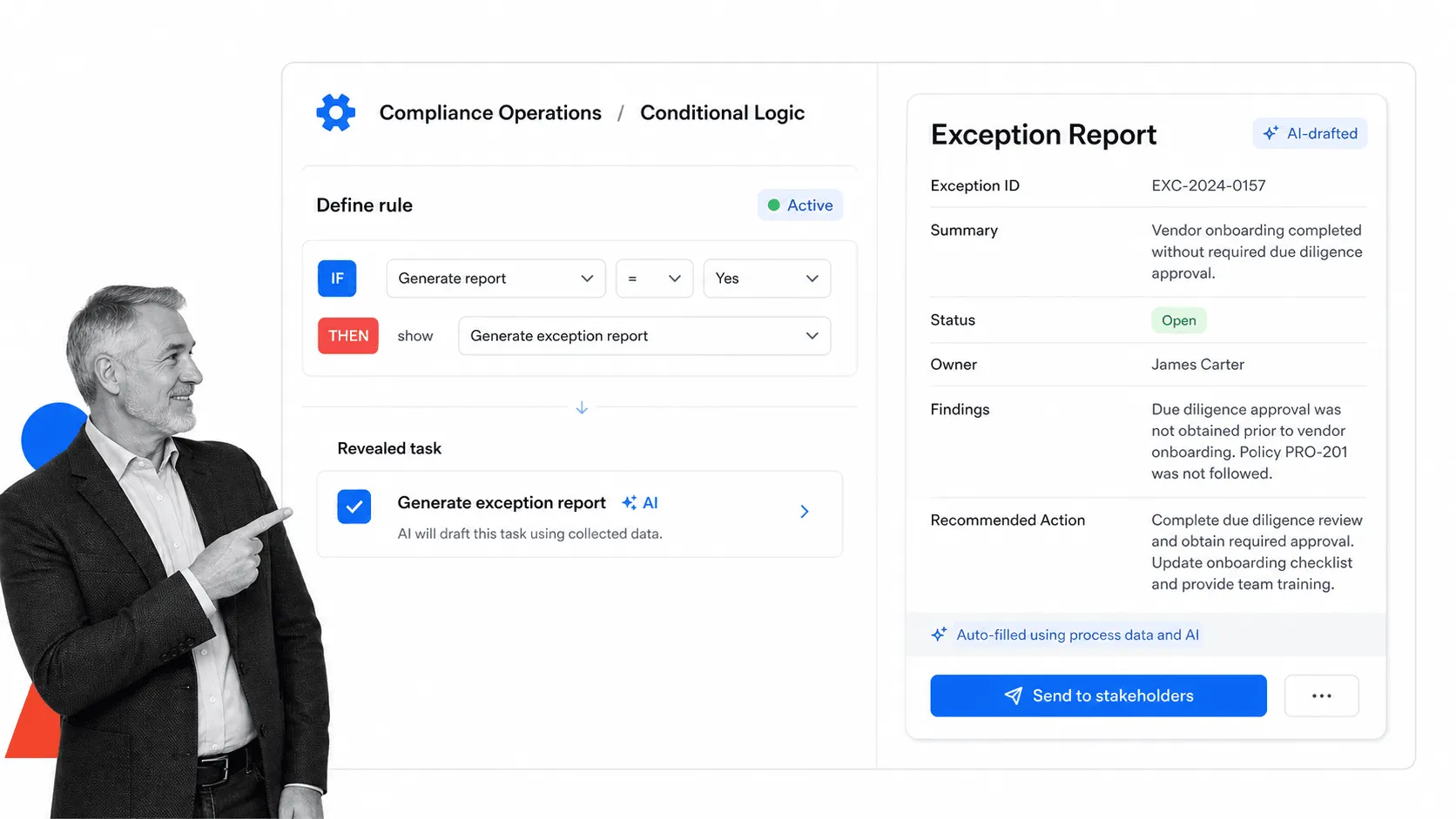
By building your workflow so it gathers data on what went wrong, you can easily review it inside the run itself, or, as described above, hand the collated data to built-in AI to produce a more formal report. Either way, the exception is captured, documented, and acted on without anyone stopping to write it up by hand.
Exception report FAQs
What is an exception report?
An exception report is a short document that records when a business process, or a step within it, produces an outcome different from what was expected. It captures what should have happened, what actually happened, where and why, and the impact, so the problem can be understood and fixed.
How do you write an exception report?
Keep it to a consistent set of fields: what was meant to happen, what actually happened, the stage it occurred at, any extenuating circumstances, the impact, and the likely cause. Capturing those same fields every time is what makes exception reports comparable and useful at scale. In Process Street, form fields and stop tasks capture them during the run, and built-in AI can assemble the finished report.
What is management by exception?
Management by exception is an operating principle where leaders focus their attention on the deviations that fall outside expected tolerances, rather than reviewing every routine result. Exception reports are how that principle works in practice: routine runs pass quietly, and only the exceptions are surfaced for review.
What is the difference between an exception report and an incident report?
An exception report covers any deviation from an expected process outcome, including minor ones that still carry useful improvement data. An incident report is usually reserved for a specific event that caused harm, loss, or a safety or compliance breach. Exception reporting is broader and feeds continuous process improvement, while incident reporting is event driven.
Capture and automate exception reports with Process Street
By using Process Street, all problems within a process are recorded as they occur. A step is included at the end of the workflow to review all the problems, and through the variables feature all those problems are displayed in the same task, making it easy for the operator to review the process performance and make a judgment.
If the operator deems it necessary to generate an exception report, they simply select to do so in the dropdown field and then complete the next task. Built-in AI drafts the report and it is routed to the appropriate people automatically. No extra data entry is needed, and there is no separate document generator to maintain.
This massively reduces the amount of data entry needed and provides significantly more available labor time. Moreover, because generating an exception report is natively embedded within the original process itself, it increases adherence to your internal exception report procedures. It makes everyone’s lives easier.
The post Automate Your Exception Reports: It’s Easy, Here’s How first appeared on Process Street | Compliance Operations Platform.