










All The Tools You Need To Set Up An Effective Link Building Campaign
Blog: Blog | Process Street | Compliance Operations Platform

This is a guest post from Nikola Banicek, an internet marketing specialist at Point Visible, a marketing agency providing custom outreach and link building services. He’s a laid-back guy with experience in PPC, copywriting, and project planning. When he’s not working, he’s either gaming, watching football or anime.
The best link building tools help you find credible prospects, understand why competitors earn links, manage personalized outreach, and keep every follow-up accountable. A strong link building campaign usually combines backlink research, content discovery, outreach software, communication, and a repeatable operating workflow.
No single tool does every job equally well. Choose the smallest stack that covers your campaign stages, then use the same qualification rules and outreach process every time. Paid or sponsored placements should use rel="sponsored" or nofollow, and automated link creation, excessive exchanges, and low-quality directories should stay out of the plan under Google’s spam policies.
Link building isn’t easy. It takes time, effort, patience, and skill. Tools are designed to solve problems and make the work more efficient, from finding better link building opportunities to managing outreach projects. The rewards are significant, but only if you get the process right.
Link building campaign tools: The quicklinks!
- Ahrefs
- Semrush Link Building Tool
- BuzzStream
- Moz Link Explorer
- BuzzSumo
- Pitchbox
- Majestic
- Screaming Frog SEO Spider
- Breeze
- Slack
- Google Sheets
- Process Street
Ahrefs
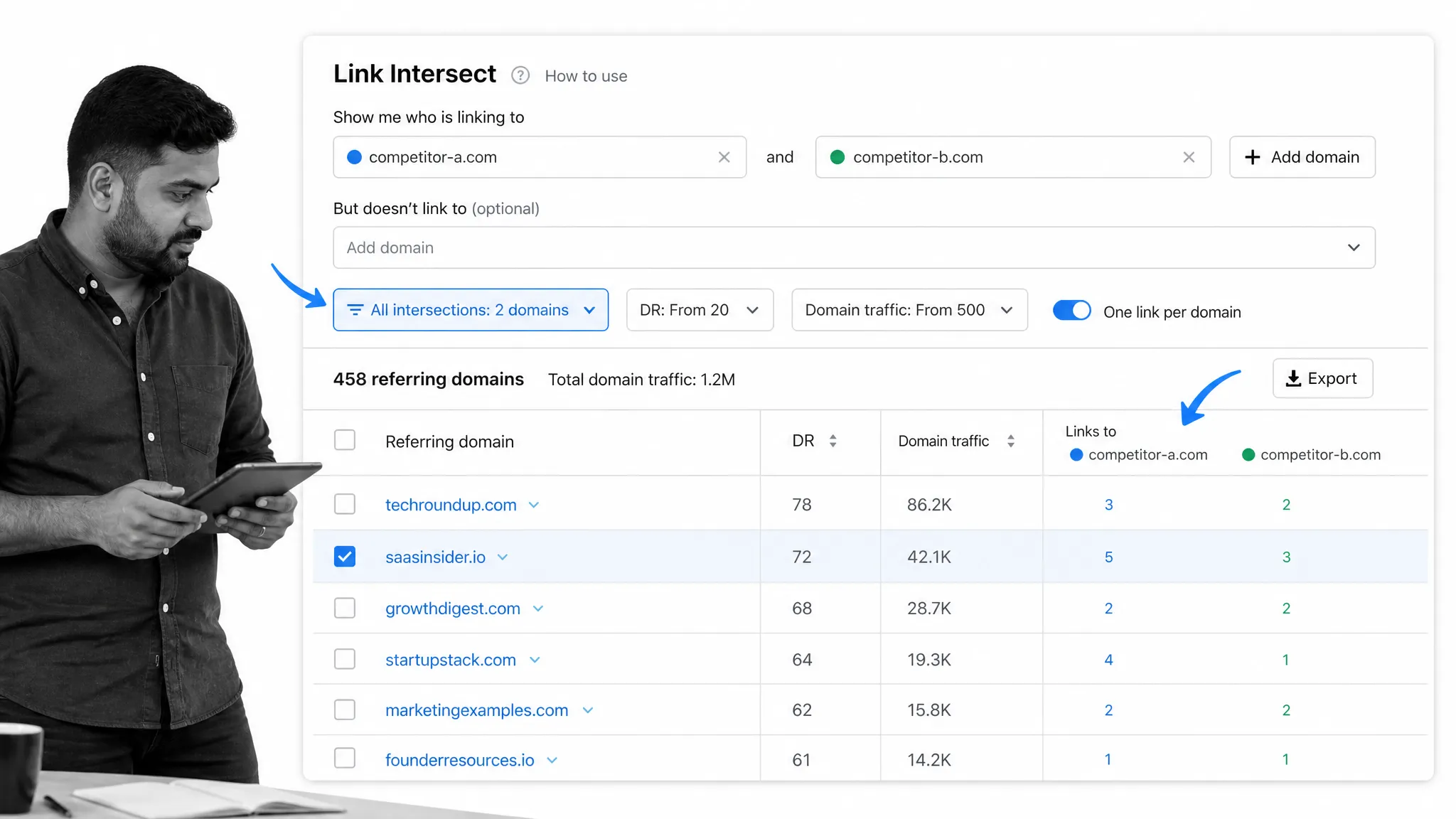
Ahrefs started as a backlink analysis platform and has grown into a broad SEO research suite. The Ahrefs backlinks index supports several ways to research a link profile. For link building, Site Explorer and Link Intersect are especially useful because they show who links to competing pages and where your own domain is missing from the conversation.
You can use Ahrefs to:
- See search traffic for referring pages
- Inspect lost, new, and redirected backlinks
- Research keywords and find out the difficulty to rank for each one
- Compare competing domains with Link Intersect to find realistic outreach prospects
The tool can also show whether a website links to two or more of your rivals. This is important because if a website is linking out to two or more of your competitors, it means that they’d probably be open to linking out to you, too.
That overlap is a useful qualification signal, but it is not a reason to send a generic pitch. Open the referring page, identify why each competitor earned its mention, and look for a real gap your resource can fill. Then check topical relevance, editorial quality, and likely audience value before you reach out.
Semrush Link Building Tool
For more and better organic links, you need a reliable way to turn keyword and competitor research into a qualified prospect list.
The Semrush Link Building Tool brings prospect discovery, contact research, outreach, and backlink monitoring into one campaign workspace. Start with target keywords and competing domains, then review each suggested prospect before adding it to an outreach sequence.
Use the tool to:
- Find prospects from keywords, competitors, mentions, and lost backlinks
- Review authority, relevance, and contact details before outreach
- Send and track personalized emails from the campaign workspace
- Monitor acquired and lost links after a campaign launches
The prospect list is a starting point, not an approval queue. Check each site’s editorial standards and audience fit before investing in a pitch. Segment the approved prospects by the reason they might link, such as a resource-page gap, a stronger data source, a missing example, or a broken reference. That gives each outreach message a specific job.
BuzzStream
Email outreach is going to be a key part of your link building campaign. There’ll be emails to send, clients to work with, and conversations to keep track of.
To make sure all of this doesn’t get on top of you, check out BuzzStream.
BuzzStream comes with a neat Discovery tool that helps you find websites to reach out to. It also:
- Uncovers their contact info for you
- Lets you personalize and sequence outreach without losing the relationship history
Not just this, but BuzzStream keeps you up-to-date with the status of each conversation and email so that you know when to send that crucial follow-up.
Moz Link Explorer
When you’re putting together a guest blogging campaign, it’s important to target websites that are relevant, editorially credible, and capable of sending the right readers. Authority metrics can help with screening, but they should never replace a manual quality review.
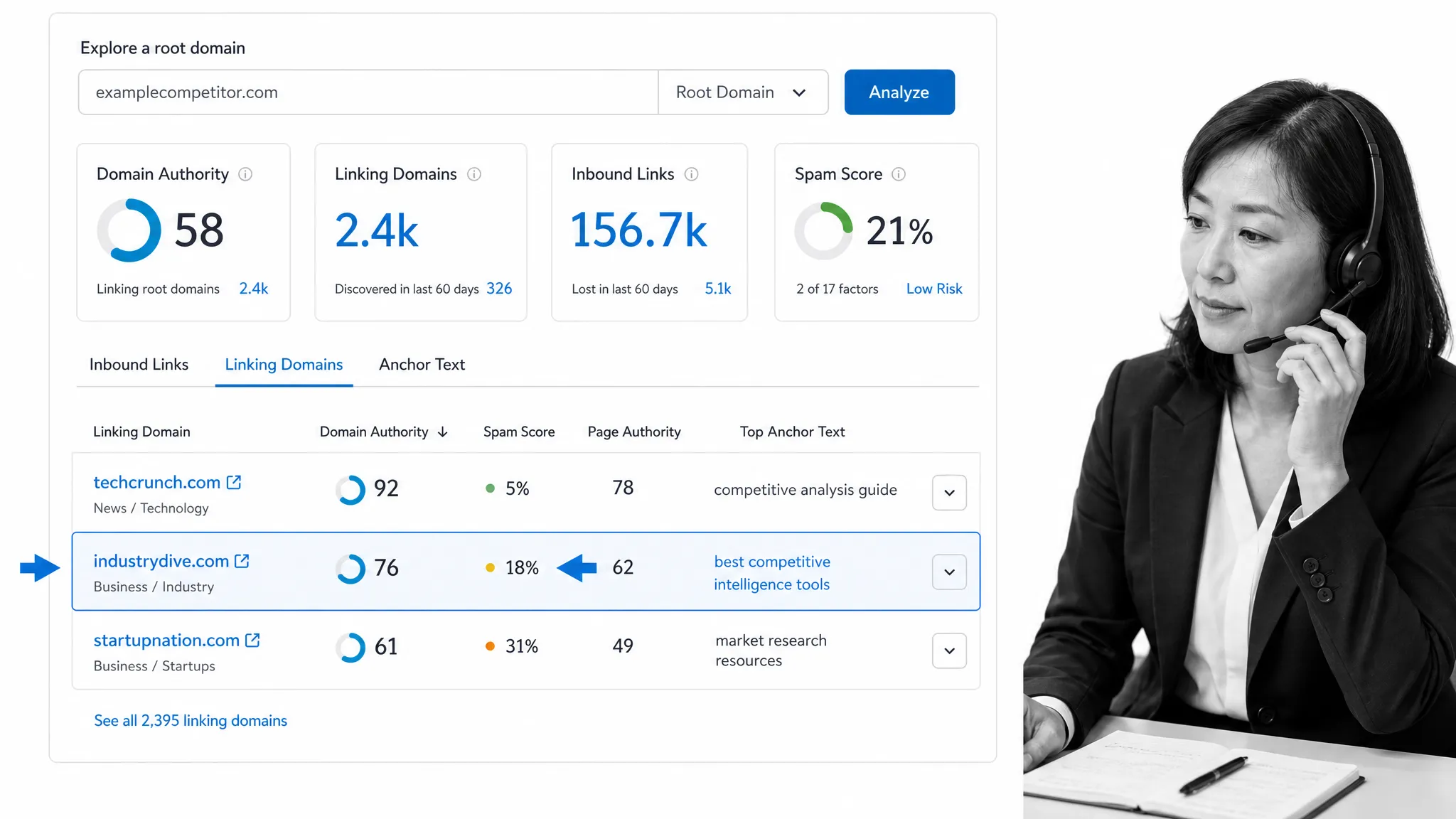
Moz Link Explorer lets you enter a competitor’s domain and inspect its backlinks, linking domains, anchor text, and top pages. It also shows Domain Authority and Spam Score.
Domain Authority is a comparative Moz metric, not a Google ranking factor. Use it to compare similar prospects in the same niche, then check whether the site publishes original material, attracts a real audience, and links out responsibly. Spam Score is another screening input, not an automatic rejection rule.
The most useful review combines metrics with context. A lower-authority specialist publication can be more valuable than a high-scoring general site when its readers, editorial standards, and subject matter align with your resource. Link Explorer can also help you reverse engineer your rivals’ backlinks without assuming that every competing link is worth pursuing.
BuzzSumo
The thing about guest blogging is that you have to keep coming up with interesting content and unique ideas that a webmaster and their audience will enjoy.
Moreover, the content needs to be relevant, and it needs to be content that people actually want to read and will find useful. Tricky.
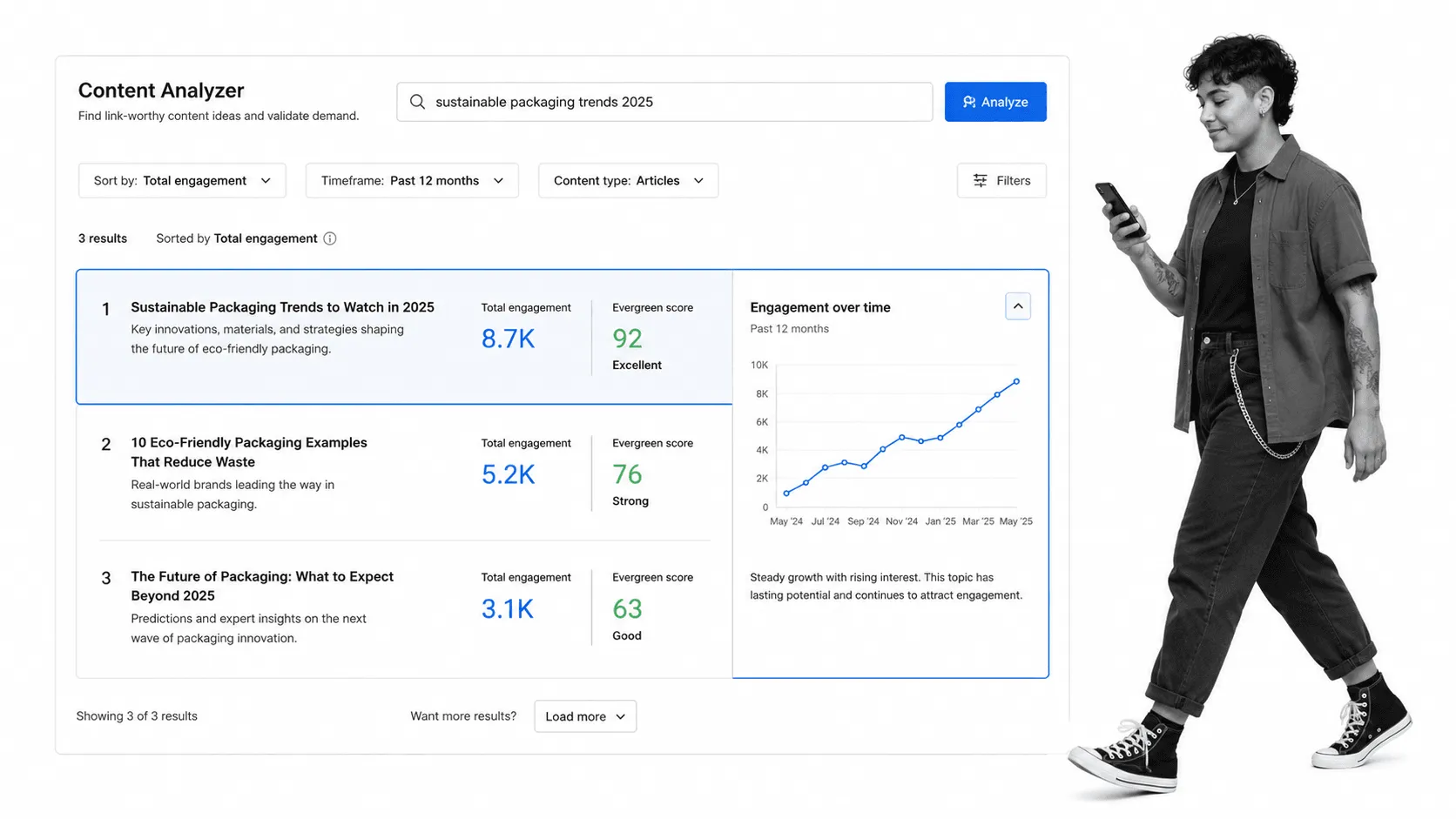
This is where BuzzSumo comes in. BuzzSumo is useful for generating content ideas that you can then pitch to bloggers. Its Content Analyzer makes the research straightforward: All you have to do is enter a short tail keyword phrase related to a particular topic in your niche (such as “digital marketing”) and BuzzSumo will display popular content.
The results show which content formats and angles are attracting engagement, which helps you shape a pitch around demonstrated audience demand. Compare the leading results by format, publication date, and evergreen performance, then decide whether your contribution should add new data, a sharper framework, or a better practical example.
Not just this, but BuzzSumo also lets you discover influencers in your field who are sharing your rival’s content. That can reveal both topic opportunities and potential amplifiers.
You can also use it to find examples of people mentioning your brand in a blog post.
Pitchbox
When it comes to your outreach campaigns, it’s really important that you track your conversions. To do this, you can use a tool like Pitchbox, which is built for scaled outreach and link building.
Pitchbox is best suited to agencies and larger teams that need to send and track emails. You can use the tool itself to:
- Reply to messages (while automating and personalizing the replies)
- Create your own customized templates that you can use again and again.
Another great feature of Pitchbox is that it makes it really easy to find leads related to your niche. Just do a bit of research on keywords you’d like to rank for, insert them in Pitchbox, and you’ll get a lengthy list of websites with similar content. On top of that, Pitchbox can find contact information for each website, which saves research time.
Other than that, Pitchbox isn’t just an outreach tool. You can use it to create entire blogger outreach projects. For example, you can use Pitchbox to find blog article ideas, and you can find websites that are already linking to your rivals.
It also connects with Slack so campaign teams can route relevant notifications without turning the inbox into another disconnected system.
Majestic
To put together an effective link building campaign, you need to perform link analysis. Majestic is a specialist backlink platform for teams that want a second view of a site’s link profile.
Majestic shows anchor text, referring domains, backlink counts, and link-history data. Its Trust Flow and Citation Flow metrics are particularly useful for comparing the quality and volume patterns of similar sites.
Use those metrics as directional evidence. A strong prospect still needs topical relevance, original editorial work, and an audience that fits the content you plan to pitch.
Screaming Frog SEO Spider
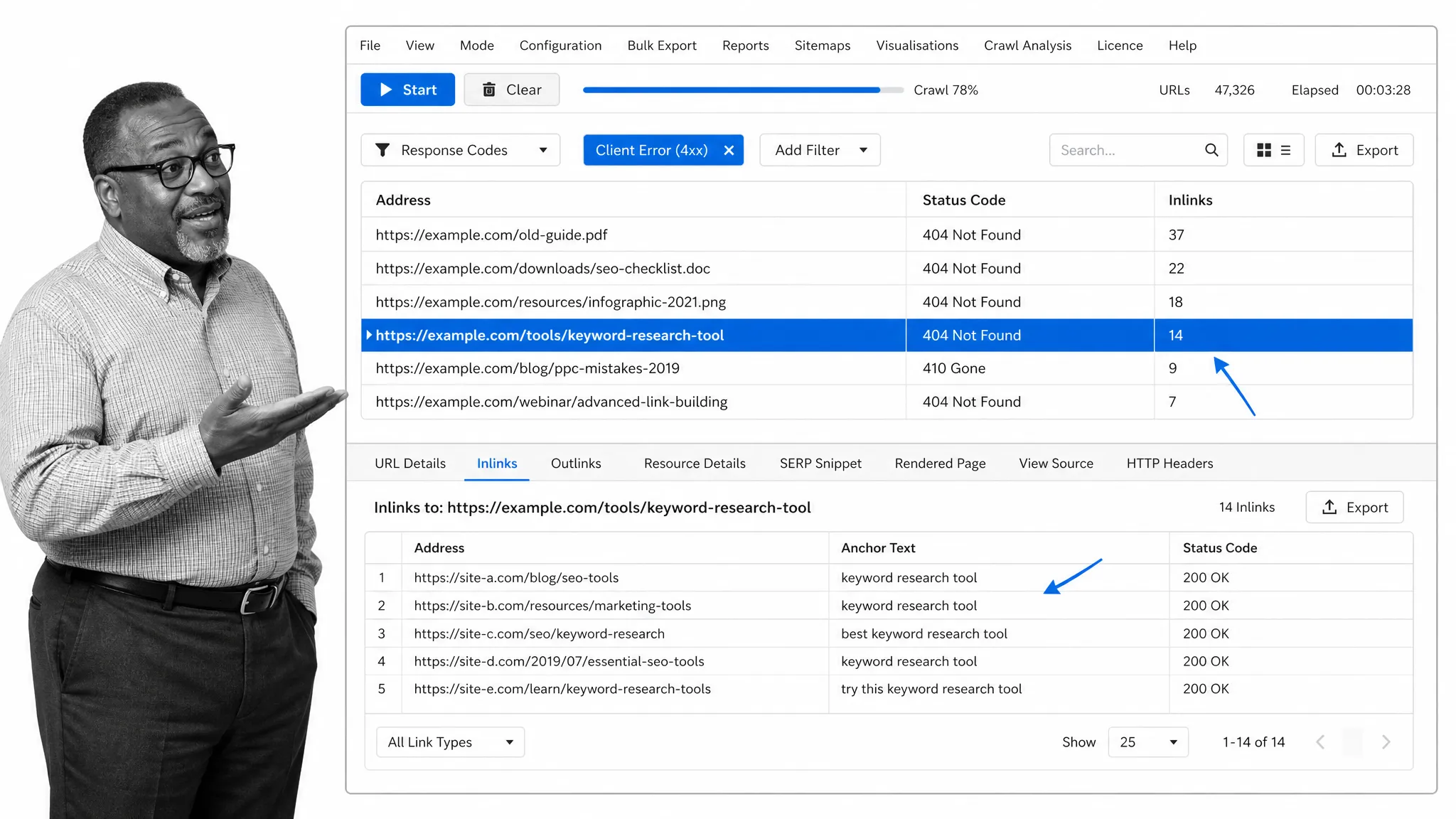
Broken links represent useful link building opportunities because they create a clear reason for a publisher to update an existing page.
Screaming Frog SEO Spider can crawl a website and surface 4xx client errors. Export the affected URLs and their inlinks, then review the pages manually to find cases where your content is a close, useful replacement.
Many established websites have broken links somewhere in their content, and the publisher may not be aware of them. A respectful note that identifies the problem and offers a genuinely relevant alternative link can save the editor time.
A practical workflow is:
- Crawl a relevant site and filter response codes for client errors.
- Open the Inlinks report to see which pages still point to the dead resource.
- Check whether your content matches the original intent and improves the reader’s experience.
- Add qualified prospects to Google Sheets or your outreach system.
- Send a concise note that identifies the broken link and suggests the most relevant replacement.
The opportunity only works when the replacement genuinely belongs on the page. Do not force a loosely related asset into the pitch.
Breeze
If you need a lightweight project-management layer for link building, Breeze is an option.
Breeze can support individual bloggers, agencies, and mid-sized teams that want a simple way to track a campaign from beginning to end.
Breeze’s core features include:
- Calendar
- Discussion
- Reports
- Time tracking
- “To-dos”
Breeze gives your team and clients a shared view of the work. Everyone will know what their goals are, what their tasks for today are, as well as where they’re up to. And because everyone can see where everyone else is up to, it ensures a much better workflow. That visibility is useful when the campaign is small enough that a dedicated outreach platform would be unnecessary.
Slack
When you’re working on a guest blogging campaign, you’ll have a small team behind you. To make sure communication is solid, you can use Slack.
Slack is a team communication platform that allows teams to keep in touch with one another. When you connect it to your campaign tools, you can define which notifications should reach a channel. This means you can customize notifications so that your setup is optimized for efficiency.
It gives project managers, content creators, and outreach specialists one place to resolve blockers and share context. Keep campaign records in the system of record, then use Slack for discussion and time-sensitive coordination.
Explore Slack’s collaboration features.
Google Sheets
When you’re working on a guest blogging campaign, it’s a good idea to use a tool like Google Sheets to help you stay on track. It is especially useful for a small campaign that does not yet need a dedicated outreach CRM.
Essentially, you can use it to keep tabs on your link prospects (websites/bloggers), as well as your content. For example, you could break things down like this:
- Prospects not yet researched: You’ve identified a website as a potential link prospect but haven’t properly researched them
- Prospects prepped: You’ve researched prospects but haven’t got in touch
- Attempting to reach: You’ve reached out to a prospect but haven’t yet heard back
- In discussion: You’ve heard back from a prospect but a guest post hasn’t been confirmed yet
- Agreed to Link: They’ve accepted your proposal and now it’s time for you to write the content
You can also use Google Sheets to track which topics, formats, and publishers produce the strongest results. Add an owner, next action, follow-up date, outreach angle, and final outcome to every active row so the sheet functions as a campaign queue, not just a database. Protected ranges and data validation can keep campaign stages consistent across contributors.
Process Street
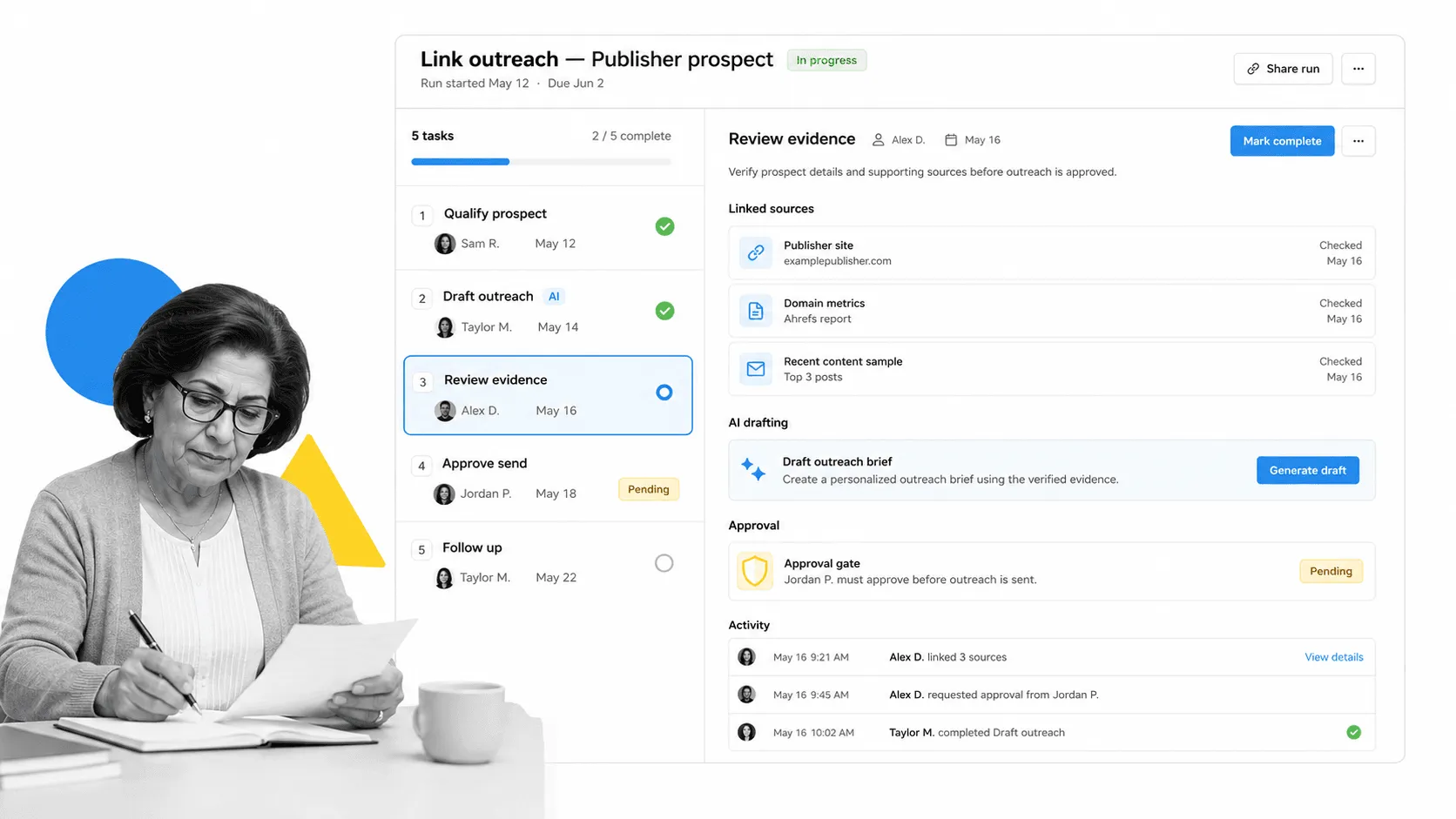
Process Street is a Compliance Operations Platform that brings Docs and Ops capability areas together with built-in AI. Docs gives your team a controlled home for outreach standards, qualification rules, and reusable guidance. Ops turns those standards into workflows with owners, approvals, due dates, integrations, and an activity trail.
For a link building campaign, that means you can standardize the work without making every prospect feel the same. A workflow can guide a team through prospect qualification, evidence review, pitch drafting, approval, follow-up, and outcome tracking. Conditional paths can adapt the steps to guest posts, broken-link outreach, unlinked mentions, or content partnerships. Required fields can prevent a prospect from moving forward until the source page, relevance rationale, contact method, and proposed value are documented.
Built-in AI can help summarize research, draft a first-pass message from approved inputs, and classify responses. Human approvals can stay in place for decisions that affect brand voice, publisher relationships, or compliance. That combination makes the operation more scalable while keeping accountability visible.
Process Street is also useful when a campaign depends on a broader content workflow. Editorial briefs, peer review, publishing, promotion, and outreach can share one governed operating model instead of becoming separate checklists.
Relevant templates include:
- On-Page SEO Checklist
- Social Media Influencer Outreach Checklist
- SEO Checklist: The Keyword Research Process
- Advanced Content Promotion Checklist
- Peer-Editing Checklist for Bloggers
- Find Almost Anyone’s Email
- Daily Mention Tracking for Content Promotion
- Scraping Broken Links with SEO Spider and Ahrefs
- Accepting, Formatting, Editing and Publishing a Guest Post
Build a better link building campaign today!
The right link building tools make each stage easier, but the stack is only as good as the campaign behind it. Start with one backlink-research tool, one outreach system, and one operating workflow. Add specialist software only when a real bottleneck appears.
Before a campaign starts, define what makes a prospect relevant, who approves a pitch, how follow-ups are scheduled, and where outcomes are recorded. That turns link building from a collection of one-off emails into a process your team can improve.
Which tools are at the core of your workflow? Let us know in the comments below.
The post All The Tools You Need To Set Up An Effective Link Building Campaign first appeared on Process Street | Compliance Operations Platform.