











3 Ways to Repurpose Instagram Content for Your Email Marketing
Blog: Blog | Process Street | Compliance Operations Platform
Natasha Ponomaroff is the Senior Marketing Director of Instasize, a content creating toolkit for anyone editing photos and online content on mobile. A weekly contributor on the site’s blog, Natasha tracks social media trends and shares guidance for the millions of creatives using Instasize to curate online content.
Seeking to establish a well-rounded online presence? There are many different digital marketing channels to choose from, and all of them contribute to a holistic online strategy. To succeed, you need to know how to pair the right kind of content with the most suitable platform.
For marketers, there is a constant pressure to create new content while maintaining a high level of quality. To alleviate that burden, look to social media content. Social media content, especially the kind of content you will find on a visual-focused channel like Instagram, is perfect for repurposing.
Not all audiences favor social media as their communication medium of choice. Email marketing still gives you a direct way to reach subscribers, especially when a campaign needs more context than a feed post can provide. With that in mind, and to cover multiple audience bases at once, here is how you can bring Instagram content into your email marketing campaigns and save time in the process.
In this Process Street article, we will cover:
- Embedding user-generated content into your email marketing
- Making the most of original content in emails
- How to save and share Instagram Stories through email newsletters
- Getting started with repurposing your Instagram for email marketing content
- Use Process Street for your email marketing processes and more
1. Embed user-generated content into your email marketing
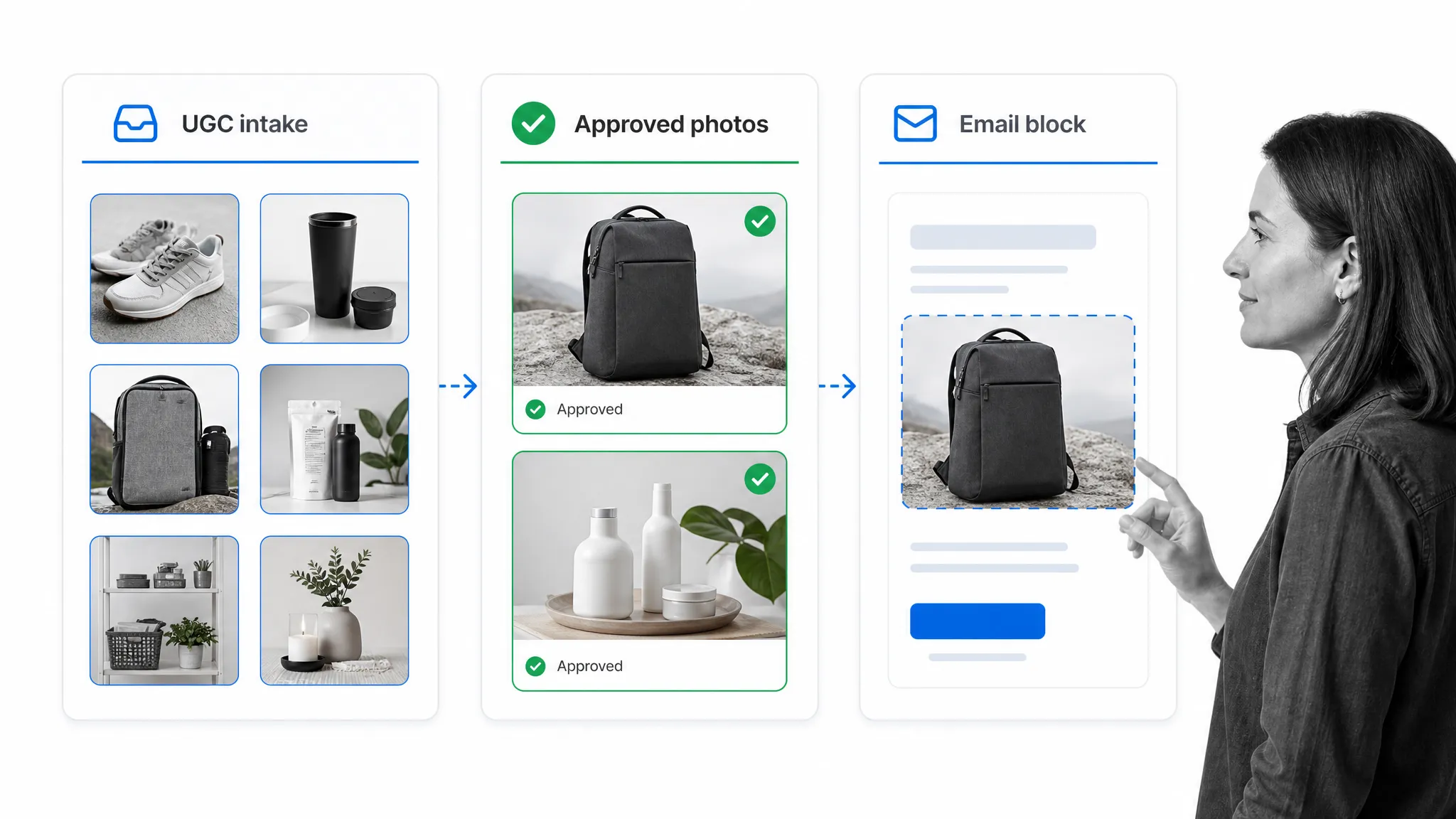
To showcase products more authentically, use photos of actual people who use them, sourced from their personal accounts. By tapping into user-generated content on Instagram for emails, you can have a pre-curated selection of product photos ready for use alongside the trust that comes with digital word-of-mouth.
User-generated content can include customer photos, tagged posts, public mentions, product reviews, Stories replies, and campaign hashtag submissions. It helps humanize marketing because the visuals come from real customers and creators instead of only from the brand’s own photo library.
To get the UGC you need, you need a way to track your audience’s conversations about your brand, put out calls to action to encourage them to share photos of whatever they use, and choose the ones you prefer for email. A social listening workflow, along with tools such as Brand24, can help you monitor brand mentions and campaign hashtags across digital channels.
- Track. Any brand on social media needs its own set of personalized hashtags: one for the brand name itself, and one corresponding to each major social media marketing campaign. Make your hashtag visible on your Instagram profile and on each post to keep it top of mind for followers.
- Call to Action. Show support for those who want to talk about your brand. For some, even acknowledgement on a brand’s official Instagram account is reward enough because it acts as a promotion for their account too. Use your captions to ask your audience to share, and include your official brand hashtag.
- Ask permission. Before reposting photos or embedding images from Instagram accounts into your email, get clear permission, agree on creator credit, and record any limits. If a post includes an endorsement, incentive, free product, or affiliate relationship, follow the FTC endorsement guidance.
- Repost with credit. When you repurpose Instagram content, keep your brand Instagram account there for curious readers to click through to. This also keeps you in control of the caption formatting. Credit the source of the original photo on the image, in the caption, or in the surrounding email copy as appropriate.
After you have a good supply of user-generated content, it is time to embed it into your emails. But which ones do you choose? It all boils down to whether you have a specific marketing campaign in mind. Building your email around a theme tells the reader a story, and the Instagram posts should not distract from that.
Email clients can be restrictive, so treat the Instagram post as source material rather than a live social embed. Use a static image, approved screenshot, clean quote block, or email-safe GIF, then link back to the source Instagram URL, product page, or campaign page when the reader should click through.
2. Make the most of original content in emails
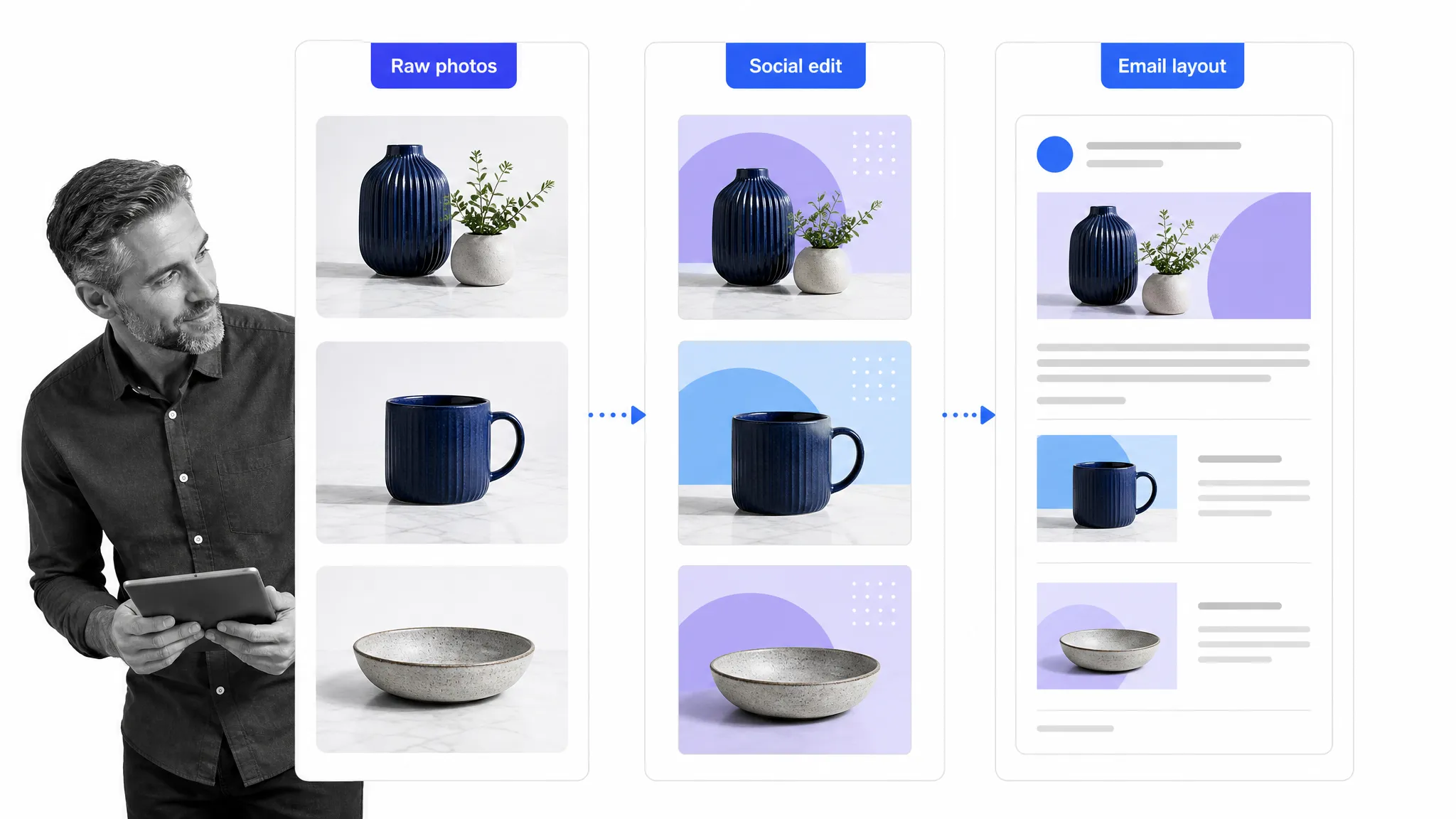
Keep all photos, raw and edited, that you use for Instagram management in an easy-to-access location in your chosen file storage. After spending time conceptualizing and assembling great combinations of photos, filters, edits, and possibly text, it would be a shame to post them once and subsequently forget about them.
Repurpose Instagram feed photos by using them as the main visual components of your marketing emails. There are a few different approaches to repurposing this type of content, and you do not need to stick to one method. Evaluate which of the following suits your needs per campaign and deploy each method accordingly:
- Using the same raw photos. Cover two goals with one asset by taking the sets of raw photos you have taken for your brand’s Instagram account and using them again in emails. An example would be using the same product shot across digital channels. The benefit is that while you are using the same shot, you can post-process, edit, and lay out the images differently as needed, optimizing color and size to suit each platform.
- Using the same fully edited photos. After editing raw photos for Instagram posting in an app like Instasize, save them to your device. You can then insert these photos into your planned email layouts and mould the other visual elements around them. This is useful for marketers who need to manage both social media and email marketing tasks and need striking visuals for both in a shorter amount of time.
- Embedding Instagram posts as linked previews. If your email marketing campaign references an event or promotion occurring specifically on your Instagram account, share a clean image or thumbnail from the post and link it to the Instagram content. Instagram embed guidance is useful for web pages, but an email-safe linked preview is more reliable in the inbox.
Need ideas on where to place these images within your email layout? Try to:
- Keep it simple. Use one image as the central focal point of your email, with minimal supplementary text above, below, or around it.
- Use a grid. Instagram photos are often in square dimensions. Put complementary ones together in a grid-like collage for an eye-catching effect.
- Play with color. Look at the dominant colors in your chosen photos, raw or edited, and position them to play off each other in the layout.
- Balance it out. If the context of each photo is just as important as the visual itself, make the amount of text equal to the photo size so both get equal attention.
The most important preparatory step for all these methods is ensuring adequate photo size and quality. Instagram is accessed through an app, and mobile has nearly taken over email use in recent years, but you do not want to leave a low-res file in an email someone could read on desktop. Take photos in high raw quality at larger dimensions because it is easier to scale photos down than scale up.
How do you write effective email marketing content?
Writing effective email marketing content is all about understanding your target audience and figuring out the right balance of tone, language, brevity, and clarity to communicate your message. You need to be sure that you are connecting with your audience, and Instagram content is often effective because of how relatable it can be.
3. Save and share Instagram Stories through email newsletters
Sharing regular newsletters is a standard part of an email marketing strategy. They are a good way to touch base with subscribers and can assist in building closer connections with customers.
They need to be used carefully, though. Some individuals tend to dislike newsletters because irrelevant fluff may fill up their inbox. Email marketing remains effective when it provides quality content that communicates value to subscribers and lessens the chances they unsubscribe. If you are going for the newsworthy in a newsletter, make the experience worth the load time by repurposing content from Instagram Stories.
Why Stories for email marketing content?
Stories give brands more potential to play with different types of audience engagement than just responding to direct messages and comments on photo uploads. Stories can include stickers, doodles, tags, videos, polls, questions, and behind-the-scenes looks that feel more immediate than a standard feed post.
Stories are temporary by design; Meta explains that Instagram Stories disappear from public view after 24 hours unless they are saved or added to Highlights. That means useful content can be relegated to an archive too quickly for subscribers who do not check you out on social media. Why not give that content a bit of tweaking for email?
While you cannot embed Stories into emails like posts, that does not mean they have nothing to offer. Here are some ideas that start with Stories, repurposed for email marketing use.
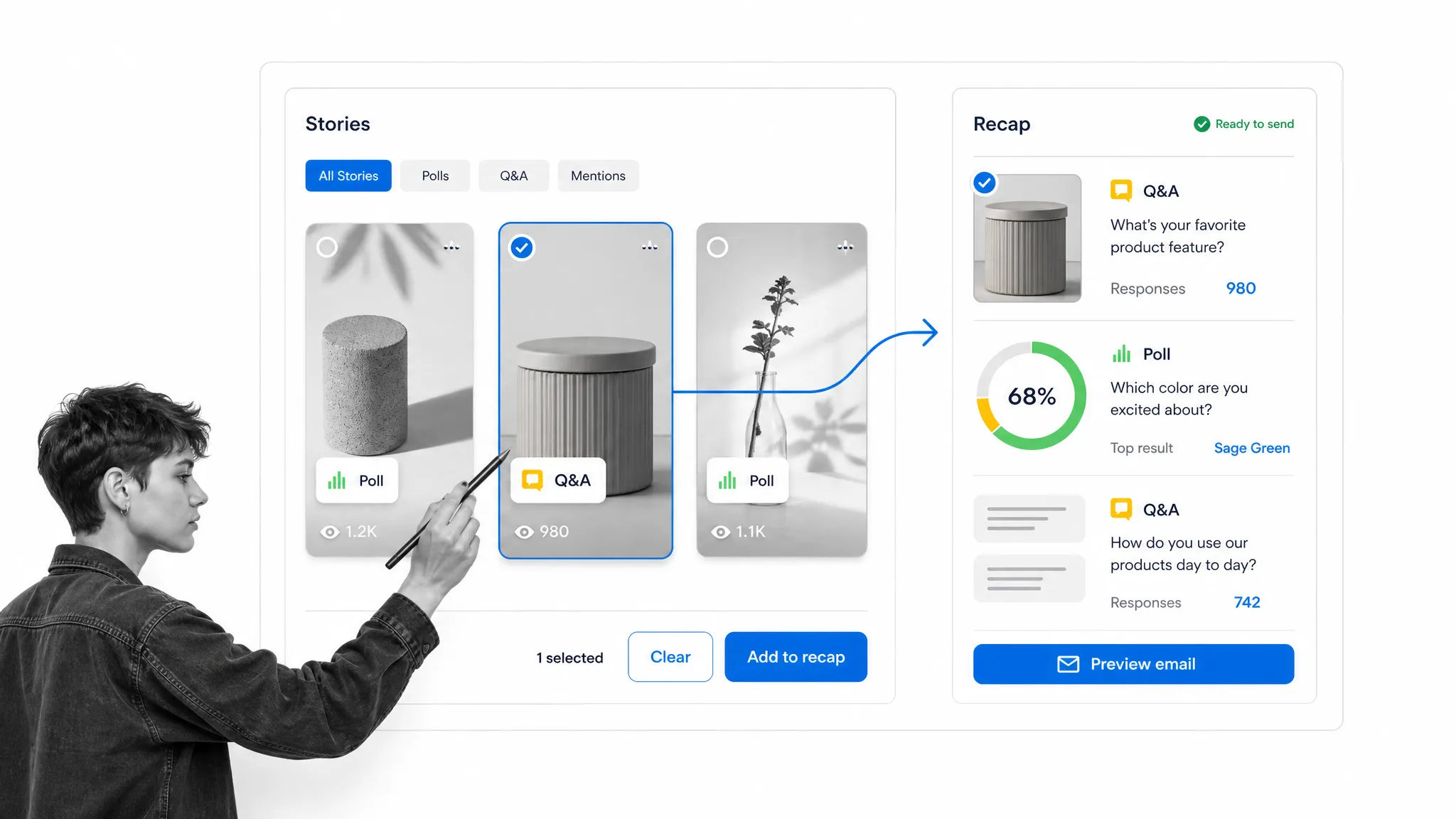
- Use Stories screenshots and videos for event recaps. Collect the live vlogs and photos you take at special events and organize them into a collection. Instead of a plain text list or a long-form blogged recap of your event, try a multimedia gallery. The stickers, doodles, and tags on Stories can add a more personal touch to the recall, giving it a more interesting angle.
- Reformat Q&As into full interviews. Instagram users can use the Questions sticker to prompt followers to ask any question. Whoever handles your brand’s account can then see which questions came in and create a new story post to answer each one. Hold a Q&A session from your brand, with an influencer, or with employees, then reformat it as a fun addition to your emails.
- Make mini infographics out of user polls. Alongside the Question sticker is the Poll sticker. Users can create simple two-choice polls with customizable text. Ask users to choose between two different items, such as breakfast food, pancakes versus waffles, or stick with yes or no. Tapping on the poll afterwards allows you to see voting percentages, which can become a small infographic in an email newsletter.
- Use Instagram Stories to create a mini product catalog. You can add stickers, doodle, and add text directly into Stories posts, which you can use for pointing out specific products in a shot. Customers are also more likely to buy products they receive information about through an opt-in email, especially if it fits their interests. Stories are often vertical, which gives you more freedom to play with layout choices in your email marketing campaign.
Get started repurposing your Instagram for email marketing content
While these ideas can help you repurpose Instagram for email marketing content, none of them will work if applied inappropriately. Before rushing to overhaul your email strategy, ask yourself:
- Do users I am emailing already follow our brand on social media?
- Would anyone other than myself want to read this in their free time?
- Is my audience the type to enjoy more casual content?
- Does this Instagram asset support the campaign goal?
- Do we have permission, credit, and any disclosure language we need?
If you need one key best practice for crafting effective email campaigns to follow, it is this: proper segmentation is the key. Providing quality content that communicates value about subscribers’ interests improves your email marketing metrics overall. Do not talk about everything under the sun; single-topic, dedicated emails usually work better because they give the subscriber one clear message and one clear action.
Since the main idea behind repurposing Instagram content is to keep the quality of your marketing materials up to par while shaving off the time it takes to make them, turn to data to evaluate whether it is worth trying some of the specific tips on this list. Litmus tracks how email teams are balancing personalization, automation, and creative quality, but your own campaign data should decide what stays.
Take note of how much time it used to take you to create everything from scratch and compare whether preparatory work going into repurposing decreases that or adds another layer of stress to your routine. Once your campaign runs, measure whether the content works at capturing subscribers’ attention.
Use Process Street for your email marketing processes and more
The best way to do this is to develop a consistent process, or set of processes, to follow when you repurpose content. Having a process to follow standardizes your approach and makes it more easily repeatable. This way, you know how long it should take, what metrics you are measuring for, and how to tell whether your campaign has been a success.
Process Street is a Compliance Operations Platform for building and running recurring work across teams. You can use Docs to keep guidelines, source material, approvals, and campaign notes organized; Ops to run the email marketing workflow; and Cora to help teams find process context and move work forward without losing key details.
For Instagram-to-email work, that means a workflow can assign people, capture permission notes, gather information with form fields, enforce review with stop tasks, adapt with conditional logic, and keep track of progress from source content through final QA. You can make workflows and run workflows each time you need to do the task.
You can also connect Process Street to other apps and webapps with direct, universal integrations to 5,000+ systems. Need a new one? An AI agent builds it on the fly. This way, you can trigger actions in the other services you already use straight from your workflow, or update the information in your workflow based on what you do in other apps. The options are broad enough to support a full marketing automation workflow instead of scattered spreadsheets and chat threads.
Ultimately, you are aiming to find a balance between personal work productivity and improved engagement with customers. Follow these tips, test different methods, identify what works, and you will end up with a unique strategy suited to your own brand.
If you want some more marketing processes to help you boost your business, check out some of the premade workflow templates below:
- On-Page SEO Checklist
- Technical SEO Audit
- Product Launch Checklist
- UX Audit
- Social Media Manager Daily Checklist
- Influencer Outreach Checklist
- Keyword Research Checklist
- Affiliate Onboarding
- Advanced Content Promotion Checklist
- Find Almost Anyone’s Email
- Submitting Content to Social Bookmarking Sites
- Daily Mention Tracking for Content Promotion
- Creating a Database of Influencers using Buzzsumo
- Scraping Broken Links with SEO Spider and Ahrefs
- SEO Checklist: The Keyword Research Process
- Accepting, Formatting, Editing and Publishing a Guest Post
Have you repurposed content from Instagram or other social media for use in your email marketing content? Was it successful? We would love to hear from you. Let us know your experiences in the comments below.
The post 3 Ways to Repurpose Instagram Content for Your Email Marketing first appeared on Process Street | Compliance Operations Platform.