











17 Best Gmail Extensions that Make Email Super Easy
Blog: Blog | Process Street | Compliance Operations Platform

The best Gmail extensions in 2026 are not the ones that pile novelty into your inbox. Gmail already handles more drafting, scheduling, and search natively than it used to. The extensions that still matter are the ones that close the workflow gaps Gmail still handles badly: CRM context, task capture, follow-up, shared inbox routing, outbound volume, encryption, and focus. If you are trying to improve day-to-day inbox performance first, this pairs well with a broader email productivity system.
That matters because Gmail is still where a lot of operational work starts. Leads arrive there. Approvals get requested there. Customers reply there. Handoffs get buried there. If you only optimize the message layer, you still end up doing manual follow-up and status chasing. That is where a workflow system like Process Street becomes useful: extensions can improve the inbox, but repeatable work still needs a system that can assign owners, enforce approvals, and prove what happened.
For this list, I re-centered the category around the concrete jobs Gmail users still need help with in 2026. I also cut several older single-purpose picks that no longer hold up once you compare them against current Gmail-native sales, scheduling, shared inbox, and mail merge tools.
The 17 best Gmail extensions in 2026
1. Streak CRM for Gmail
Streak is still one of the cleanest ways to run lightweight CRM workflows directly inside Gmail. If your team lives in the inbox and does not want a hard jump to a separate sales workspace for every follow-up, Streak is a strong fit. It is especially useful for founders, operators, and small sales teams who need pipelines, reminders, snippets, and basic reporting without leaving Gmail.

2. HubSpot Sales
HubSpot Sales is the better choice when Gmail needs to plug into a larger commercial system. It gives you email tracking, templates, meeting scheduling, and contact context, but the real value is that Gmail activity can roll back into the CRM instead of staying trapped in the inbox. If you already run HubSpot, this is one of the easiest Gmail extensions to justify.
3. Mixmax
Mixmax has become one of the strongest Gmail-native sales execution tools in the market. It combines email engagement, sequences, scheduling, and AI-assisted follow-up inside the inbox, which makes it a better modern pick than older reminder-only extensions. If Gmail is where your pipeline actually moves, Mixmax deserves a serious look.

4. Todoist for Gmail
Todoist is a clean answer for the common problem where email quietly becomes your task list. The Gmail integration lets you turn messages into tasks with due dates and projects fast, which is better than starring things and hoping you come back later. It is a good pick for people who want a real personal execution system without adding a heavy project tool.
5. ActiveInbox
ActiveInbox is more aggressive than Todoist about turning Gmail into an action workspace. It is built for people who manage a lot of follow-up and want next actions, due dates, and projects embedded in the inbox itself. If your constraint is execution discipline rather than raw email volume, ActiveInbox is worth a look.
6. Boomerang for Gmail
Boomerang is still one of the best Gmail extensions for scheduling and reply management. It works well if your main pain is timing: send later, remind me, inbox pause, and follow-up discipline. Gmail has improved a lot natively, but Boomerang still earns its place for people who need stronger control over response timing and inbox pacing.
7. Calendly for Gmail
Calendly deserves inclusion because meeting scheduling remains one of the most common bits of friction inside email. Its Gmail extension lets you insert booking links, offer time slots, and create one-off meetings directly from the compose window. For people who repeatedly schedule from Gmail, this is a more current specialist pick than older lightweight meeting helpers.

8. Grammarly
Grammarly is no longer just grammar correction. It is now more about clarity, tone, rewrite help, and drafting speed inside the tools you already use. Gmail is one of the places where that matters most, because small wording mistakes can create unnecessary back-and-forth. If you write a lot of external email, Grammarly still earns a default slot.
9. GMass
GMass is one of the most established ways to run serious mail merge and outbound sequences directly inside Gmail. It is more specialized than a generic extension, but that specialization is exactly why it still belongs on this list. If your team sends recurring outreach at real volume, GMass remains one of the category anchors.
10. Yet Another Mail Merge (YAMM)
YAMM still has a strong claim as one of the simplest and most proven mail merge tools for Gmail and Google Sheets. It is especially useful when you want personalized bulk sends without moving into a heavier outbound platform. For low-friction campaigns, event outreach, and operational notifications, it is still a very credible choice.
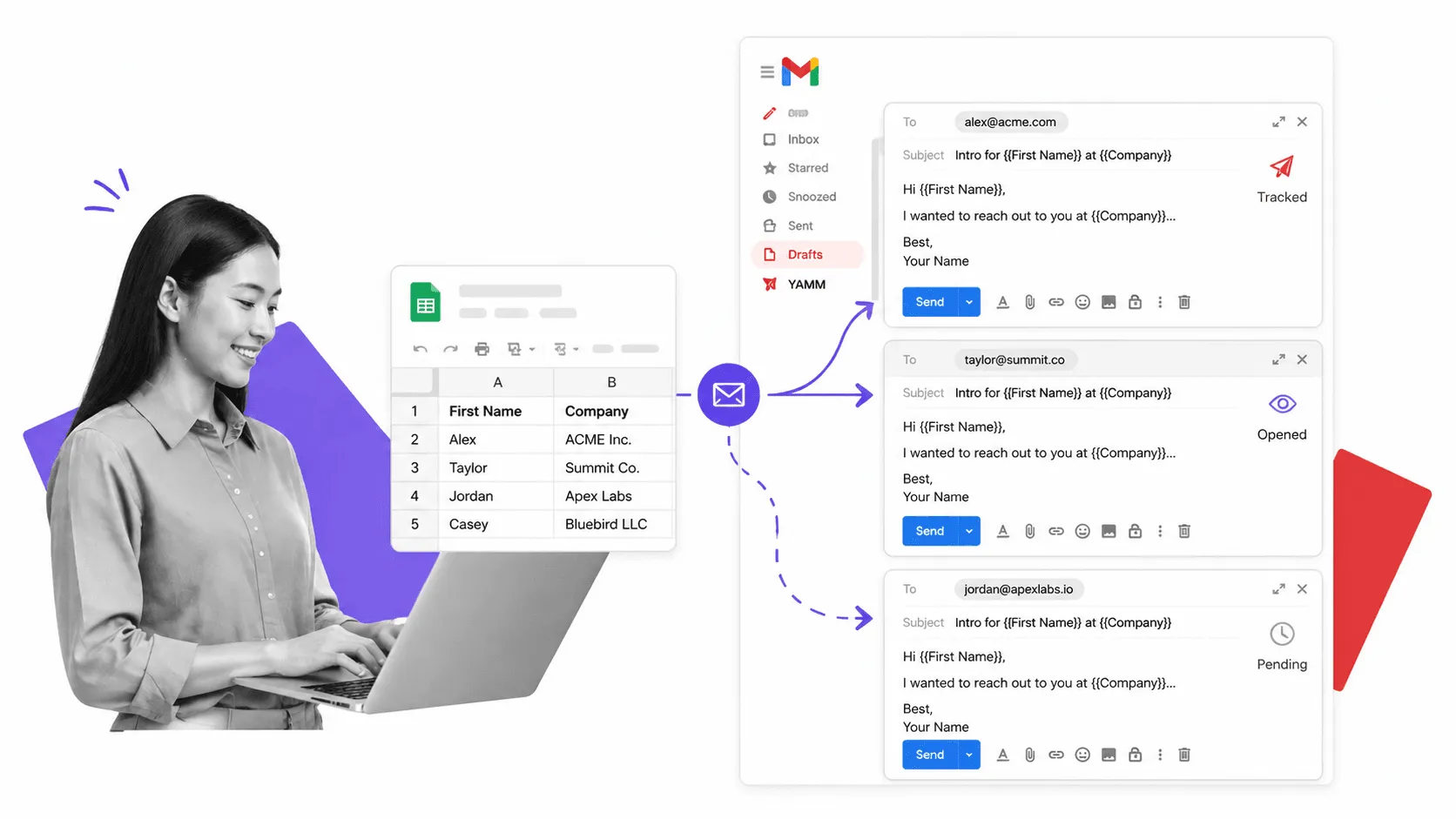
11. Mailmeteor
Mailmeteor has expanded well beyond basic mail merge and now covers tracking, AI help, templates, and follow-ups inside Gmail. It is a strong option for teams that want a modern outreach tool with a cleaner, lighter feel than some older sales extensions. If you want outbound functionality without jumping to a full sales stack, Mailmeteor is easy to justify.
12. Hiver
Hiver is one of the better ways to run a shared inbox on top of Gmail. If support, success, finance, or operations teams need ownership, collision detection, tags, notes, and service-level discipline without leaving Gmail, Hiver is a serious option. This is where the category becomes operational, not just personal productivity.

13. Drag
Drag takes a different angle on shared inbox work by turning Gmail into a board-style workspace. If your team thinks visually and wants pipelines, assignment, and simple workflow movement inside the inbox, it is worth considering. It is useful for support, hiring, deal flow, and small team coordination where Gmail is already the center of gravity.
14. Keeping
Keeping is a strong Gmail-native shared inbox and lightweight help desk for teams that want assignment, notes, collision detection, templates, and reporting without abandoning the Gmail interface. Recent 2026 shared inbox searches keep surfacing it for exactly that reason. If your team wants a simpler support-oriented option than a larger help desk suite, Keeping is a good fit.

15. Mailvelope
Mailvelope is still one of the clearest answers for encrypted email in Gmail. Most users do not need this, which is exactly why it should stay a specialist pick instead of a default recommendation. But if privacy, regulated communication, or secure document exchange matters, it is still relevant.
16. Checker Plus for Gmail
Checker Plus is useful for people who need faster desktop-level notification handling without living in the Gmail tab all day. It helps reduce pointless inbox refresh behavior while still keeping important messages visible. That makes it a practical extension for operators who want responsiveness without constant context switching.
17. Inbox When Ready
Inbox When Ready solves a different problem from most Gmail plugins on this list. It is not about adding more power. It is about removing temptation. If your real issue is compulsive inbox checking, hidden unread counts, or constant self-interruption, this extension can improve output more than another tracking or scheduling layer.

How to choose the right Gmail extension
Start with the job, not the extension.
- If you need lightweight CRM inside Gmail, start with Streak, HubSpot Sales, or Mixmax.
- If you need better task capture and follow-through, start with Todoist or ActiveInbox.
- If you need stronger send timing, reminders, or meeting booking, start with Boomerang or Calendly.
- If you need outbound volume, look at GMass, YAMM, or Mailmeteor.
- If you need a shared inbox, evaluate Hiver, Drag, or Keeping.
- If you need privacy, use Mailvelope.
- If you need focus and visibility control, Checker Plus and Inbox When Ready are more useful than another shiny feature layer.
The key is not to overload Gmail with ten overlapping tools. Pick the smallest set that meaningfully reduces friction. Most people only need one extension for execution, one for writing or follow-up, and one for team routing if Gmail is shared.
Where Gmail extensions stop being enough
Extensions improve the inbox. They do not run the business process behind the inbox.
That line matters. A Gmail extension can schedule a message, track an open, or turn an email into a task. It cannot reliably run onboarding, approvals, audit evidence collection, or multi-step handoffs across teams on its own. Once the work matters beyond the message, you need a workflow layer.
That is where workflow automation software starts to matter. You can use Gmail extensions to speed up communication, then move the real work into a system with owners, approvals, due dates, and traceability. If your operations team already feels buried by inbox work, this is usually the next step, not another plugin. For teams doing recurring operational work, operations workflows, structured approvals, and reusable templates like this employee onboarding checklist are far more durable than trying to manage everything from Gmail alone.
The post 17 Best Gmail Extensions that Make Email Super Easy first appeared on Process Street | Compliance Operations Platform.